



During the process of multi-account operation on Amazon, account association risk has always been one of the most concerning issues for sellers.
Many sellers only realize after increasing the number of stores that the real difficulty is not registering accounts, but how to long-term maintain the running environments corresponding to multiple accounts.
Many sellers think account association mainly comes from IP issues, but in fact, the platform usually comprehensively judges multiple factors, including account information, network environment, device information, browser environment, and operational behavior.
For teams operating multiple stores simultaneously, the real problem to solve is not "how to log into multiple accounts", but:
How to make different accounts have clear, independent, and manageable running environments.
To reduce account association risk, three aspects need to be done well:
- Independent account information management: Ensure that registration information, payment information, contact information, etc., of different stores do not repeat;
- Independent network and browser environment management: Configure independent network environments and browser running environments for different accounts;
- Standardize team account operation processes: Establish clear account-environment-member correspondence relationships, reduce multiple people mixing the same environment.
Among these, browser environment management is a link that many teams easily overlook but is very important.
I. Why is it easy for Amazon multi-accounts to be associated?
When many sellers encounter account association problems, their first reaction is "whether there is an IP problem". In fact, Amazon's association judgment is comprehensive and will not directly judge based on a single factor. Common association triggering factors include:
- Registration information: Company name, legal person information, registration address, contact information, etc., repeated use;
- Payment information: Multiple stores bound to the same payment account or the same bank account;
- Network environment: Multiple accounts logged in and operated under the same IP or the same network environment for a long time;
- Login device: Multiple accounts frequently logged in on the same computer, the same set of hardware equipment;
- Browser environment: Multiple accounts sharing the same Cookie, browser cache, device fingerprint parameters.
When these factors appear individually, they may not trigger association. However, if multiple factors overlap simultaneously, the association risk between accounts will significantly increase.
II. How does Amazon determine whether multiple accounts are associated?
1. Network environment
IP address is one of the most basic identification dimensions. If multiple accounts are logged in and operated under the same IP address for a long time, the platform will record this association feature. Besides IP, network stability, proxy usage, network geographic location, etc., will also be included in the reference scope of environment identification.
2. Browser environment
The browser environment includes information of multiple dimensions. The platform will comprehensively judge whether different accounts are running in similar running environments based on these parameters:
- Cookie and Local Storage: Save website data such as login status, user preferences, etc. Multiple accounts sharing the same storage data will produce association features;
- User-Agent: Identifies browser version and operating system information;
- Canvas and WebGL rendering features: There are differences in graphic rendering results of different devices, which are an important part of browser fingerprints;
- System font environment: There are differences in font lists of different operating systems and devices;
- Time zone and language settings: Reflect the basic environment parameters of the user's location area.
These parameters combined will form a set of unique browser environment features. If multiple accounts share highly similar running environments for a long time, it may increase account management risk.
3. Operational behavior
Besides static environment parameters, the platform also pays attention to dynamic operational features, such as login time rules, operation trajectories, page browsing habits, etc. For team operation, if multiple accounts are managed by the same person following similar operational models, they may also produce behavioral association features.
III. Can Chrome Profile prevent association? Why does multi-account operation still need environment management?
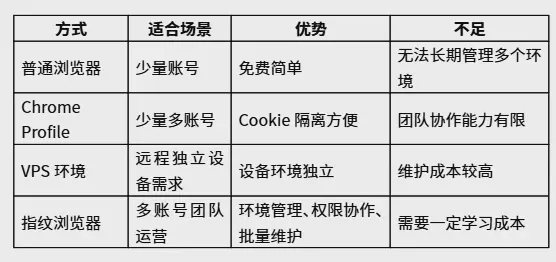
Many sellers initially use Chrome Profile to manage multiple Amazon accounts. The advantages of Chrome Profile are free, simple to use, can save different Cookies and login states. For a small number of accounts, it can solve the basic login isolation needs.
But when the number of stores increases, the limitations of Chrome Profile will gradually appear:
- Management difficulties: After the number of accounts exceeds a certain scale, Profile classification and maintenance costs will rise rapidly, and it is easy to cause environment correspondence confusion;
- Poor team collaboration: Profile is bound to local devices, team members cannot share environments, and permission allocation cannot be performed;
- Environment parameter sharing: Although Chrome Profile isolates Cookie and login data, the device fingerprint parameters at the bottom of the browser (such as Canvas rendering features, WebGL parameters, system font environment, etc.) still have high consistency on the same device, and complete environment isolation cannot be achieved.
Simply put, Chrome Profile solves the problem of "data classification", while multi-account operation requires "complete environment isolation". The needs solved by the two are not the same. Therefore, Chrome Profile is more suitable for a small number of account management, while professional environment management tools are more suitable for long-term, multi-account, team-oriented operation scenarios. This is also the reason why many sellers had no problems using Chrome Profile in the early stage, but began to encounter management difficulties after the account scale expanded.
Comparison of common environment management methods for multi-account operation
IV. How can professional environment management solutions help manage multiple accounts?
For operators of a small number of accounts, ordinary browsers may already be sufficient. But when the number of accounts increases and team members increase, what really affects efficiency is not creating accounts, but how to long-term maintain dozens or even hundreds of independent environments.
When the number of stores increases and the team starts collaborative operation, many sellers will upgrade from Chrome Profile to professional environment management tools, such as P1 fingerprint browser. The core value of this type of tool is to reduce the risk of environment mixing between different accounts through independent environment management, and help the team establish a more standardized account environment management system.
1. Independent browsing environment, reduce account management chaos
For teams operating multiple Amazon stores, the biggest pain point is not creating environments, but long-term maintaining the correspondence of dozens or even hundreds of accounts. P1 can help the team establish the correspondence management relationship of "account-environment-member", allowing operation personnel to quickly find the corresponding store environment, reduce repeated configuration and misoperation. Each environment has independent Cookie, Local Storage, browser configuration and login status, helping different stores establish independent data management environments, reducing environment mixing.
2. Environment parameter management, reduce environment feature overlap
During the process of multi-account operation, browser environment parameters are also an important part that needs to be paid attention to. P1 supports configuration management of browser parameters for each independent environment, including User-Agent, language settings, time zone configuration, Canvas/WebGL related environment parameters, etc. By configuring differentiated environment parameters for different stores, the possibility of environment feature overlap between different accounts can be further reduced, helping the team establish a clearer environment management system.
3. Team collaboration management, clarify account operation ownership
For multi-member operation teams, P1 provides member management, permission allocation and environment allocation capabilities. Different operation personnel can manage the corresponding store environment according to business division of labor, clarify account operation ownership, and reduce the situation of multiple people mixing the same environment.
4. Stable operation, reduce long-term maintenance costs
Multi-account operation is not a short-term operation, but a long-term maintenance process. Browser kernel compatibility, environment saving, version updates will all affect the daily use experience. Stable environment management capabilities can reduce team repeated configuration and maintenance costs.
Compared to tools that simply solve login isolation problems, P1 focuses more on environment management efficiency during long-term multi-account operation, including environment creation, member collaboration, permission management, and daily maintenance.
V. How should Amazon sellers choose environment management tools?
Sellers of different scales and business models also have different focus on the needs of environment management tools.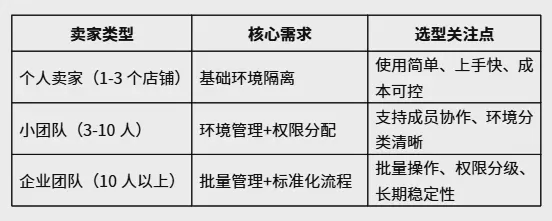
When choosing, don't just look at "how many environments can be created", but also pay attention to the stability of environment isolation, team collaboration capabilities, and long-term usage costs. For more analysis on selection criteria, you can refer to"How to Choose a Fingerprint Browser? Complete Selection Guide from Environment Isolation, Anti-Association to Team Management".
VI. Which Amazon sellers is P1 fingerprint browser suitable for?
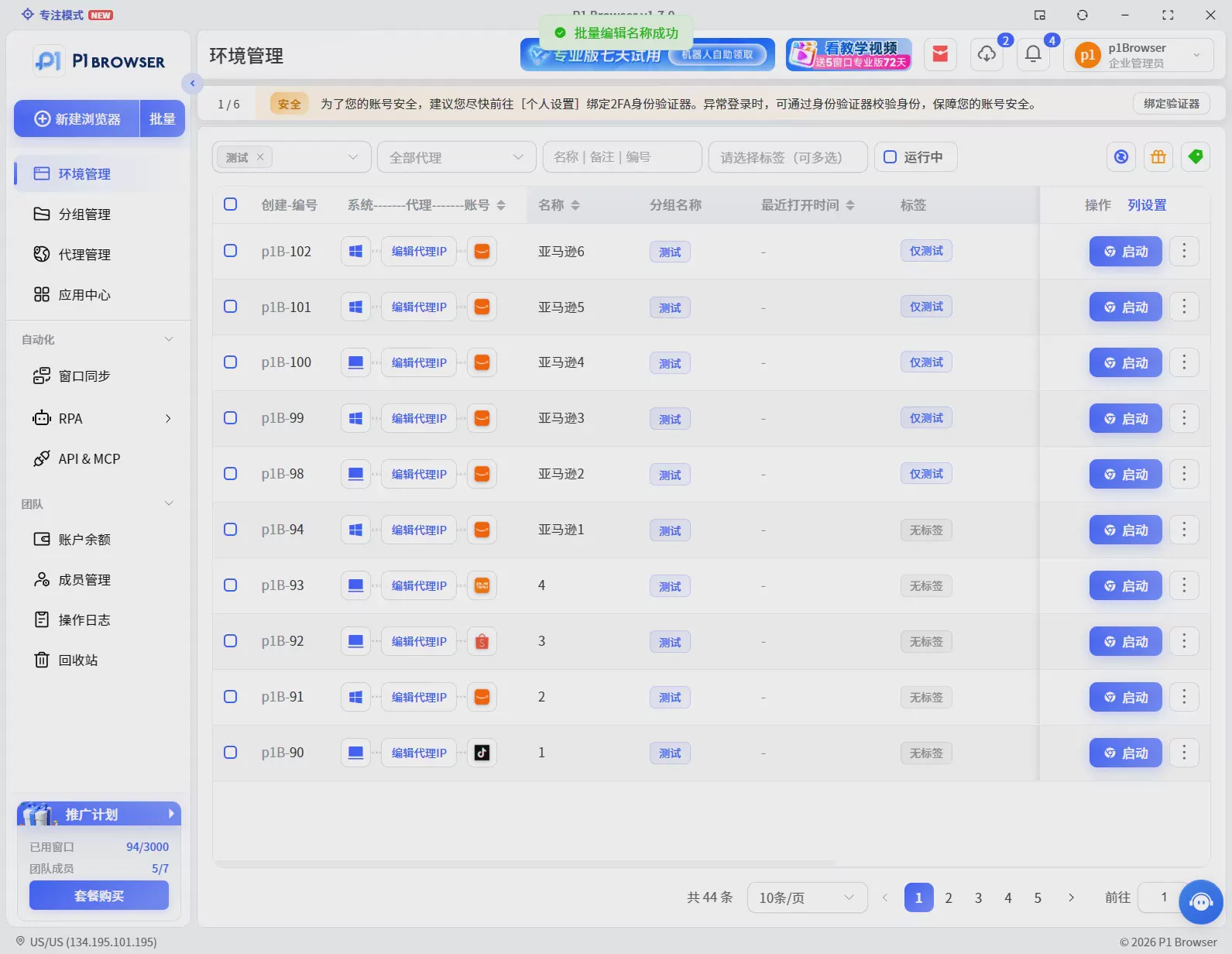
P1 fingerprint browser is mainly aimed at the following Amazon multi-account operation scenarios:
- Multi-store sellers: Operate multiple Amazon sites or multiple stores on the same site simultaneously, need to establish independent browsing environments for each store;
- Proxy operation teams: Manage Amazon stores of multiple customers simultaneously, need to clarify account ownership and environment isolation;
- Cross-border e-commerce companies: Multiple departments and multiple members collaborate to operate multiple stores, need unified team permission management;
- Advertising operation teams: Manage multiple advertising accounts, need to long-term maintain stable independent running environments.
If your team is managing multiple Amazon stores, you can choose a suitable environment management solution based on the current number of accounts and team size.P1 fingerprint browserSupports multi-environment creation, team collaboration, and browser environment management, helping teams establish more standardized multi-account operation processes.
Common Questions FAQ
What does Amazon account association mean?
Amazon account association refers to the platform identifying through technical means that there is an associative relationship between multiple accounts, such as sharing the same network environment, browser environment, registration information, or operational behavior. Once identified as associated, it may lead to account restriction or banning.
Why do Amazon sellers need fingerprint browsers?
When sellers only operate one store, ordinary browsers can usually meet the needs. But when managing multiple stores simultaneously, multiple members collaborating, need to establish independent browsing environments for different accounts, reduce environment mixing, and improve team management efficiency.
What is the difference between Chrome Profile and fingerprint browser?
Chrome Profile mainly solves browser data isolation problems such as Cookie, login status, etc., while fingerprint browsers further focus on browser environment parameter management, team collaboration, and large-scale environment maintenance. For a small number of accounts, using Chrome Profile is sufficient. But when the number of accounts increases, the advantages of professional environment management tools will become more obvious.
Can fingerprint browsers reduce account association risk?
Fingerprint browsers are mainly used to help users establish independent browsing environments for each account, reducing the risk of environment mixing between different accounts. But account security operation also needs to be comprehensively managed in combination with platform rules, independent registration information, stable network environment, and compliant operation methods. No tool can completely replace compliant operation.
How many fingerprint browser environments are needed for Amazon multi-accounts?
If operating multiple Amazon stores, it is usually recommended to establish corresponding environments according to business accounts. The specific quantity needs to be decided in combination with the account scale, team member quantity, and operation method. The focus is not that the more environment quantity is better, but whether each account has a clear, stable management environment.
What tools are needed for Amazon multi-account operation?
Amazon multi-account operation usually requires three types of tools: one is independent network environment (such as static IP/residential proxy), the second is professional browser environment management tool (such as P1 fingerprint browser), the third is compliant account registration and payment information. The three work together to effectively reduce account association risk.

