


What is a proxy?
A proxy (P1Browser proxy) is a technical means of forwarding network requests through an intermediary server, serving as a “bridge” between the user and the target website or server. When you visit a website, your device usually connects directly to the target server, but when using a proxy, all network requests are first processed by the proxy server, which then forwards the requests to the target website. The target server only sees the proxy server’s IP address and cannot identify the user’s real IP address.
The role of a proxy is not limited to simply “substituting” for requests. It plays an important role in modern internet applications and is widely used to enhance anonymity, bypass geographic restrictions, improve security, and more.
Core functions and purposes of using a proxy:
- Hide your real identity and enhance anonymity: When using a proxy, the user’s real IP address is hidden, and the target website can only see the proxy server’s IP address. This helps prevent tracking and protect personal privacy. Proxies are particularly important when handling sensitive data or when anonymous browsing is required.
- For example, when you use public Wi-Fi, a proxy can provide your device with a concealed access path, reducing the security risks of exposure on an open network.
- Bypass geographic restrictions and access restricted content: Some websites or streaming services (such as Netflix, Hulu, BBC iPlayer, etc.) restrict access based on the user’s geographic location. With a proxy, users can disguise themselves as visitors from another region and bypass these restrictions. For example, users in China can access Netflix content intended for the United States through a US proxy server.
- This technology makes cross-border data access much simpler. Users often rely on proxies to bypass content restrictions on streaming services, news websites, and social platforms.
- Improving internet speed and stability: Certain types of proxies, such as caching proxies, can cache frequently visited website content, thereby reducing loading times and improving access speeds. If you frequently visit the same website, the proxy server may cache some of its content. The next time you visit, the proxy server can provide the cached content directly, avoiding another download and significantly improving page loading speed.
- Managing multiple accounts and preventing bans: Many platforms, especially social media and e-commerce platforms, typically restrict the creation of multiple accounts from a single IP address, considering it abusive or fraudulent behavior. With a proxy, users can obtain different IP addresses, thereby avoiding the risk of account bans caused by frequently creating multiple accounts from the same IP address.
- For example, if multiple merchants on an e-commerce platform operate using the same IP address, the platform may consider this abnormal behavior and subsequently restrict the accounts. When using a proxy, each account can use a different IP address, reducing the risk of being banned.
Specific types of proxies:
- HTTP proxy: Primarily used for web browsing, it handles requests through the HTTP protocol and is suitable for web access and similar applications.
- SOCKS proxy: Supports more protocols and is not limited to HTTP. It is suitable for scenarios requiring greater flexibility and the ability to handle various types of network requests, such as FTP, P2P, and SMTP.
- Transparent proxy: Typically used for caching content or controlling access. Users may not be aware that they are using a proxy.
- Anonymous proxy: Hides the user's real IP address through the proxy, but the server can still tell that the user is accessing it through a proxy.
- High-anonymity proxy: In addition to hiding the user's real IP address, it also prevents the server from knowing whether a proxy is being used, thereby providing complete anonymity.
- The choice of proxy depends on the purpose and specific requirements. For example, if you need to conceal your identity and avoid being detected by a platform for using a proxy, a high-anonymity proxy would be a better choice. If you only want to speed up webpage loading, an HTTP proxy will meet your needs.
What are static IPs and dynamic IPs?
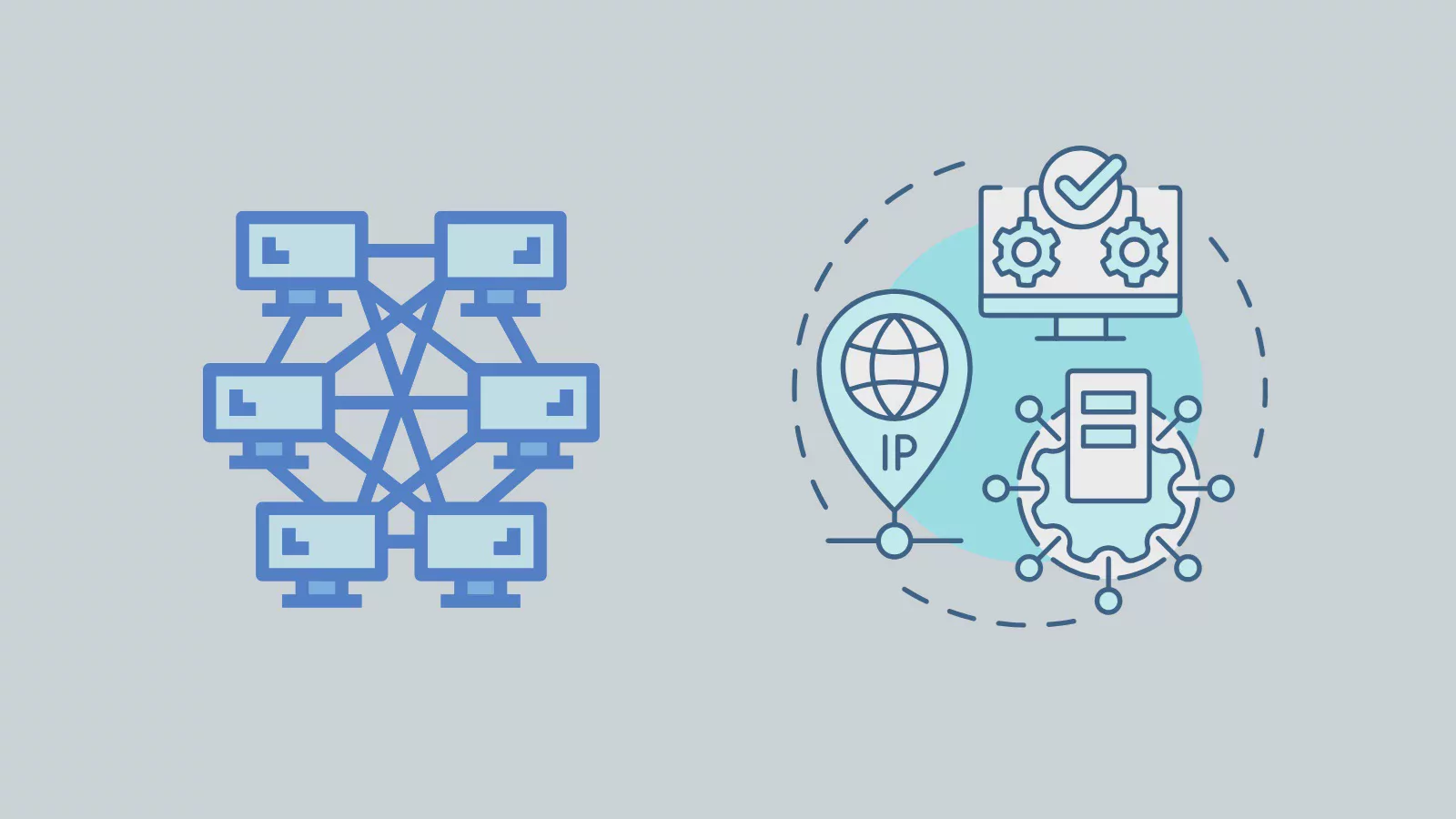
IP address(Internet Protocol address) is the unique identifier of every internet-connected device on a network, much like a house's mailing address, and is used to indicate the device's network location.Static IPandDynamic IP, which differ significantly in terms of stability, cost, security, and applicable scenarios.
Static IP
Static IPis a fixed IP address manually assigned by an Internet Service Provider (ISP). Once assigned to a device, this IP address remains unchanged no matter when or where the device reconnects to the network. Therefore, static IPs are ideal for devices and services that require long-term, stable connections, such as enterprise servers, remote monitoring systems, virtual private networks (VPNs), or network devices that need to be accessed externally.
Dynamic IP
Dynamic IPis a temporary IP address assigned through the Dynamic Host Configuration Protocol (DHCP). Whenever a device connects to the network, the ISP or router randomly assigns it an available IP address. After the device disconnects from the network, that IP address may be reassigned to another device. This flexible allocation method makes dynamic IPs the mainstream choice for home networks and small businesses.
Differences Between Dynamic IP and Static IP
Dynamic IPandStatic IPare two different IP address allocation methods, each with its own characteristics and suitable use cases. Below, we will compare their differences in detail from multiple perspectives.
1. Allocation Method
- Dynamic IP: A dynamic IP address is assigned dynamically through the Dynamic Host Configuration Protocol (DHCP). Each time a device connects to the network, the internet service provider (ISP) or local router assigns the device a temporary IP address as needed. Whenever the device disconnects from and reconnects to the network, its IP address may change.
- Static IP: A static IP address is manually assigned to a device by the ISP or network administrator and remains unchanged for an extended period. Regardless of how the device connects to the network, the static IP always remains fixed.
2. Stability
- Dynamic IP: Since the IP address is assigned dynamically, the device may receive a new IP address each time it reconnects. This means that dynamic IPs are less stable and are particularly suitable for scenarios that do not require a fixed connection.
- Static IP: A static IP address does not change, providing a high level of stability. It is suitable for applications that need to remain online for extended periods and do not want the IP address to change, such as servers, remote access, and monitoring devices.
3. Security
- Dynamic IP: Because a dynamic IP changes with each connection, it enhances online privacy and security. It is difficult for hackers to track a user's real identity because the IP address changes frequently. This makes dynamic IPs safer for ordinary home users and individuals in terms of preventing attacks and protecting privacy.
- Static IP: Because a static IP address is fixed, attackers who know the IP address can track and attack the target device over an extended period. Although static IPs are very useful for providing stable services, they may also increase exposure risks, especially in the absence of other security measures.
4. Cost
- Dynamic IP: Usually provided free of charge by ISPs. A dynamic IP does not require any additional fees and is assigned by default to most home and small business users. Most home broadband services use dynamic IPs.
- Static IP: A static IP typically requires an additional fee. Because configuring, maintaining, and managing a static IP requires more resources, and because it provides continuous, long-term network connectivity, ISPs usually charge extra for static IPs.
5. Use Cases
- Dynamic IP: Suitable for home users and general internet needs. A dynamic IP is sufficient in most cases, especially for short-term connection needs such as everyday internet use, browsing the web, and watching videos.
- Static IP: Suitable for application scenarios that require long-term stable connections, such as servers, website hosting, remote desktops, VPN connections, and video surveillance systems. If you need other devices or users to access your device or service through a fixed address, a static IP is the best choice.
6. Network Management
- Dynamic IP: Because the IP address changes dynamically, users cannot accurately predict the IP address assigned to their device each time they connect. This does not pose a significant problem for home users, but for applications that require a fixed IP, such as VPNs and remote desktops, it may increase management complexity.
- Static IP: Static IP addresses are easy to manage, especially for businesses or users who need to manage devices remotely. A static IP enables network administrators to arrange and manage device access permissions and network configurations more clearly.
7. Configuration and Maintenance
- Dynamic IP: For most users, dynamic IP configuration is completed automatically without user intervention. Users only need to connect to the network, and an IP address will be assigned automatically.
- Static IP: Configuring a static IP usually requires manually entering the address and may involve modifying the network settings of the router or device. If multiple static IP addresses are required, it may also be necessary to apply to the ISP and configure the corresponding settings.
Dynamic IP vs. Static IP Comparison (Organized by Points)
-
Assignment MethodDynamic IP: Dynamically assigned, automatically assigned through the DHCP protocolStatic IP: Manually assigned, remains unchanged over the long term
-
StabilityDynamic IP: The IP address changes and is unstableStatic IP: The IP address remains fixed, providing a stable connection
-
SecurityDynamic IP: The IP address changes frequently, offering higher securityStatic IP: The IP address remains fixed, making it easy for attackers to track and target
-
CostDynamic IP: Usually free, with no additional feesStatic IP: Requires an additional fee
-
Use casesDynamic IP: Everyday internet access, home users, and small businessesStatic IP: devices that require stable connections, such as servers, remote access, monitoring devices, etc.
-
Network managementDynamic IP: not suitable for fixed management, as the IP address changes frequentlyStatic IP: easy to manage and suitable for scenarios that require a fixed IP
What is a Shared SOCKS Proxy?
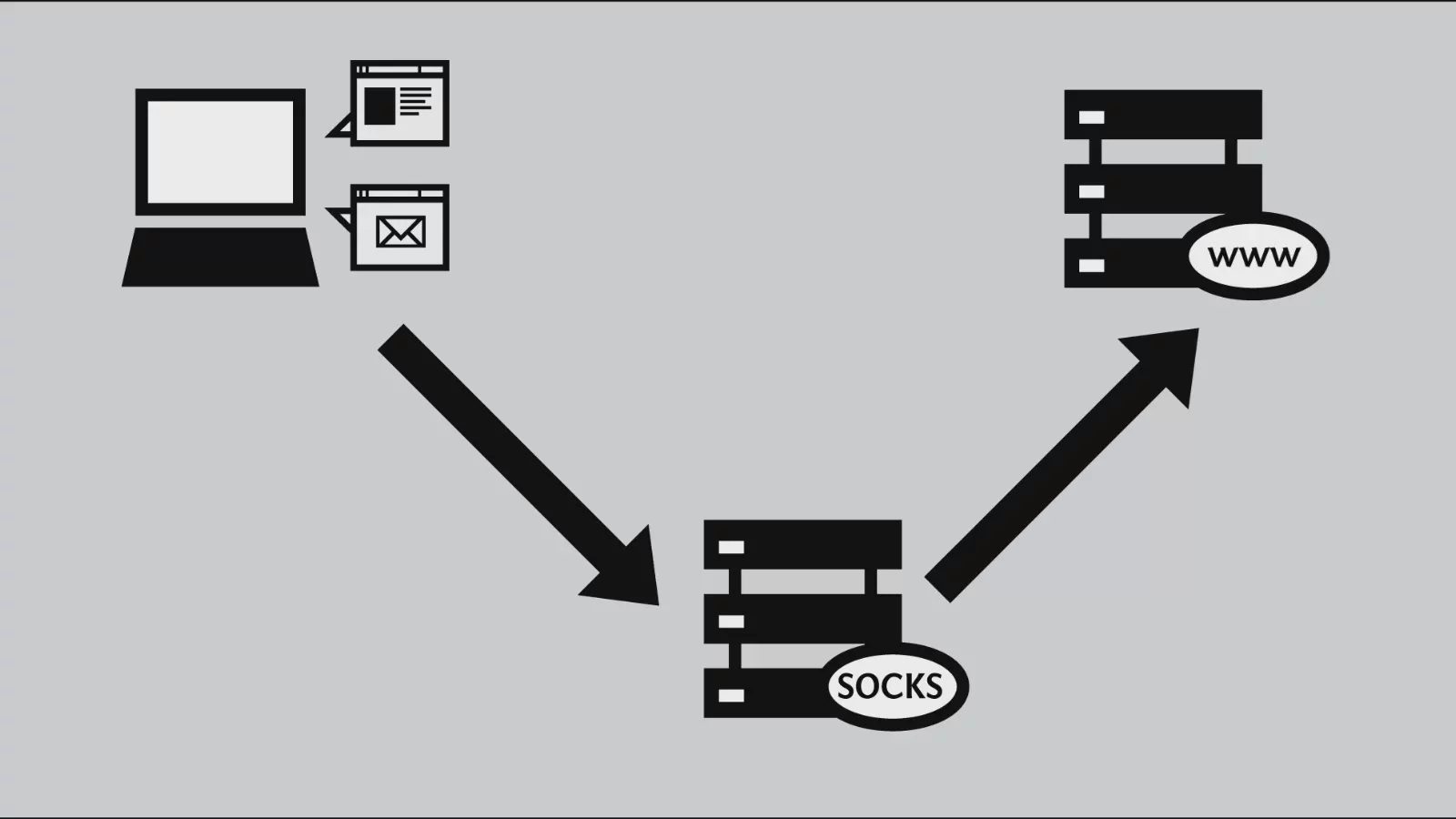
Shared SOCKS Proxy(Shared Proxy SOCKS) is a proxy server that forwardsthe SOCKS protocolusers' traffic to target websites or services. SOCKS (Socket Secure) is a low-level network protocol that can transmit network traffic through a proxy server and supports various applications, such as browsers, email clients, FTP clients, etc.Shared proxymeans that multiple users share the same IP address.
1. Overview of the SOCKS Protocol
SOCKS is a protocol different from traditional HTTP proxies, offering greater flexibility and compatibility. SOCKS proxies can handle any type of network traffic and support multiple protocols (such as TCP and UDP), making them more versatile than HTTP proxies. The main versions of the SOCKS protocol are SOCKS4 and SOCKS5, among which:
- SOCKS4: The original version, supporting the TCP protocol with relatively basic functionality and no authentication.
- SOCKS5: An improved version based on SOCKS4, supporting more features, including authentication, stronger security, and UDP protocol support.
- Shared ProxiesThis means that multiple users share the same IP address through a single proxy server. In other words, the traffic of multiple users is forwarded through the same proxy, so the target website or service can only see the proxy's IP address and cannot determine the true source of the traffic.
2. Features of Shared SOCKS Proxies
- Multiple users share an IP address: Unlike a Private Proxy, the IP address of a shared proxy is used by multiple users. Each user accesses network resources through the same proxy server, which can reduce the cost of proxy services but may affect stability and speed.
- Support for multiple applications: SOCKS proxies can handle multiple protocols. In addition to browsing the web, they can also be used for FTP, email transmission, video streaming, and more. Therefore, SOCKS proxies are more versatile than standard HTTP proxies.
- Lower cost: Shared proxies typically cost less because multiple users share the same proxy IP address. This approach is suitable for users who do not need to access services frequently and do not have high anonymity requirements.
3. Pros and Cons of Shared SOCKS Proxies
Advantages:
- Low cost: The greatest advantage of shared proxies is their relatively low price. Because multiple users share the same IP address, providers can distribute the cost among multiple users, keeping the expense for each user low.
- Wide range of applications: SOCKS proxies support various protocols and applications and are suitable for many network operations, such as browsing the web, downloading files, and using P2P.
- Provides a certain level of anonymity: When using a shared proxy, the target website can only see the proxy server's IP address and cannot directly trace the user's real IP address, thereby providing a certain level of privacy protection.
- Disadvantages:
- Shared IP addresses may be blocked: Because multiple users share the same IP address, if one user's behavior is considered abnormal or malicious, the entire IP address may be blocked by the website. In this case, all users using that IP address will be affected.
- Slower speeds: Because multiple users share the same proxy IP address, traffic may become overloaded, resulting in slower access speeds, especially during peak hours or under heavy loads.
- Not suitable for tasks requiring high anonymity: The shared proxy's IP address has already been used by multiple users, so it provides relatively limited anonymity, and websites may recognize it as a proxy IP. For scenarios requiring a high level of anonymity, such as bypassing strict anti-fraud mechanisms, a shared proxy may not be the best choice.
4. How to Choose a Shared SOCKS Proxy
When choosing a shared SOCKS proxy, users should pay attention to the following points:
- Reputation of the proxy provider: Choosing a reputable proxy service provider can reduce the risk of being blocked and provide more stable proxy services.
- Proxy speed and stability: Since multiple users share the same IP address, the speed and stability of shared proxies are affected by the load. When making a selection, you should evaluate the network quality, server locations, and other factors provided by the proxy service provider.
- Usage restrictions: Find out whether the service provider limits traffic or the number of connections, as well as the period during which the proxy is available.
- Risk of IP blocking: Since multiple users share the same IP, abnormal behavior by one user may cause the IP address to be blocked, affecting the user experience of others. Choosing a reputable provider can effectively reduce this risk.
What is a residential IP?
Residential IP (Residential IP)refers to an IP address provided byinternet service providers (ISPs) for ordinary household users. These IP addresses are linked to residential addresses and are typically used for home internet access. This type of IP address offers greater reliability and legitimacy and is usually obtained through a residential broadband connection.
Residential IP anddata center IP(also known ascommercial IP) compared with, its biggest distinguishing feature lies in its source and purpose. A residential IP is an IP that truly originates from a home user and represents a physical address, typically used for personal or household internet access. These IPs are assigned by ISPs to ordinary households or individuals.
1. Characteristics of Residential IP Addresses
- Ordinary home broadband connections provided by ISPs: Residential IPs are common IP addresses provided by ISPs for home users, typically obtained through broadband connections. These IP addresses are directly associated with the addresses of ordinary household users.
- Higher reliability: Because these IP addresses are assigned by ISPs to home users, they are generally less likely to be banned or blocked and are usually considered more “trustworthy” than commercial or data center IPs.
- Less likely to be identified as a proxy: Residential IPs are typically not identified by websites or services as proxy servers or VPNs. This is because they come from home networks rather than being provided through virtual network services or data center servers. Therefore, residential IPs are often more effective than other types of IPs for bypassing geographical restrictions or browsing anonymously.
2. Advantages and Disadvantages of Residential IP Addresses
Advantages:
- More difficult to block: Because residential IP addresses are associated with the addresses of ordinary household users, websites typically do not restrict access from these IPs. Therefore, residential IPs are more reliable for bypassing geographical restrictions.
- Less likely to be identified as proxies: Residential IP addresses are not as easily identified as data center IPs or VPN addresses, making them suitable for scenarios that require greater discretion, such as bypassing content filters and enhancing anonymity.
- Higher level of trust: Some websites and online services may place greater trust in residential IP addresses because they believe these IPs represent genuine user activity rather than traffic from virtual servers or proxies.
- Drawbacks:
- Higher cost: Residential IP addresses are generally more expensive than other types of IPs (such as data center IPs or shared proxies) because they must be rented or purchased from internet service providers and are typically charged based on traffic or duration.
- Limited availability: The supply of residential IPs is relatively limited, especially in scenarios requiring a large number of IPs, making it difficult to obtain enough residential IP addresses.
3. How to Obtain Residential IP Addresses
There are usually two ways to obtain residential IP addresses:
- Direct purchase: Some service providers allow users to purchase residential IP addresses. These IPs are typically obtained from home broadband networks and are more expensive, but they are suitable for scenarios requiring a high level of privacy and anonymity.
- Proxy services: Some proxy providers specialize in offering residential proxy IPs. These IPs are obtained from real residential addresses rather than being provided through virtual servers. Users can rent these residential IPs to bypass blocks, increase anonymity, and achieve other purposes.
The Relationship Between Residential IP Addresses and Shared Proxies
In the use of network proxies,Residential IP addressandShared ProxyThese differences are primarily reflected in the sources of the IP addresses, anonymity, usage scenarios, and other aspects. Understanding their relationship helps users choose a suitable proxy service based on their needs.
1. Basic Differences Between Shared Proxies and Residential IP Addresses
- A Shared Proxy is a service in which multiple users share the same proxy IP address. All users accessing the internet through this proxy connect via the same IP, so the target website can only see the proxy IP address and cannot trace the user's real IP.
- A Residential IP is an IP address associated with the physical address of an ordinary household user. These IPs are typically assigned to residential users by Internet Service Providers (ISPs) for everyday internet activities. Since they are generally regarded as “real” IPs and are not as easily identified as proxy services as data center IPs or proxy IPs, Residential IPs are usually considered more legitimate and stable.
2. Application Scenarios for Residential IPs and Shared Proxies
- Bypassing IP Blocks and Regional Restrictions: Because Shared Proxy IP addresses are used by multiple users, they are more easily identified as proxy IPs by target websites and are therefore more likely to be blocked. Residential IPs, on the other hand, are typically associated with household users' addresses, making it difficult for target websites to determine whether they are being used as proxies. Therefore, Residential IPs are more reliable than Shared Proxies when bypassing regional restrictions and IP blocks.
- For example, when you use a Shared Proxy to access certain websites, the website may detect that the IP is being used frequently, determine that it belongs to a proxy service, and consequently restrict access. In contrast, when using a Residential IP, the website sees an IP associated with an ordinary household user and will generally not block it.
- Social Media Management and Automated Operations: For tasks that require operating multiple accounts, such as social media management or batch operations on e-commerce platforms, using a Shared Proxy may result in the IP being monitored frequently and blocked because multiple users share the same IP. Because of their “real” nature, Residential IPs provide greater stability and reduce the risk of being blocked. Therefore, Residential IPs perform more naturally in these scenarios.
- Web Crawling and Data Scraping: For large-scale data scraping, using Shared Proxies may entail the risk of having the IP blocked, especially when the target website has strict detection measures for proxy IPs. Residential IPs can reduce these risks because they are generally not regarded as proxy servers. Residential IPs can provide greater reliability and a longer service life when crawling data on a large scale.
3. Security and privacy of shared proxies and residential IP addresses
- Security: The IP addresses of shared proxies are typically public, and multiple users share the same IP, causing it to be used frequently and making it easy for target websites to identify and block. Residential IP addresses, on the other hand, are used by ordinary household users and are generally not exposed to the public network, so they are usually more secure than shared proxies.
- Privacy: Because residential IP addresses are associated with the actual addresses of household users, they are generally considered “real” IP addresses. This makes them appear more natural when accessing certain services that require a high level of anonymity and less likely to be tracked. Since shared proxy IP addresses are used by multiple users, websites may identify them as proxy servers, thereby affecting user privacy.
4. Cost comparison
- Shared proxies are relatively inexpensive and are suitable for users who do not have high requirements for IP stability and anonymity. Since multiple users share one IP, proxy service providers can distribute the costs among them and offer relatively low prices.
- Residential IP addresses are relatively more expensive because these IPs are typically provided by ISPs and assigned to specific household users. Due to their high anonymity and lower risk of being blocked, residential IP addresses are usually more expensive than shared proxies.
How to add a proxy
Setting up a proxy for your browser is an important way to protect privacy, bypass regional restrictions, or optimize network access. The following are detailed operating steps, using Google Chrome and Microsoft Edge as examples, to help you complete the proxy configuration smoothly.
Step 1: Open the browser’s settings page
- Google Chrome: Open the Chrome browser and click the “three-dot menu” in the upper-right corner (usually located to the right of the address bar). In the drop-down menu, select “Settings” (Settings).
- Microsoft Edge: Open the Edge browser and click the “three-dot menu” in the upper-right corner. Select “Settings” from the menu.
Step 2: Find the Proxy Settings Entry Point
On the browser’s settings page, look for options related to proxy settings:
- Use the “Search bar”: Enter “proxy settings” in the search box at the top of the settings page. Click the “Open your computer’s proxy settings” link displayed in the results to go to the system proxy settings.
- Direct navigation: On the settings page, click “System and performance” > “Open your computer’s proxy settings” in sequence (Edge may display it as “Network settings”).
Step 3: Access the System Proxy Settings
The browser’s “Proxy settings” will actually redirect you to the operating system’s proxy configuration interface, as follows:
- Windows: In the pop-up “Network & Internet settings” window, click “Proxy” in the left-hand menu. You will see a page with “Automatic proxy setup” and “Manual proxy setup”.
- Mac: Go to “System Settings” > “Network”. Select the network currently in use, then click “Advanced” > the “Proxies” tab.
Step 4: Configure a Manual Proxy
- Windows: Scroll down to the “Manual proxy setup” section. Find the “Use a proxy server” option and switch it to “On”. Enter the following information in the corresponding text boxes: Proxy address: for example, 192.168.1.1 Port number: for example, 8080 After confirming that everything is correct, click the “Save” button.
- Mac: Select the proxy types you want to enable (such as HTTP, HTTPS, or SOCKS). Enter the proxy server address and port number in the text boxes on the right. Click “Apply” to save the changes.
Frequently Asked Questions About Proxies
1. What is a proxy?
A proxy is an intermediary server that sends network requests on behalf of users and forwards them to the target website, concealing the user's real IP address and providing functions such as anonymity and bypassing geographical restrictions.
2. What types of proxies are there?
The main types of proxies include HTTP proxies, SOCKS proxies, transparent proxies, anonymous proxies, and high-anonymity proxies, each suited to different use cases.
3. What is the difference between static IPs and dynamic IPs?
A static IP address remains fixed and is suitable for scenarios requiring a stable connection; a dynamic IP address changes with each connection and is suitable for ordinary home users.
4. What are the advantages and disadvantages of shared SOCKS proxies?
Shared SOCKS proxies support multiple protocols and have a relatively low cost, but sharing the same IP address among multiple users may result in slower speeds and a higher risk of being blocked.
5. How do you choose the right proxy?
When choosing a proxy, select a suitable type based on your needs, pay attention to its stability and speed, and check whether it provides anonymity, ensuring that you choose a reputable proxy service provider.

