
Do You Need a Fingerprint Browser for Multi-Account TikTok Operations? A Guide to Anti-Account-Linking and Environment Management
Whether you need a fingerprint browser for multi-account TikTok operations depends on your number of accounts and team size.
If you only operate 1-2 accounts, a standard browser paired with a stable network environment is usually sufficient to meet your needs.
However, when you are managing multiple TikTok Shop stores, content accounts, or ad accounts simultaneously, creating an independent browser environment for each account can effectively reduce the management risks caused by environment overlap.
From TikTok's environment identification logic, the limitations of standard browsers, to a capability comparison of professional environment management tools, this article helps you determine whether your operational scenario requires a fingerprint browser.
I. Real-World Scenarios and Pain Points in Multi-Account TikTok Operations
For cross-border sellers and operations teams:
- Multiple TikTok Shop stores (different countries/categories)
- Multiple content accounts for matrix testing
- Multiple ad accounts running campaigns separately
- Multiple team members operating different accounts
As the number of accounts grows, the following issues commonly arise:
- Operators log into the wrong environment; account A ends up using account B's Cookie
- Onboarding new hires is chaotic, with no clarity on which account corresponds to which configuration
- Multiple people working on the same computer at once, causing account data to overwrite each other
- Every device switch requires a full reconfiguration, making the process extremely inefficient
When you only have a few accounts, these issues may not be very noticeable. But once you scale up, the efficiency of environment management will directly impact operational efficiency and increase the risk of the platform flagging associations between different accounts.
II. How Does TikTok Determine Whether Multiple Accounts Come from the Same Environment?
Many people believe:
"Can simply switching IPs solve the account problem?"
In reality, it is not that simple. Platforms typically assess whether accounts are linked by combining multiple factors, including the network environment, browser environment, and account activity patterns:
1. Network Environment
The IP address is one of the most fundamental identification dimensions. If multiple accounts are logged in and operated under the same IP address over a prolonged period, the platform will record this as an association signal.
2. Browser Environment
Browsers expose a large number of parameters to the platform. When combined, these data points can form a unique "fingerprint":
- Cookies and cache: they store login sessions and user preferences. When multiple accounts share the same stored data, a direct association is created.
- Browser parameters and device characteristics: Including system language, time zone, screen resolution, operating system version, and more.
- Canvas / WebGL: The low-level graphics rendering characteristics of the browser, which also serve as an important basis for platforms to identify browser environments.
3. Operational Behavior
Frequently switching between different accounts on the same computer over an extended period, along with similar posting and browsing habits, can also be identified as associated behavior by platform algorithms.
Therefore, the core of multi-account operation is not just network isolation, but also how to properly manage each account's correspondingbrowser environment.
III. Can Multiple Instances of a Regular Browser Manage Multiple TikTok Accounts?
Many beginners initially use Chrome multi-user profiles (Profile), different browsers, or incognito mode to manage multiple accounts.
This approach works when you have few accounts, but as the number of accounts increases, the limitations become very obvious:
1. Environments Are Prone to Getting Mixed Up
Data for different accounts is scattered across various local folders, and the management cost keeps rising. Once a local file is corrupted, the login status of all accounts is lost.
2. Login Status Is Hard to Maintain
Long-term operations require a stable environment. If a regular browser frequently clears its cache or switches to a different device, the environment fingerprint changes, increasing account instability.
3. Team Collaboration Is Extremely Difficult
When multiple people are operating, it is difficult to clearly define: which account corresponds to which environment? Who is responsible for which account? Regular browsers make it hard to achieve permission isolation and unified management within a team.
IV. What Problems Can a Fingerprint Browser Solve?
A fingerprint browser (also called an anti-association browser) is essentially abrowser environment management tool. It primarily addresses the following pain points:
1. Independent and Persistent Browsing Environments
It allows you to create fully isolated browser environments for each TikTok account. Each environment independently stores cookies, login status, browser settings, and usage history, physically reducing the risk of mixing multi-account environments.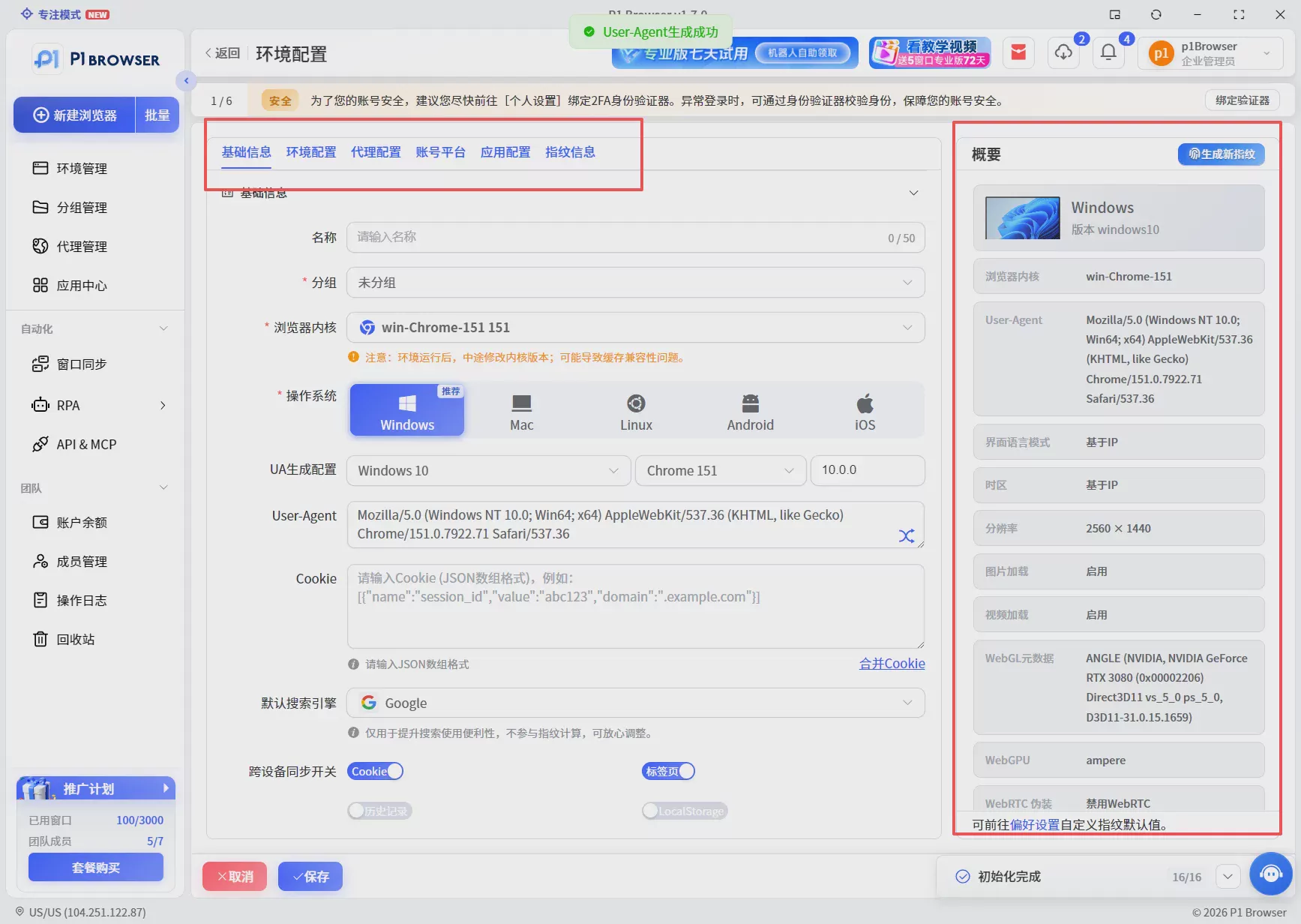
2. Long-Term Environment Storage, Ready to Use Anytime
Account operations are not a one-time login. A fingerprint browser can save configured environment data locally or in the cloud, making it easy to open and resume seamlessly at any time.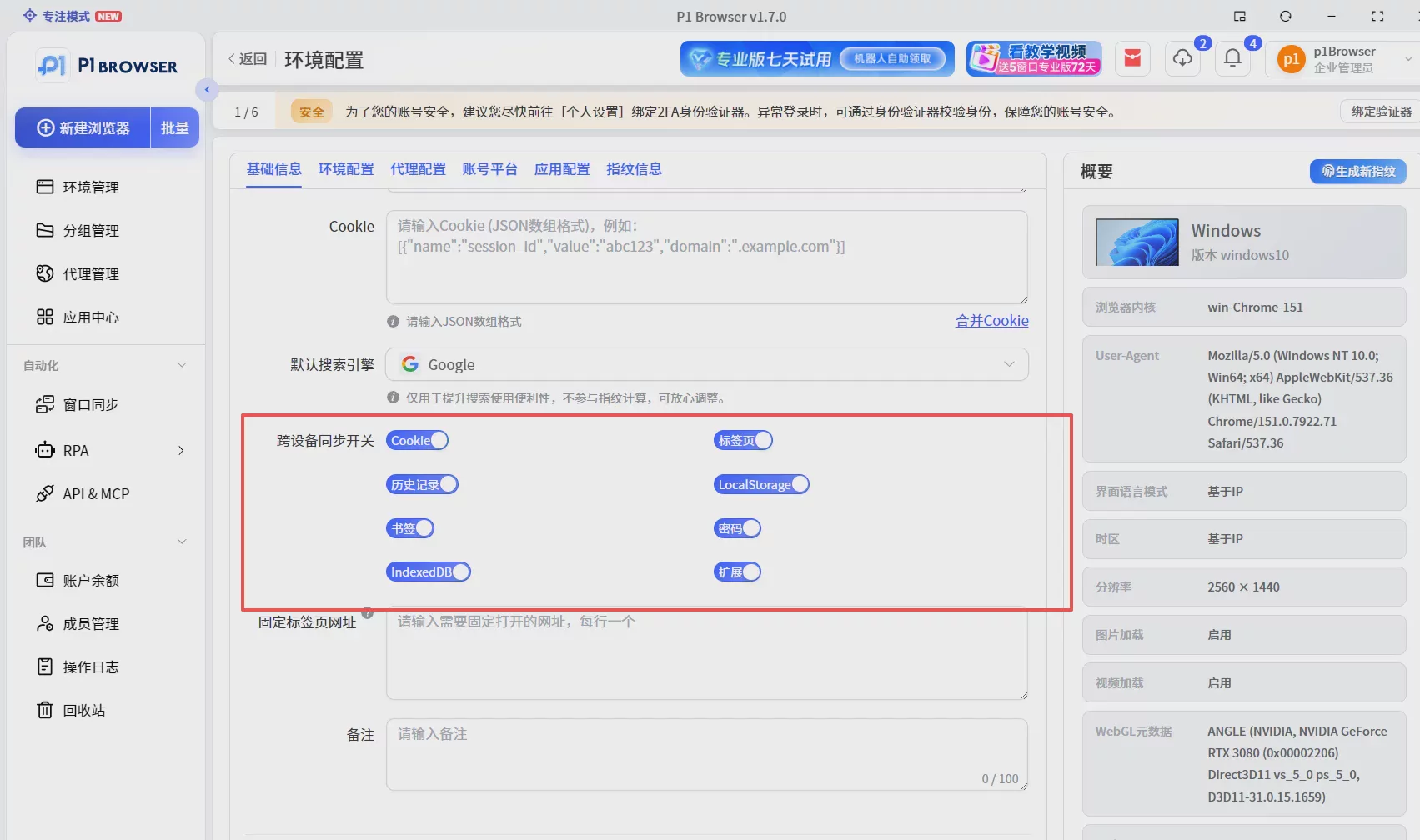
3. Unified Team Account Management
For teams, a clear "Account → Browser Environment → Operator" management chain can be established. Operations supervisors can clearly assign which accounts Operator A is responsible for and which environments Operator B uses, preventing unauthorized actions.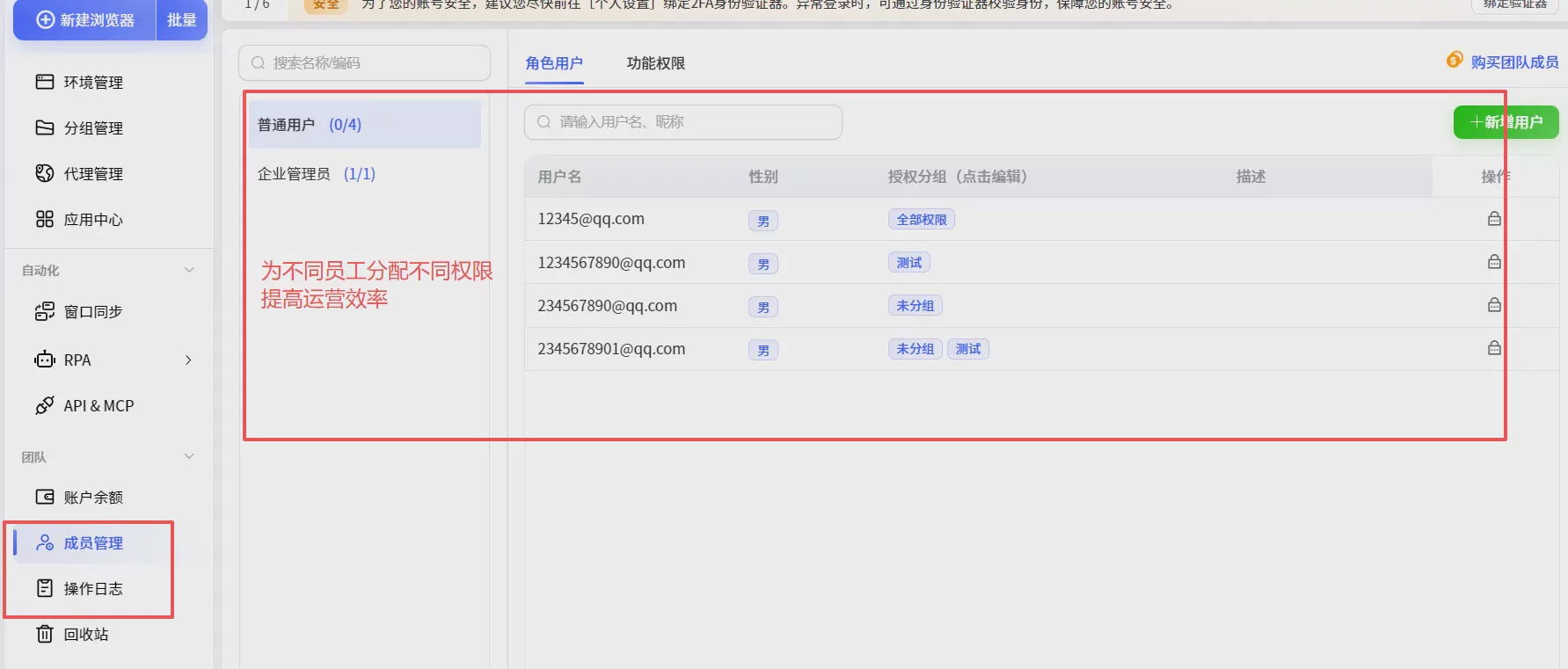
Why We Recommend P1 Browser?
P1 Browser is more than just a simple "anti-linking browser"—it places greater emphasis onthe account management system.
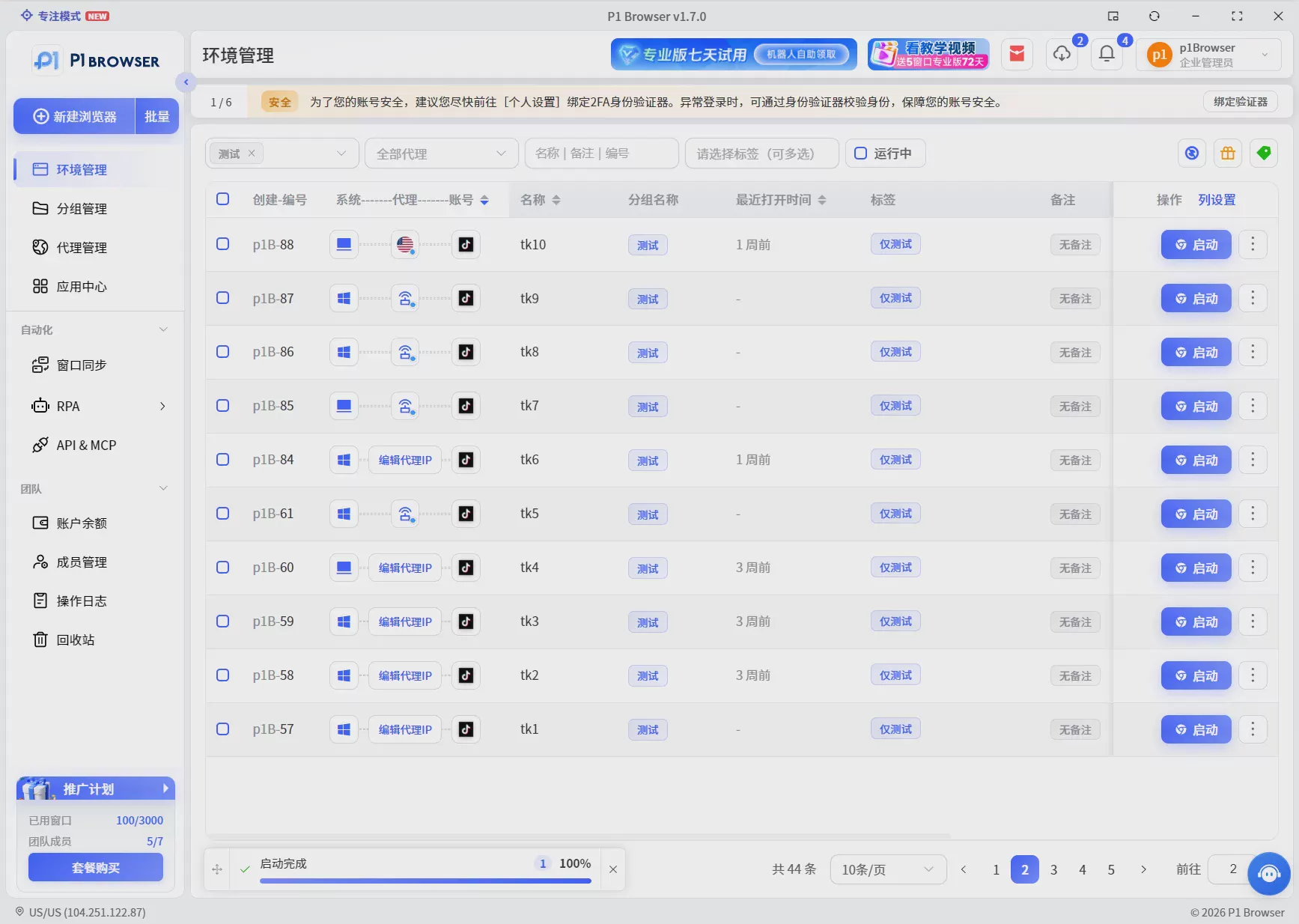
Unlike traditional multi-browser approaches, P1 places greater emphasis on unified management across account environments, team members, and operational workflows, helping teams build a standardized account management system. With intuitive tab management and permission assignment, new team members can get up to speed quickly without having to repeatedly configure complex environment parameters.
Six. Frequently Asked Questions (FAQ)
Q: Do you have to use a fingerprint browser for multiple TikTok accounts?
A: It depends on the number of accounts. For 1-2 accounts, running multiple instances in a regular browser is sufficient; if you are operating more than 10 shops, ad, or content accounts, a fingerprint browser can significantly reduce environment management costs.
Q: Is a fingerprint browser suitable for multi-shop TikTok Shop operations?
A: Absolutely. Multi-shop operations typically require collaboration among multiple people. A fingerprint browser helps teams clearly assign environment permissions for each shop, reducing the risk of environment confusion and greatly improving day-to-day management efficiency.
Q: Are fingerprint browsers really safe?
A: Fingerprint browsers from legitimate brands (such as P1 Browser) simply isolate and simulate low-level browser parameters. They do not involve user passwords or financial security, and they support local data storage, making them more secure than multiple people sharing the same computer.
Q: What does TikTok primarily look at when detecting multiple accounts?
A: It primarily checks network IP, browser fingerprints (such as Cookies, timezone, system language, Canvas features, etc.), and the operational behavioral patterns of the accounts.
Summary
When operating multiple TikTok Shop stores, content accounts, or ad accounts, a professional environment management tool is essential for teams to improve efficiency and standardize workflows.
When selecting a fingerprint browser, focus on itsenvironment isolation capabilities, team collaboration efficiency, and data stability, establishing a clear and standardized account management system.