



As overseas social media platforms such as Instagram, TikTok, Facebook, X(Twitter), and LinkedIn continue to evolve, more and more businesses are beginning to use social media to generate traffic, build brand influence, and drive sales.
At the same time, the social media management industry is growing rapidly, with a large number of marketing agencies (Social Media Agency), freelancers, and overseas marketing teams beginning to help multiple clients manage their social media accounts.
For an individual managing one account, publishing content, replying to messages, and reviewing data are not difficult.
But when a team is responsible for 5, 20, or even 100 client accounts at the same time, the situation becomes completely different.
Operators need to manage accounts across different platforms and also handle:
- Different clients' brand positioning.
- Login information for different accounts.
- Team member permission assignments.
- Content review and publishing schedule management.
- Account security and long-term maintenance.
Without proper management processes, multi-client social media operations can easily descend into chaos.
For example:
- Employees do not know which account they should log in to.
- Content is published to the wrong client account.
- Data from multiple accounts gets mixed together.
- Departing employees still retain account access.
- The team cannot scale the business quickly.
Therefore, for professional social media teams, managing multiple client accounts is not simply a matter of “logging in to more accounts,” but rather a complete account management system.
- Social media marketing agencies
- Overseas advertising teams
- Cross-border e-commerce operators
- Freelance social media managers
- Brand marketing teams
Why is managing multiple clients’ social media accounts becoming increasingly difficult?
Many people who are new to the social media operations industry underestimate the difficulty of managing multiple accounts.
They think:
“I only need to help clients publish content, so why do I need a complex management process?”
In reality, a mature social media operations team needs to handle multiple aspects simultaneously, including content, accounts, security, data, and team collaboration.
1. Different clients have different brand positioning
The first challenge comes from the differences between clients.
For example: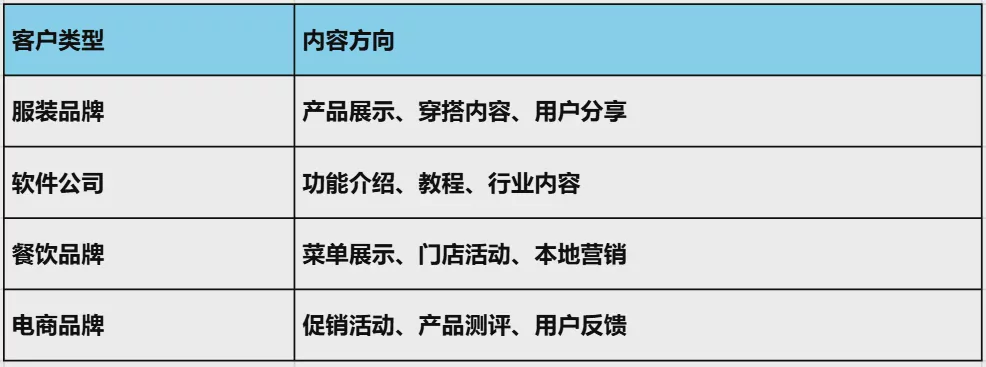
Using the same operating approach for multiple clients can easily lead to a decline in content quality.
Therefore, the team must develop an independent strategy for each client.
2. Operating on Multiple Platforms Simultaneously Increases Complexity
Today, clients typically do not choose just one social platform for marketing.
A comprehensive overseas social media marketing plan often needs to cover multiple channels simultaneously.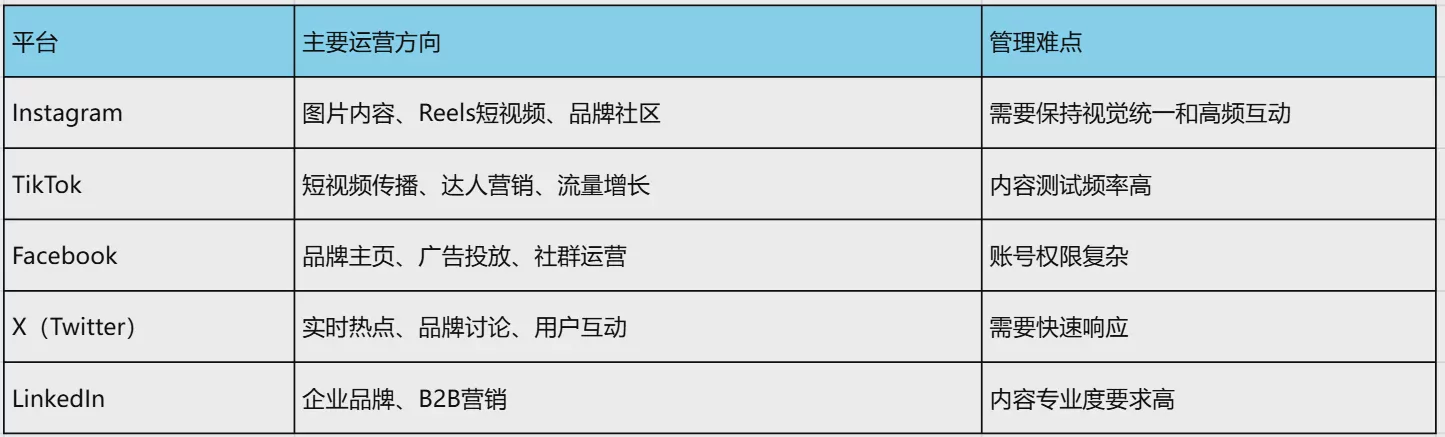
Different platforms vary significantly not only in content formats, but also in operating rhythms, user habits, and data metrics.
Therefore, a social media team responsible for multiple clients must understand the rules of multiple platforms simultaneously and establish different operating processes.
3. Collaboration becomes more difficult as the team grows
Many social media teams start with only 1-2 people.
At this stage, one person managing multiple accounts is usually not a major problem.
However, as the team grows, new issues gradually emerge:
- Who is responsible for which client?
- Who has access to the accounts?
- Who is responsible for content review?
- Who is responsible for data analysis?
- How should temporary client-requested changes be communicated?
Without standardized processes, increasing the team size does not necessarily improve efficiency.
What types of accounts do social media agencies typically need to manage?
Different types of clients have different social media account management needs.
But for most marketing teams, the following types of accounts are the most common:
1. Official Brand Accounts
Official brand accounts are typically used to showcase the company’s image.
The main content includes:
- Brand stories.
- Product introductions.
- Company news.
- Customer cases.
- Event promotions.
These accounts typically require consistent content and a unified brand style.
2. Product Marketing Accounts
Some companies create separate accounts for different products.
For example:
- Software product accounts.
- E-commerce brand accounts.
- New product promotion accounts.
This approach allows different products to reach more precisely targeted users.
3. Advertising accounts
For teams that need to run advertising campaigns overseas, ad account management is also an important task.
Operations personnel need to focus on:
- Ad creative testing.
- Advertising performance analysis.
- Budget management.
- Conversion performance optimization.
4. Content creator accounts
More and more brands are beginning to promote their products through Creator Marketing (creator marketing).
As a result, agencies may also manage multiple creator accounts at the same time.
III. The 5 Most Common Problems in Managing Multiple Client Social Media Accounts
As the number of clients increases, social media teams typically encounter the following problems.
Problem 1: Chaotic account information management
This is the most basic and most common problem.
A client may have:
- An Instagram account.
- A TikTok account.
- A Facebook Page.
- An advertising account.
- Email accounts.
Without a unified management method, employees can easily confuse account information.
This is especially problematic in collaborative environments, where a single incorrect login can lead to serious consequences.
Issue 2: Publishing the wrong content to different clients
This is one of the problems agencies fear most.
For example:
- Client A’s content is published to Client B’s account.
- Materials from another brand are used incorrectly.
- The publishing schedule is incorrect.
These errors not only affect work efficiency but also directly damage client trust.
Issue 3: Employees frequently switching between accounts
Ordinary browsers can usually maintain only a limited number of login sessions.
When operations staff need to manage dozens of accounts, they often need to:
- Log out of the current account.
- Re-enter the account password.
- Wait for the verification code.
- Access the admin panel again.
Repeating these steps every day wastes a great deal of time.
Problem 4: Customer permissions are difficult to control
Many teams face issues such as employee departures or role changes.
If all accounts rely on individuals’ login details for management, it is difficult to quickly transfer access permissions.
Problem 5: Account environments interfere with one another
Regular browsers store a large amount of browsing data:
- Cookie.
- Cache.
- Browsing history.
- Website storage data.
Using multiple accounts in the same browser environment over an extended period increases management complexity.
Why can’t ordinary browsers meet the needs of multi-client account management?
Ordinary browsers such as Chrome, Edge, and Safari are well suited for everyday use.
However, they are not designed to manage large numbers of accounts for professional social media teams.
1. Browser configurations cannot distinguish accounts precisely
Ordinary browsers primarily rely on user profiles to distinguish accounts.
However, simply distinguishing between cookies is not enough for managing a large number of client accounts.
Teams typically need a clearer way to manage environments.
2. Low efficiency in multi-user collaboration
Standard browsers typically cannot meet the account allocation needs of team members.
For example:
- Operator A is responsible for Clients 1-5.
- Operator B is responsible for Clients 6-10.
- The design team only needs to view some of the accounts.
This complex permission management requires more professional support.
3. Difficulty Scaling Projects
When the number of clients grows from 10 to 50, ordinary management methods become increasingly difficult.
Therefore, many professional teams begin looking for solutions that are better suited to managing multiple accounts.
The Correct Process for Managing Multiple Client Social Media Accounts
For professional social media agencies, managing multiple client accounts cannot rely on ad hoc operations; instead, standardized processes need to be established.
A mature account management system typically includes:
- Account organization.
- Permission allocation.
- Content planning.
- Review process.
- Data analysis.
- Continuous optimization.
The following introduces a management process suitable for most social media teams.
First step: Create a customer account management table
Before managing multiple clients, first establish a unified account database.
Many teams initially use Excel or Notion for management.
It is recommended to record the following information: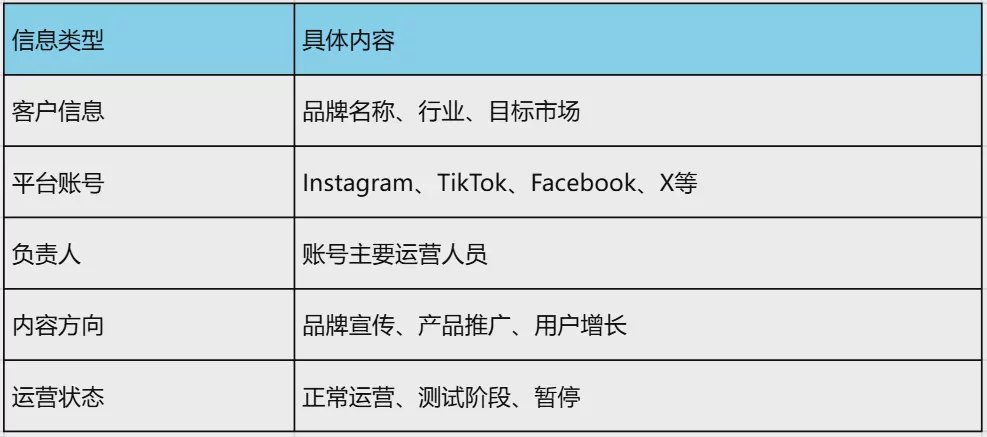
Keeping unified records helps prevent team members from repeatedly looking up account information and improves work efficiency.
Step Two: Establish an Account Classification System by Client
As the number of clients increases, simply categorizing accounts by platform is no longer sufficient.
For example:
Incorrect approach:
Instagram账号
TikTok账号
Facebook账号
This approach makes it difficult to quickly find the corresponding client.
It is more recommended to categorize accounts by client:
客户A
 ├── Instagram
 ├── TikTok
 ├── Facebook
客户B
 ├── Instagram
 ├── X
 ├── LinkedIn
This allows team members to quickly locate the corresponding project.
Third Step: Develop a Content Production Process
One of the biggest challenges of managing multiple clients is producing content consistently.
Excellent social media teams typically establish a content SOP.
The complete process is as follows: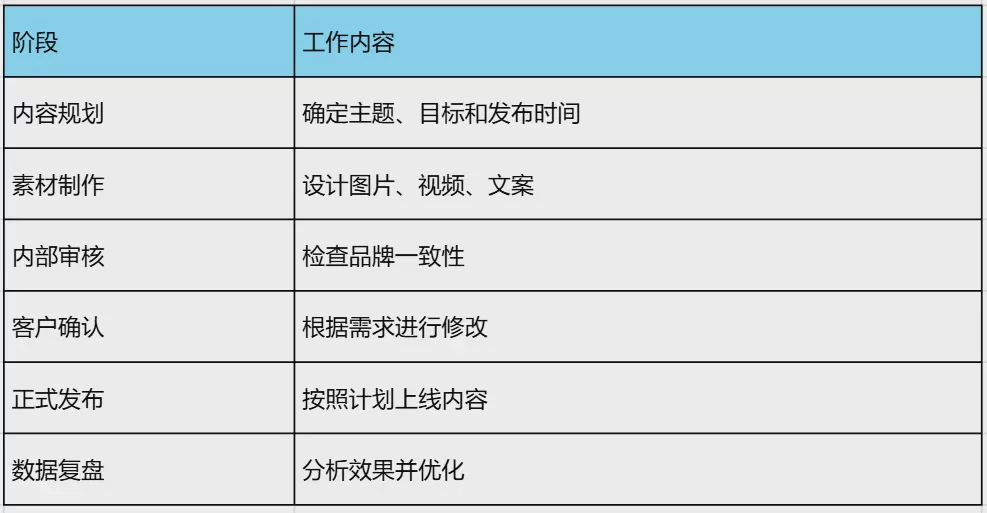
Process-based management can prevent a decline in operational quality caused by personnel changes.
Step Four: Set Team Permissions
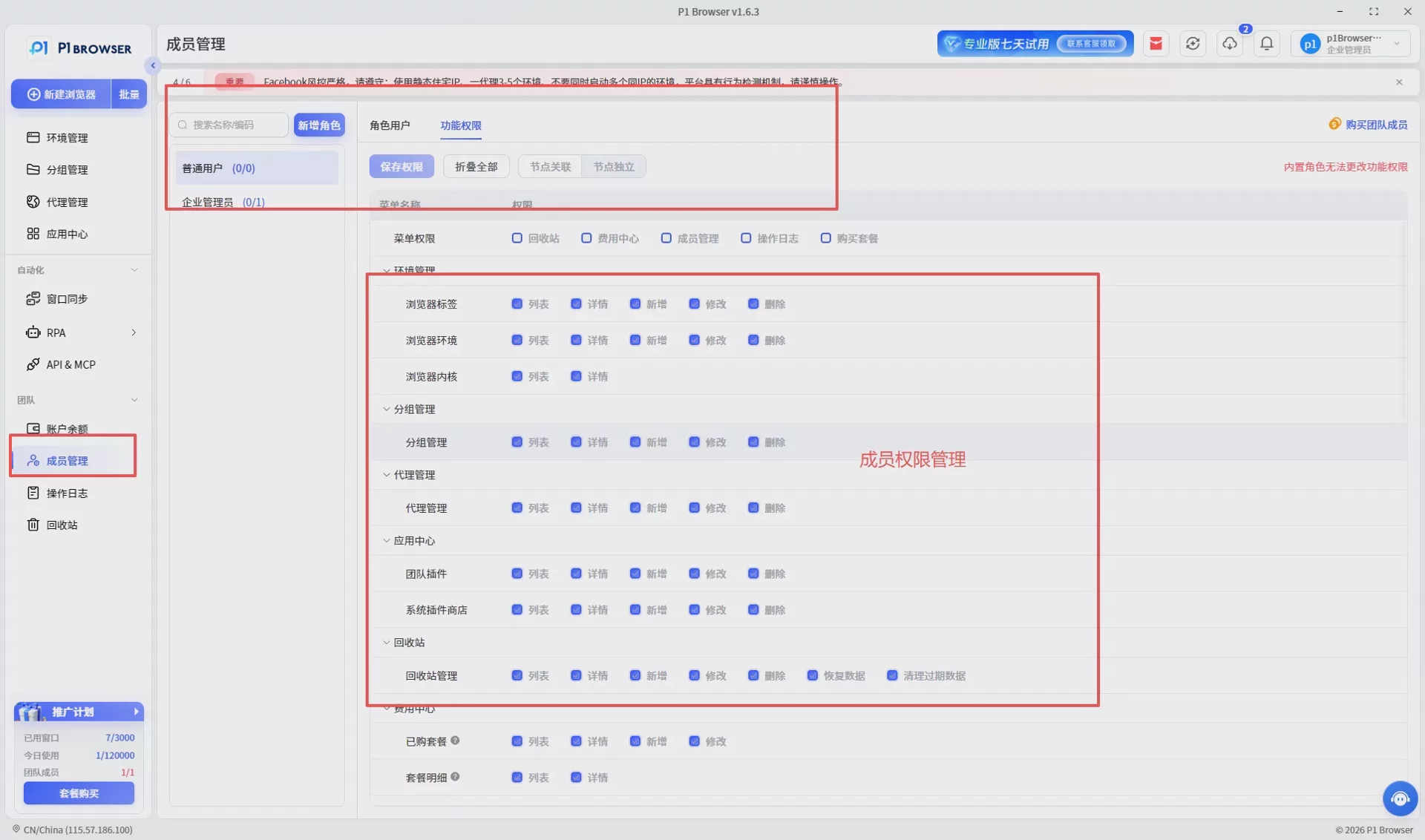
As the team grows, not everyone should have access to all accounts.
Proper permission management can reduce risks.
For example: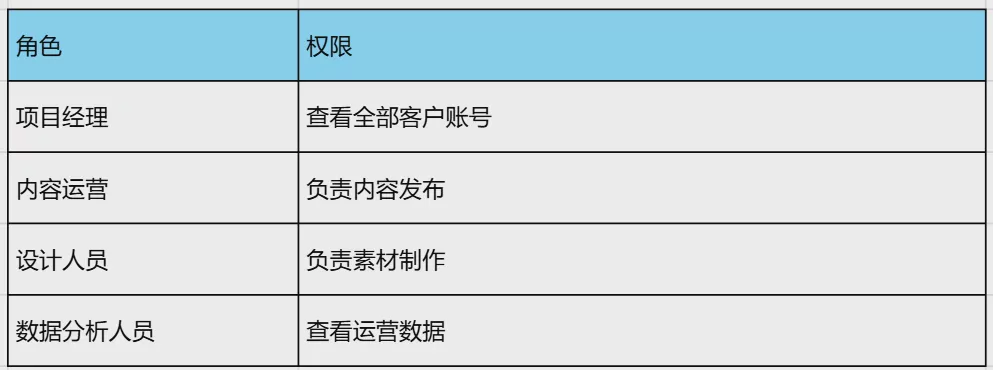
This approach can reduce operational errors while making it easier for the team to scale.
Fifth step: Establish a review mechanism
For agencies, publishing incorrect content can directly affect client relationships.
Therefore, it is recommended to establish a publishing review process.
For example:
- The operations staff creates the content.
- The project manager reviews it.
- The client confirms it.
- It is officially published.
A review process is especially important when working in industries such as finance, healthcare, beauty, and e-commerce.
How can you manage multiple platforms such as Instagram, TikTok, Facebook, and X at the same time?
Today, most brands adopt a multi-platform marketing strategy.
However, different platforms operate according to completely different principles.
Key Instagram Management Priorities
- Maintain visual consistency.
- Optimize Reels videos.
- Increase user engagement.
- Maintain the brand image.
Key TikTok Management Priorities
- Test content quickly.
- Focus on trending topics.
- Increase video completion rates.
- Continuously optimize scripts.
Key Facebook Management Priorities
- Manage page permissions.
- Maintain community engagement.
- Coordinate with advertising campaigns.
- Analyze user data.
Key Focus Areas for X (Twitter) Management
- Respond quickly to trending topics.
- Participate in industry discussions.
- Increase brand exposure.
- Maintain user relationships.
Although operating methods differ across platforms, the logic of account management is consistent:
This is the core principle for professional social media teams to improve efficiency.
VII. How to Avoid Confusion Between Different Client Accounts?
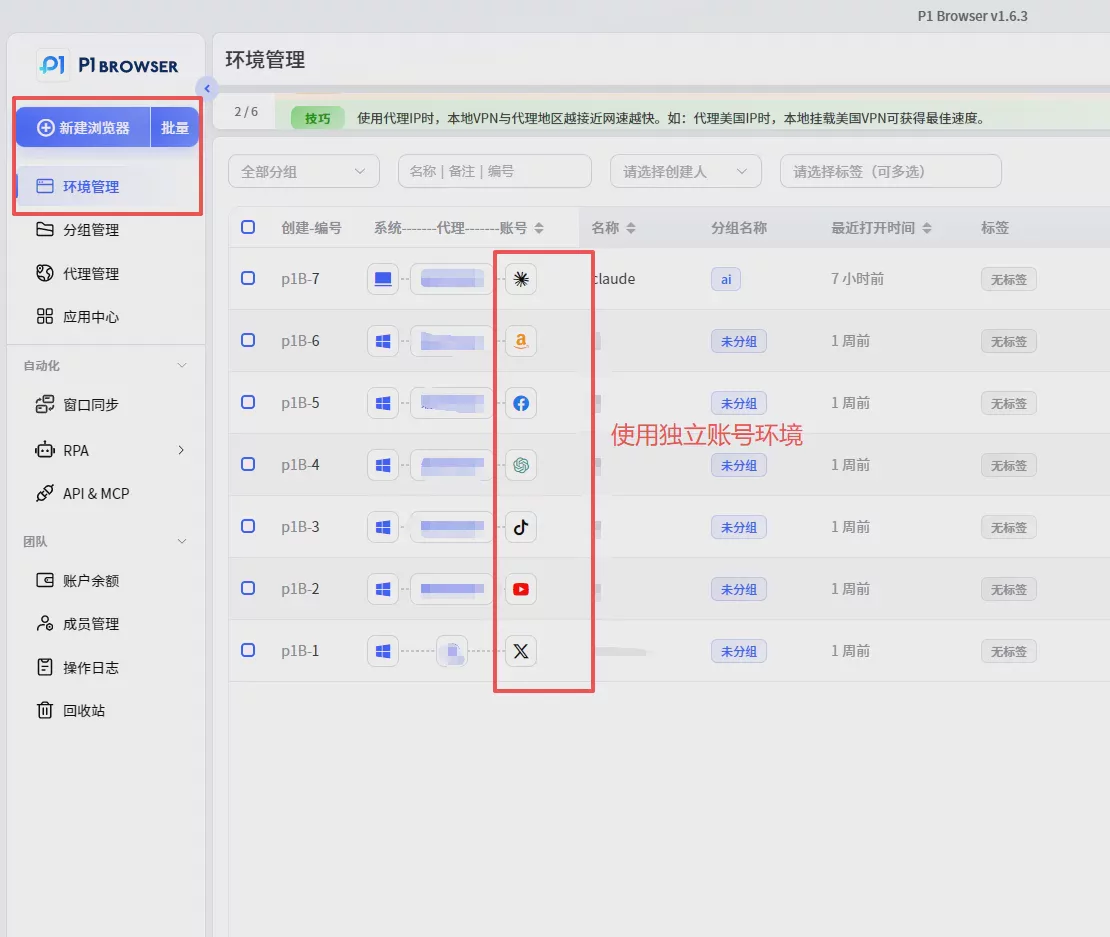
When managing multiple clients, the most important thing is to prevent accounts from affecting one another.
The following methods are recommended:
1. Use Separate Account Environments
Each client account should have its own management environment to prevent multiple projects from being mixed together.
2. Establish Clear Naming Rules
For example:
ClientA_Instagram_US
ClientA_TikTok_Main
ClientB_Facebook_AD
Consistent naming can greatly improve the team's efficiency in locating accounts.
3. Regularly Check Account Statuses
It is recommended to regularly check:
- Login status.
- Permission changes.
- Account security alerts.
- Content publishing status.
Eight. Why Do Social Media Teams Need to Establish Independent Account Environments?
As the number of clients continues to grow, traditional account management methods gradually reveal efficiency issues.
Many teams initially use the following methods:
- Recording account information in Excel.
- Saving links in browser bookmarks.
- Sharing account passwords among employees.
- Logging multiple accounts into the same browser.
This approach can work when the number of accounts is small, but as the business expands, more and more problems arise.
1. Different clients’ browsing data can easily become mixed together
Regular browsers store a large amount of local data, such as:
- Cookies.
- Cached files.
- Website storage data.
- Browsing history.
- Extension data.
If multiple client accounts use the same browsing environment over an extended period, management will become increasingly complicated.
For example, if an operations specialist is responsible for Client A in the morning and Client B in the afternoon, operating all accounts in the same environment requires frequent switching between login sessions.
2. Reduced team collaboration efficiency
As a social media team grows, account management becomes more than just a login issue—it also becomes a collaboration issue.
The team needs to clarify:
- Which team member is responsible for which account.
- Which project corresponds to which environment.
- Which personnel have operational permissions.
- How account handovers are completed.
Without clear account and environment segmentation, managing new hires or employee departures becomes more difficult.
3. Operating multiple projects simultaneously becomes more difficult
Social media agencies typically serve multiple clients at the same time.
For example: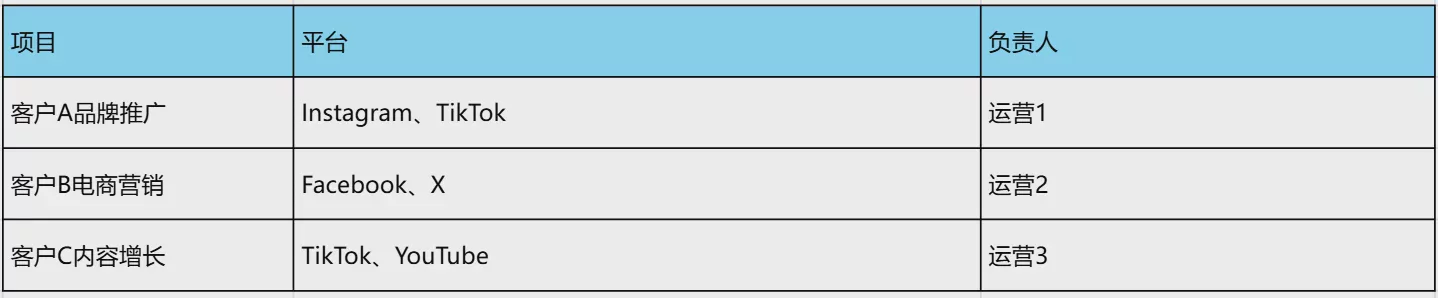
Without independent environment management, every project switch increases operational costs.
How to Establish a Professional Social Media Account Isolation System?
A mature multi-client operations team typically establishes the following account management system:
First tier: Client categorization
First, organize projects by client.
客户A
客户B
客户C
Each client has an independent operations workspace.
Second tier: Platform categorization
Within each client, categorize accounts by platform:
客户A
 ├── Instagram
 ├── TikTok
 ├── Facebook
 └── X
This allows target accounts to be located quickly.
Third tier: Member permission management
Assign permissions based on roles:
- The project lead manages the overall account portfolio.
- Content team members are responsible for publishing.
- Designers upload assets.
- Analysts review the data.
This tiered management approach allows the team to maintain stable efficiency even after scaling up.
How does the P1 fingerprint browser help manage multiple clients' social media accounts?
For individual users who manage only a few accounts, a regular browser may already be sufficient.
However, when a social media agency needs to manage dozens or more client accounts simultaneously, a more professional approach to account environment management is required.
The P1 fingerprint browser primarily helps teams address the following:
- Categorized management of multiple account environments.
- Team member collaboration.
- Independent operation of different projects.
- Reducing repetitive login operations.
Create an independent browser environment for each client
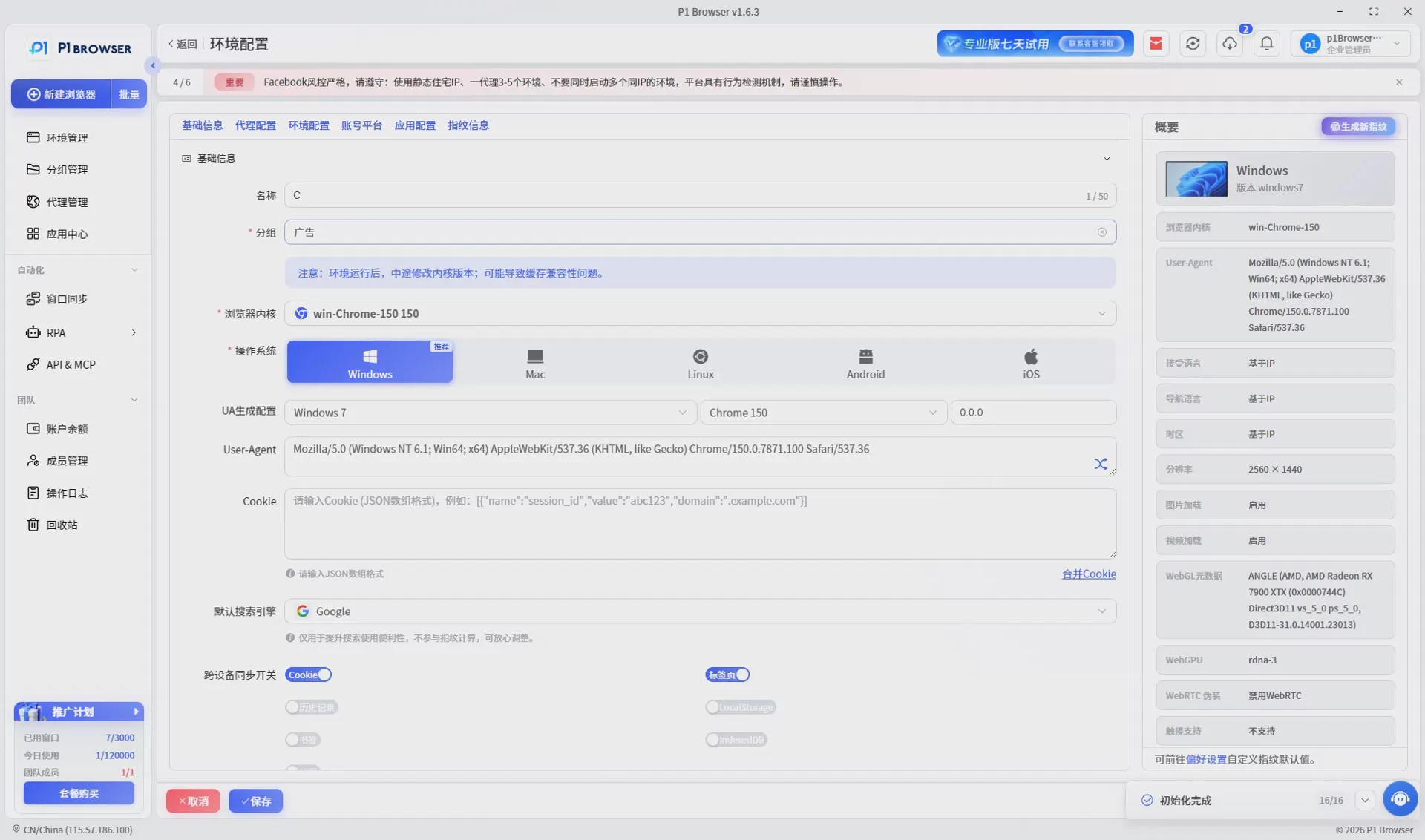
In P1, teams can create separate browser environments for different clients.
For example: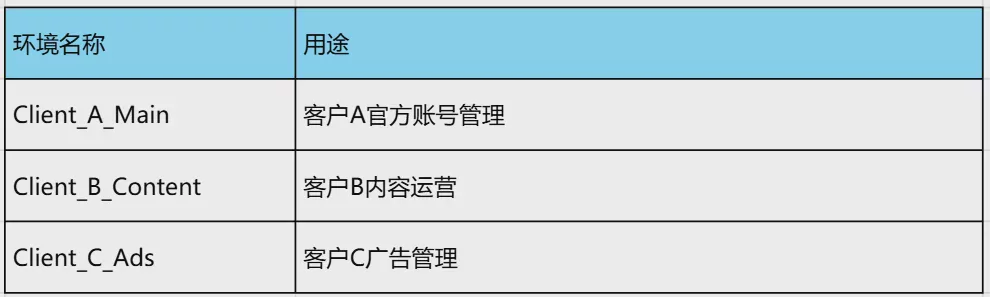
Team members can quickly access the corresponding environment based on the project, without having to repeatedly search for account information every day.
Helping Teams Manage Large Numbers of Social Media Accounts
As the number of clients grows, the biggest challenge is not creating accounts, but managing them over the long term.
P1 can help teams establish a clearer way to organize accounts, such as:
- By client.
- By country.
- By business.
- Organized by person in charge.
This approach is particularly suitable for:
- Social media marketing agencies.
- Cross-border e-commerce teams.
- Advertising teams.
- Overseas brand operations teams.
Improve team collaboration efficiency
When multiple people collaborate, a clear account management approach is essential.
For example:
- Operations staff handle daily publishing.
- The person in charge reviews the content.
- The account manager aligns requirements.
- Data personnel analyze the results.
With more standardized workflows, the team can reduce communication costs and improve overall efficiency.
Best Practices for Social Media Team Management of Multiple Client Accounts
1. Do Not Rely Solely on Human Memory
As the number of accounts increases, any management approach that relies on individual memory will encounter problems.
It is recommended to establish:
- An account database.
- A client information table.
- A content calendar.
- A task management process.
2. Regularly Organize Inactive Accounts
During long-term operations, a large number of test or abandoned accounts will be created.
It is recommended to check and organize them regularly to keep the account system clear.
3. Establish an account handover process
Staff changes are an inevitable part of team growth.
Establishing a handover process in advance can prevent personnel changes from affecting customer business.
4. Continuously optimize your content strategy
Account management is only the foundation.
The ultimate goal remains to achieve growth through high-quality content.
It is recommended to continuously analyze:
- User engagement.
- Content performance.
- Follower growth.
- Conversion results.
Twelve. Common Mistakes in Managing Social Media Accounts for Multiple Clients
Although more and more businesses are beginning to recognize the importance of social media operations, there are still some common problems when managing multiple client accounts in practice.
Understanding these mistakes in advance can help teams reduce unnecessary risks.
Mistake 1: Using the Same Operating Approach for All Clients
Different clients have different target audiences, industry characteristics, and brand positioning.
If all accounts use the same content strategy, it is difficult to achieve ideal results.
The correct approach should be:
- Develop content directions based on the client's industry.
- Adjust publishing times according to the target market.
- Optimize content based on user feedback.
Mistake 2: Failing to Manage Account Information Centrally
Many small teams rely on individuals to store account information.
This approach carries significant risks:
- Employee turnover can make account handovers difficult.
- Account passwords can easily be lost.
- The team may be unable to quickly find the relevant account.
As the number of clients increases, establishing a unified account management system becomes very important.
Mistake 3: No clearly designated account owner
When multiple people are responsible for an account but no clear owner is designated, the following problems can easily occur:
- Content may be published repeatedly.
- Client needs may be overlooked.
- Communication problems may arise.
It is recommended that each account have a clearly designated owner, along with an established review process.
Mistake 4: Ignoring data analysis
Many teams focus only on publishing content while overlooking subsequent data analysis.
Effective social media operations require continuous attention to:
- Content engagement rate.
- User growth.
- Video completion rate.
- Website traffic data.
- Conversion performance.
Only through continuous review can you optimize strategies for the next phase.
How to Choose a Multi-Account Management Tool for Your Social Media Team?
As the business grows, many teams choose professional tools to help manage multiple accounts.
When choosing a tool, you can focus on the following aspects:
1. Whether it supports multiple independent workspaces
A professional multi-account management tool should help teams distinguish between different project environments.
For example:
- Client A environment.
- Client B environment.
- Testing environment.
- Advertising operations environment.
This can reduce confusion in account management.
2. Does it support team collaboration?
For agencies, a tool designed for one person cannot meet the needs of a team.
You should look at:
- Member management.
- Permission allocation.
- Environment sharing.
- Project categorization.
3. Whether it is suitable for long-term expansion
Excellent tools not only solve current problems but also need to support future growth.
For example:
- Managing 10 accounts today.
- Expanding to 100 accounts in the future.
- Adding more team members.
The tool's scalability is very important.
Which social media operations scenarios is the P1 fingerprint browser suitable for?
The P1 fingerprint browser is primarily suitable for teams that need to manage multiple online accounts.
Common application scenarios include: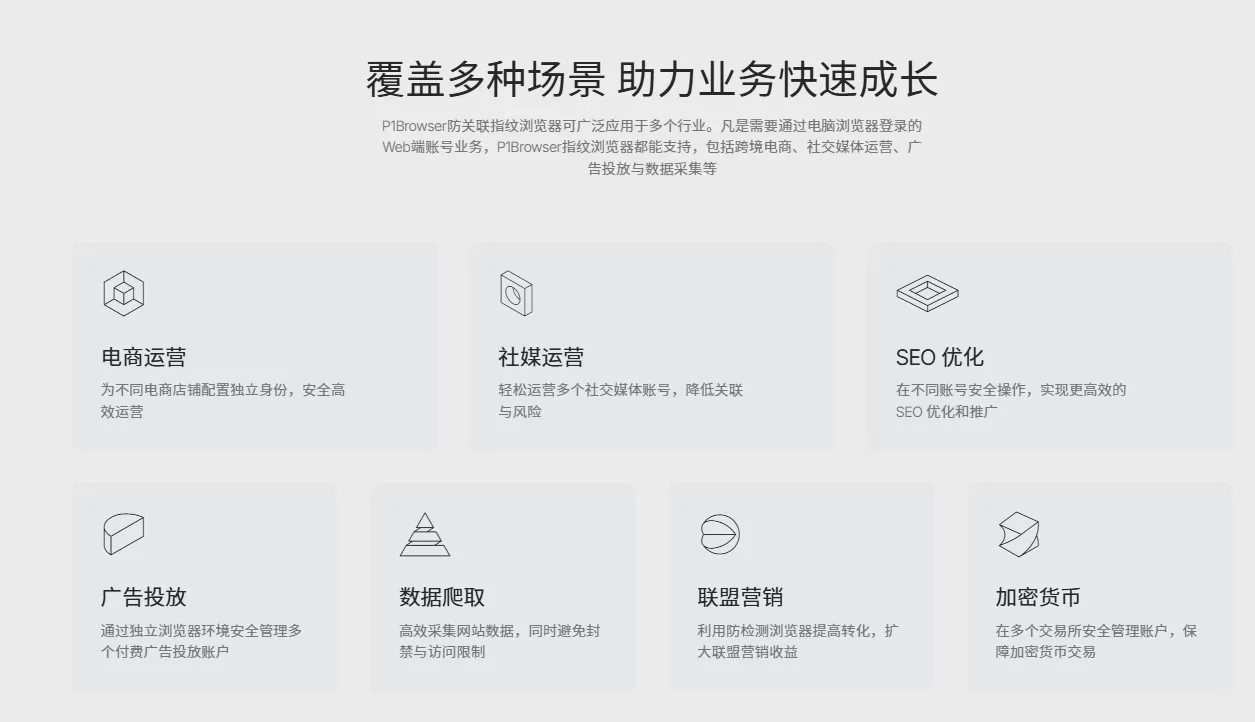
For teams that need to manage a large number of accounts over the long term, establishing a clear approach to browser environment management can effectively improve operational efficiency.
FAQ: Frequently Asked Questions About Managing Multiple Clients’ Social Media Accounts
Q1: What is the most important aspect of managing multiple clients’ social media accounts?
The most important aspect is establishing standardized management processes, including account categorization, permission management, content review, and data analysis.
Q2: How many social media accounts can one person manage?
There is no fixed number. It mainly depends on the account types, content complexity, and operational processes. With the right tools and processes, a team can manage more accounts.
Q3: Can multiple client accounts use the same browser?
This is possible when managing a small number of accounts, but as the number of accounts increases, it is recommended to adopt a clearer account environment management approach to improve team efficiency.
Q4: Why do social media agencies need to categorize accounts?
Account categorization helps teams quickly locate projects, reduce operational errors, and facilitate collaboration among team members.
Q5: How can you prevent employee departures from affecting customer accounts?
It is recommended to establish an access management system that does not rely on individuals to store account information, while also creating a standardized handover process.
Q6: Can Instagram, TikTok, and Facebook be managed together?
Yes. Many brands and agencies operate multiple social media platforms simultaneously, managing accounts across different platforms through unified processes.
Q7: What account information does a social media team need to record?
This usually includes the account name, platform, person responsible, content direction, login information management method, and operating status.
Q8: Why are regular browsers unsuitable for managing a large number of accounts?
Regular browsers are primarily designed for personal use and have limited capabilities when it comes to managing large numbers of accounts, multi-member collaboration, and project management.
Q9: Does multi-account operation require switching logins every day?
Without an independent management environment, frequent switching is usually required. A more efficient account management approach can reduce repetitive operations.
Q10: Can the P1 fingerprint browser be used for social media operations?
Yes. P1 is suitable for operational scenarios that require managing multiple online accounts, such as social media operations, cross-border e-commerce, and advertising marketing.
Q11: Is a multi-account management tool suitable for small teams?
If a team manages only a small number of accounts, conventional methods may already be sufficient. However, as the business grows, professional management tools can help improve efficiency.
Q12: What are the advantages of building a social media account matrix?
An account matrix can reach a broader range of users, increase brand exposure, and reduce the operational risks associated with relying on a single account.
Summary: Establishing systematic processes is the key to efficiently managing multiple client accounts
The real challenge in managing multiple clients’ social media accounts is not creating more accounts, but operating them efficiently, consistently, and sustainably over the long term.
Professional social media teams need to establish:
- A clear account classification system.
- Standardized content production processes.
- Appropriate team permission management.
- A comprehensive data analysis mechanism.
- A stable account management environment.
As the number of accounts continues to grow, relying on manual record-keeping and standard browsers is no longer sufficient for team needs.
With more professional management methods, teams can reduce operational complexity, improve collaboration efficiency, and support continued business expansion.
P1 fingerprint browser is committed to helping teams that need to manage multiple online accounts create a clearer, more efficient browsing environment, making multi-account operations simpler.

