



In today’s rapidly evolving X (formerly Twitter) landscape, a vast amount of posts, news, discussions, and business information is generated every day. For cross-border e-commerce sellers, brand operators, and community marketing professionals, quickly finding valuable content has become an essential skill for improving work efficiency.
When using X, many people simply enter basic keywords into the search bar, which often returns a large amount of irrelevant information. In fact, X’s built-in advanced search feature (Twitter Advanced Search) can precisely locate target content using criteria such as keywords, time, accounts, and engagement data.
This article provides a comprehensive overview of how to use X Advanced Search in 2026 and shares how to use search techniques to find market information, analyze competitors, discover trending topics, and manage multiple community accounts with P1 Browser to improve overseas marketing efficiency.
What Is Twitter Advanced Search (X Advanced Search)?
Twitter Advanced Search is an advanced search tool provided by the X platform that allows users to set more detailed search criteria instead of relying solely on a single keyword to find content.
Compared with regular search, advanced search can help users filter:
- Content posted by specific accounts
- Posts containing specified keywords
- Discussions within a specific date range
- Popular posts with high engagement
- Content related to a specific language or region
For businesses and marketers, this means being able to find potential customer needs, industry trends, and competing brand activity more quickly.
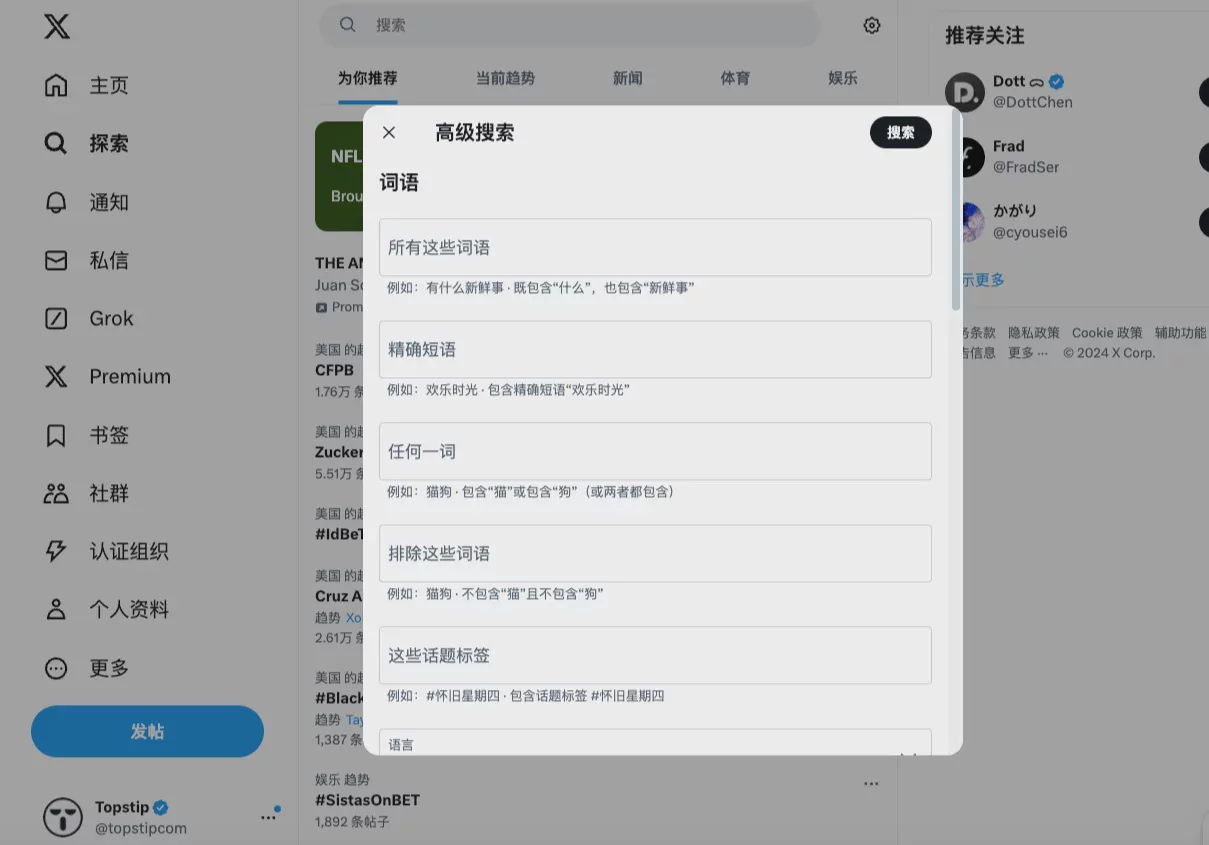
How to enable X (Twitter) Advanced Search?
Currently, X Advanced Search is primarily available through the web version. Here’s how to use it:
- Log in to your X account
- Enter any keyword in the search bar
- Go to the search results page
- Click the advanced search option next to the search bar
- Set your desired filters
If you cannot find the advanced search option, you can also use search commands directly to filter results.
Complete Guide to Common Twitter Advanced Search Commands
X Search supports a variety of search syntax, and familiarizing yourself with these commands can greatly improve search efficiency.
1. Search for specific keywords
For example, if you want to view all discussions about 「antidetect browser」:
antidetect browser
The system will display relevant posts containing the keyword.
2. Search content from a specific account
If you want to view content published by a particular brand or competitor, you can use:
from:账号名称
For example:
from:P1_Browser
You can quickly view the specified account’s historical posts.
3. Search for content mentioning a specific account
to:账号名称
This feature is suitable for brand monitoring and allows you to view interactions between other users and a specific brand.
4. Search by time range
If you want to view discussions from a specific period, you can use:
since:2026-01-01 until:2026-03-01
For example, when analyzing market reactions during a product launch, you can use date restrictions to quickly organize the information.
5. Find popular posts with high engagement
X can filter popular content through engagement data:
min_faves:100
This represents a search for posts that have received at least 100 likes.
Other common conditions:
- min_retweets: minimum number of reposts
- min_replies: minimum number of replies
Using Twitter Advanced Search for market research
For cross-border e-commerce businesses and overseas brands, X is not just a social platform but also an important source of market intelligence.
With Advanced Search, you can quickly learn:
- What products consumers are discussing
- Which campaigns are popular among competing brands
- What new trends are emerging in the market
- What complaints users have about products
For example, a brand that sells outdoor products can search for:
"camping gear" min_faves:50
Review recent popular discussions to understand the features and needs consumers truly care about.
Use Twitter Search to analyze competitors
Competitor analysis is an important part of overseas marketing. With X Advanced Search, you can track competing brands:
- Brand posting frequency
- Popular content types
- User responses
- Fan engagement methods
For example:
from:competitor brand
Review content previously posted by competitors, then analyze which posts received higher engagement.
Using Twitter Advanced Search in community marketing
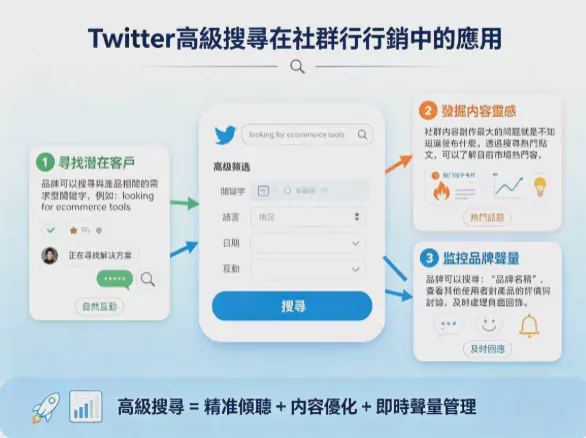
1. Find potential customers
Brands can search for need-based keywords related to their products, such as:
looking for ecommerce tools
Find users who are looking for solutions and engage with them naturally.
2. Discover content inspiration
The biggest challenge in creating community content is not knowing what to post.
By searching for popular posts, brands can understand the topics currently trending in the market and create content that better meets audience needs.
3. Monitor brand mentions
Brands can be searched for:
"品牌名称"
View other users’ reviews and discussions about the product, and promptly address negative feedback.
How can multi-account operations be combined with P1 Browser to improve efficiency?
For cross-border e-commerce, affiliate marketing, and overseas community teams, it is often necessary to manage multiple X accounts simultaneously.
However, operating multiple accounts can easily lead to issues such as a chaotic browser environment and mixed-up account data.
P1 Browser is an anti-association browser specifically designed for multi-account management. It can create independent browsing environments, allowing different accounts to have their own Cookies, browsing data, and browser fingerprint settings.
Combined with X Advanced Search, teams can:
- Manage community accounts in different markets
- Track information related to different brands
- Create an independent operating environment
- Improve the efficiency of team collaboration
Things to Note When Using Twitter Advanced Search
Avoid overly broad keywords
If the search term is too simple, such as 「marketing」, it may produce a large amount of irrelevant content.
It is recommended to add more filters, such as time, accounts, or engagement data, to improve search accuracy.
Organize your search strategy regularly
Market trends can change rapidly, and repeatedly searching for the same keywords may cause you to miss new opportunities.
It is recommended to continuously adjust your search approach based on your products, market, and target audience.
Conclusion: Master X Advanced Search to Enhance Your Competitiveness in Overseas Communities
Twitter Advanced Search is not only a tool for finding information but also a method for market analysis and community operations.
Whether you are a cross-border e-commerce seller, a brand marketer, or an overseas community management team, you can use precise searches to quickly obtain market intelligence and improve your content strategy and operational efficiency.
As the number of X accounts increases, combining P1 Browser to create a secure, independent account management environment can make multi-account operations more stable and efficient.
In the highly competitive overseas market, making good use of tools and data analysis capabilities will become an important advantage for long-term brand growth.

