



Have you ever encountered a situation like this:
An X (Twitter) account that has been operated for several months used to have normal interactions every day, but suddenly one day, post impressions dropped significantly, your content could not be found in search, and replies and interactions became fewer and fewer.
The account was not banned, and no clear violation notice was received, but the traffic seemed to have “disappeared.”
When many social media operators encounter this situation, their first reaction is:
Has my account been Shadowbanned (shadow-restricted)?
In fact, a decline in X account exposure may come from multiple factors, including content quality, account behavior, network environment, and how the account is operated, among others.
Especially for marketing teams that need to manage multiple X accounts at the same time, account restriction issues are often not just content issues, but are also closely related to the account's long-term operating environment.
If multiple accounts are managed on the same device, in the same browser environment, or in similar network environments for a long time, it may increase the difficulty of account management.
So why do X accounts get restricted? How should multi-account operations reduce account risk?
This article will analyze this from a practical operations perspective.
What is X Shadowban? Why does an account suddenly get no exposure?
Shadowban is usually used to describe a state in which an account's content exposure is restricted.
In this case, the account can still post content normally and, unlike a banned account, can still log in, but the content may not receive normal visibility.
For example:
- Engagement drops significantly after posting content
- Other users have difficulty finding your posts through search
- Lower exposure for reply content
- Account growth rate suddenly drops
For ordinary users, an occasional drop in exposure does not necessarily mean that the account has a serious problem.
But for businesses and marketing teams that rely on social media for traffic, account stability is very important.
A brand account, an overseas KOL account, or a marketing matrix account—if it suddenly loses exposure, it may directly affect promotional performance and business growth.
Therefore, operations staff need to focus not only on published content but also on the long-term operating environment of accounts.
II. Why are social media matrix accounts more likely to encounter restrictions?
With the development of overseas marketing, more and more companies are beginning to adopt the social media matrix operating model.
For example:
- Operating different X accounts in different countries
- Promoting multiple brand accounts simultaneously
- KOL account matrix management
- Operating advertising test accounts
This approach can help teams cover more markets, but it also increases the complexity of account management.
Many teams simply use regular browsers when initially managing multiple accounts.
For example:
Open the Chrome browser and log in to account A; after logging out, log in to account B; then continue by switching to account C.
This method may seem simple, but multiple accounts may actually share the same browser environment.
Including:
- Cookie data
- Browser cache
- Device information
- Browser parameters
Over time, the management boundaries between different accounts will become increasingly blurred.
For teams that need to operate multiple accounts over the long term, establishing independent account operating environments is more important than simply increasing the number of accounts.
Third, what account environment factors does X platform usually focus on?
Many operations staff believe that as long as the account emails and passwords are different, multiple accounts are completely independent.
In practice, an account environment is usually made up of multiple factors.
1. Network Environment
The network environment is one of the important pieces of information when an account accesses a platform.
For example:
- IP address
- Network source
- Access region
If multiple accounts use the same network environment for access over a long period, they may exhibit similar access characteristics.
2. Browser Fingerprint Environment
When a browser accesses a website, it generates a large amount of environmental information.
For example:
- User-Agent
- Canvas Information
- WebGL Parameters
- Font Environment
- Screen Information
Together, this information forms a browser fingerprint.
If multiple accounts run in exactly the same browser environment for a long time, account management difficulty will also increase accordingly.
3. User Operation Behavior
In addition to the technical environment, account behavior is equally important.
For example:
- A large number of repeated operations in a short time
- Frequently switching login environments
- Abnormal operation frequency
Maintaining a natural and stable operating rhythm is an important foundation for long-term account management.
Fourth, after discovering an account anomaly, how should you troubleshoot the issue?
When an X account experiences declining impressions, reduced engagement, or functional issues, it is not advisable to directly re-register the account.
A more reasonable approach is to first analyze the source of the problem.
Check the account's recent behavior
Review whether any of the following has occurred recently:
- A large number of repetitive interactions
- Frequent changes to account information
- A large number of actions in a short period of time
Check for changes in the login environment
If the account has frequently changed recently:
- Devices
- Browser
- Network environment
also need to be a key focus.
Review multi-account management methods
If a team manages multiple X accounts at the same time, the following needs to be confirmed:
- Whether multiple accounts share a browser
- Whether Cookie data is shared
- Whether the same operating environment is used
Many account issues are not caused by a single account; rather, they accumulate from long-term management practices.
V. How to Build a Stable Operating Environment for Multiple X Accounts?
For social media teams, stably operating multiple X accounts requires establishing a clearer account management system.
A more reasonable approach is to give each account an independent operating environment.
For example:
X账号A ↓ 独立浏览器环境A ↓ 对应网络环境X账号B ↓ 独立浏览器环境B ↓ 对应网络环境
This way, each account has an independent data space, and you do not need to repeatedly switch within the same browser.
Compared with traditional browser management methods, independent environments are better suited for:
- Overseas brand matrix operations
- KOL account management
- Social media marketing team collaboration
- Multi-market account operations
Six. How does P1 Fingerprint Browser help manage multiple X accounts?
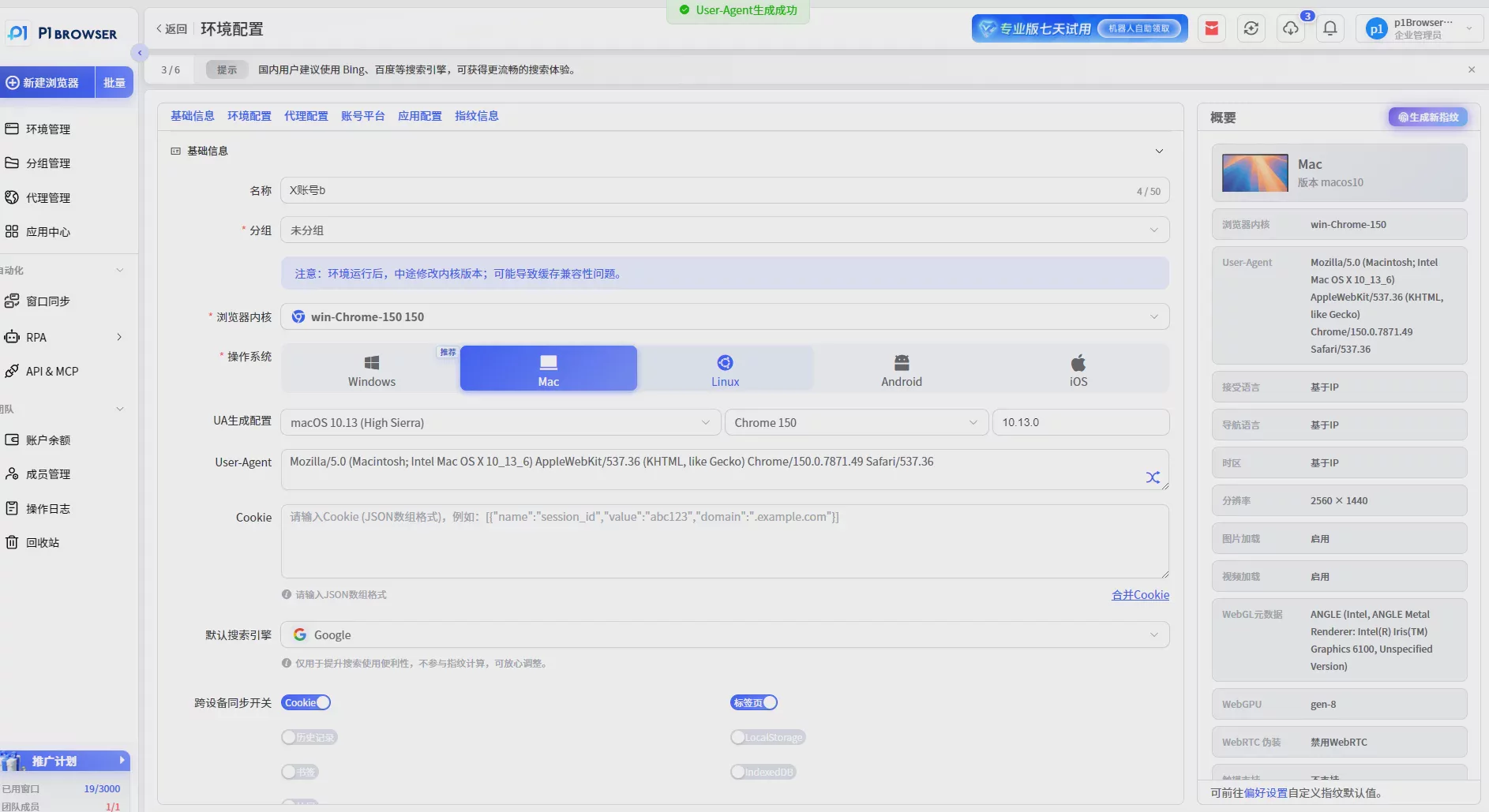
P1 Fingerprint Browser uses browser environment isolation technology to help users create multiple independent browser environments.
Each environment can correspond to an independent X account.
Different environments can be managed separately:
- Browser fingerprint
- Cookie data
- Login status
- Browser configuration
- Proxy network settings
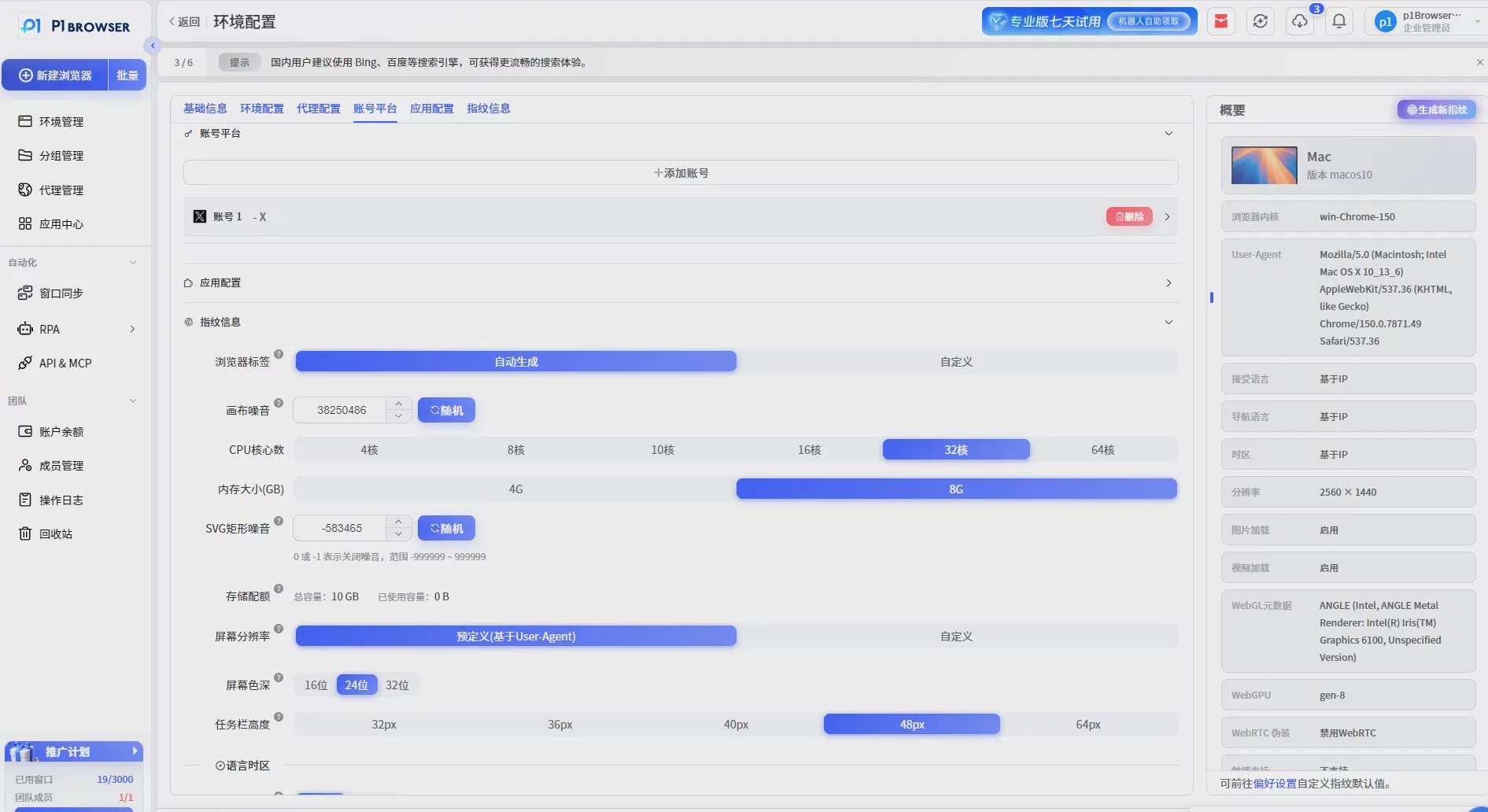
For example, when an overseas marketing team needs to operate multiple X accounts, it can create corresponding environments for different accounts.
After operations staff enter the designated environment, they only need to manage the corresponding account and do not need to frequently switch browser configurations.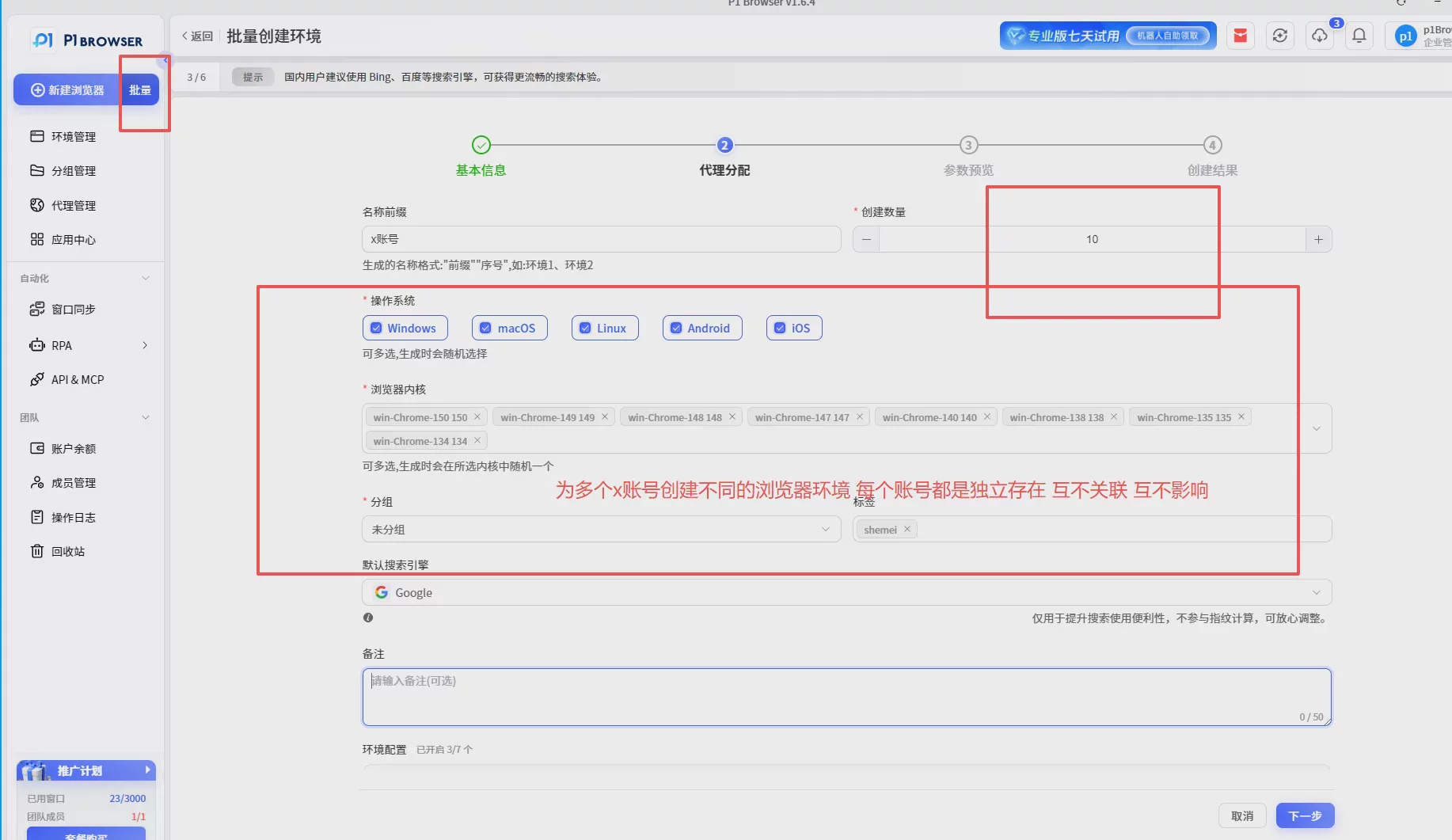
What X account operation scenarios is P1 suitable for?
1. Overseas brand matrix accounts
Create multiple brand accounts for different countries and different markets, and manage operations for each separately.
2. KOL and content marketing accounts
Help teams manage multiple content accounts, making it easier to test feedback from different markets.
3. Social media marketing teams
When multiple people collaborate on operations, a clearer approach to managing the account environment can be established.
VII. Conclusion: A stable environment is the foundation for long-term operations
The core of X account operations is not just publishing more content, but building a long-term, stable operations system.
For teams that need to manage multiple social media accounts, they need to focus on both:
- Content quality
- Account behavior
- Network environment
- Browser runtime environment
P1 fingerprint browser uses environment isolation technology to help social media operations teams manage multiple account environments more efficiently and improve account management efficiency.
Whether it's X, Facebook, Instagram, or TikTok and other overseas social media platforms, establishing a stable and clear account operating environment is an important foundation for long-term operations.

