



Does Viewing a TikTok Story Leave a Record?
TikTok has become one of the most popular short-form video platforms worldwide. In addition to watching short videos, users browse popular videos and follow the latest trends on TikTok every day.
In addition to short videos, TikTok Stories are also an important tool for many creators and brands conducting content marketing. However, in some cases, users may want to reduce their own visibility, such as when analyzing competitors' content strategies, researching overseas market trends, learning how brand accounts are operated, or viewing public content without interacting.
So, does viewing a TikTok Story leave a record? Is it possible to view TikTok Stories anonymously? This article will introduce how TikTok Stories are viewed, along with several common privacy-oriented browsing methods, to help you understand the advantages and disadvantages of different options.

The viewing mechanism for TikTok Stories is similar to that of temporary content on other social platforms. When users view a Story through their own TikTok account, the platform may record relevant interaction information according to the account settings and feature rules.
Therefore, if you are conducting competitor analysis, market research, or overseas community operations, directly using your primary account to view content from a large number of different accounts may increase your own exposure.
It is important to note that anonymous viewing does not mean being completely unidentifiable. Modern social platforms typically analyze multiple factors comprehensively, such as account information, device environment, network connection, and usage behavior.
Common Methods for Viewing TikTok Stories Anonymously
Method One: Use Incognito Mode in Your Browser
Incognito mode is one of the simplest ways to protect your privacy.

Mainstream browsers such as Chrome and Edge offer private browsing features that can reduce the amount of browsing history saved on your local device and prevent other users from viewing your browsing history.
However, it is important to note that incognito mode mainly protects privacy on your local device and cannot completely change the information that identifies you online.
For example:
- IP address
- Browser environment
- Device information
- Language and system settings
This information may still be identified by websites.
Therefore, incognito mode is suitable for everyday browsing privacy, but it is not sufficient on its own when managing a large number of accounts or conducting professional community operations.
Method Two: Use a VPN to change the network environment
A VPN can change the IP address used when accessing websites, allowing websites to see a different network exit point.
For example:
Original network environment: Local IP → TikTok
Using a VPN: IP address from another region → TikTok
For overseas market research, viewing content from different regions, or testing regional trends, a VPN can provide some assistance.
However, a VPN mainly addresses issues at the network layer.
If you continue to use the same TikTok account, the same device, and the same browser environment, the platform may still identify the connection between the accounts through other information.
Therefore, a VPN cannot completely replace an isolated browsing environment.
Method Three: Use separate browser profiles
Many users use Chrome Profiles to manage different accounts.
Different Profiles can isolate cookies, login states, and some browsing data, allowing multiple accounts to avoid sharing the same browser space.
For example:
- Profile A: Personal TikTok account
- Profile B: Brand operations account
- Profile C: Market research account
This approach is more convenient than switching between multiple accounts in the same browser, and it can also reduce the chances of data from different accounts becoming mixed together.
However, standard browser Profiles still share some aspects of the device environment, such as system information and browser characteristics. Therefore, for teams that need to manage a large number of TikTok accounts, the level of isolation is still limited.
Method Four: Use an Anti-detect Browser (an anti-association browser)
For cross-border e-commerce businesses, international marketing teams, and community media operators, an Anti-detect Browser is a more professional account management solution.
The core function of an Anti-detect Browser is to create isolated browser environments, allowing different accounts to run in independent Profiles.
Each browser Profile can have its own Cookies, browsing data, device environment configuration, and account management space.
Compared with regular browsers, it is more suitable for the following use cases:
- Managing multiple TikTok accounts
- Operating overseas social media matrices
- Conducting market competitor analysis
- Managing business accounts in different regions
For example, a cross-border e-commerce team can create independent environments based on different markets:
- TikTok accounts for the US market
- TikTok accounts for the European market
- TikTok accounts for the Southeast Asian market
Using different browsing environments for different business operations can improve account management efficiency and also facilitate team collaboration.
How to use P1Browser to manage multiple TikTok accounts?
If you need to operate TikTok accounts over the long term or manage multiple international community accounts, you can create separate browser environments through P1Browser.
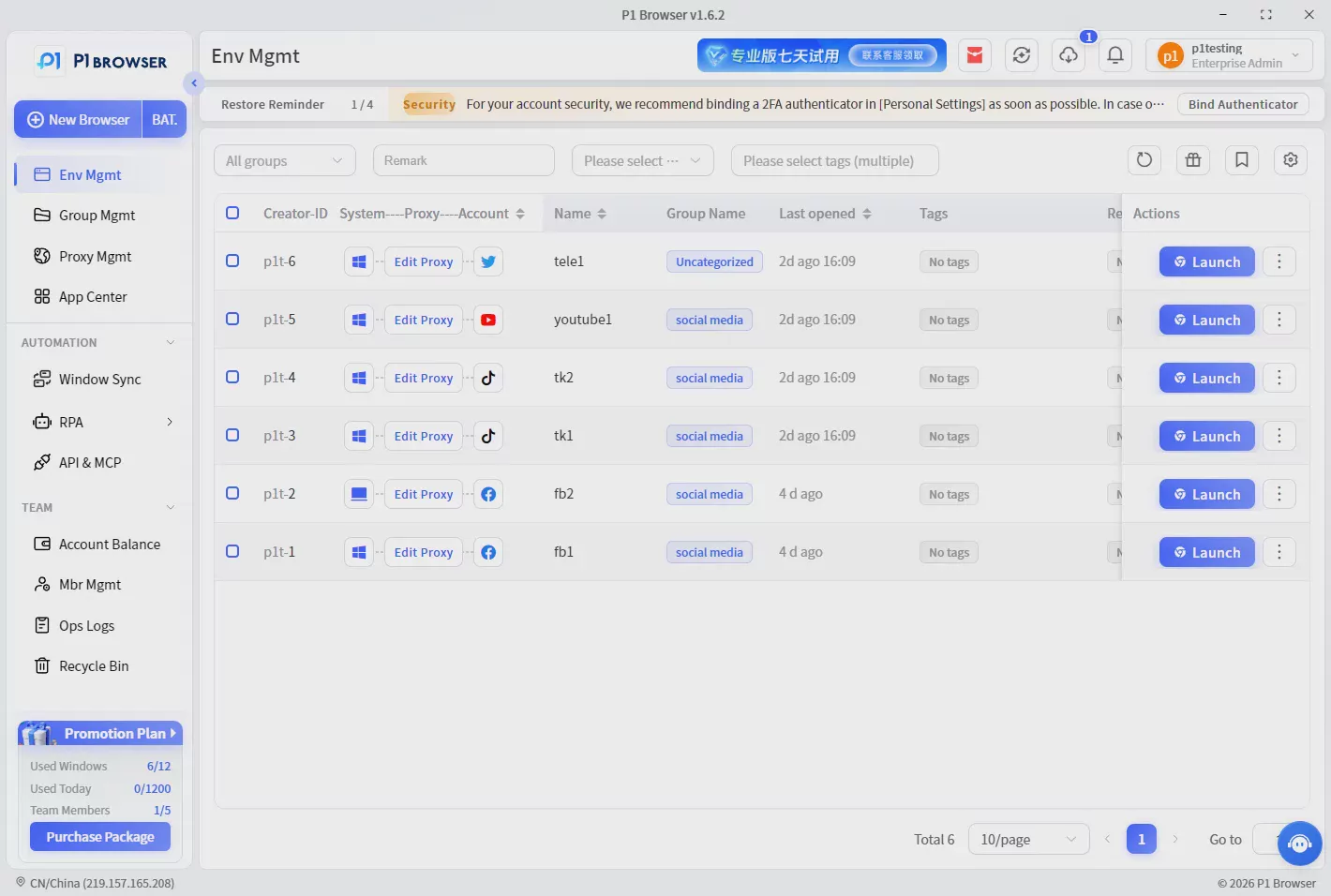
The basic process is as follows:
First step: Create a separate browser Profile
Create different browser environments based on different business needs, such as:
- TikTok US Account
- TikTok Marketing Account
- TikTok Shop Account
Each Profile can independently save its own account data and browser environment.
Second step: Configure the browser environment
Manage Cookies, browser fingerprint settings, and the network environment according to account requirements, allowing different accounts to run in different Profiles.
Step Three: Manage Different Accounts Separately
Avoid having multiple accounts share the same browser environment over an extended period and improve team management efficiency.
Through browser environment isolation technology, P1Browser helps users manage different online accounts more efficiently. It is suitable for cross-border e-commerce, community and social media marketing, and overseas business operations.
Frequently Asked Questions FAQ
1. Can TikTok Stories be viewed anonymously?
Whether viewing a TikTok Story leaves a view record depends on the platform's feature settings and the account status. Currently, there is no method that can guarantee 100% complete anonymity when viewing Stories.
If you want to reduce exposure, you can improve browsing privacy by reducing account interactions and using an isolated browsing environment.
2. Can turning off TikTok Profile View History hide Story views?
Not entirely.
TikTok Profile View History (profile viewing history) and Story views are different features. Turning off one setting does not mean that all viewing activities will leave no information records.
3. Can a VPN make TikTok completely anonymous?
No.
A VPN primarily changes the network connection environment, such as the IP address location. However, account information, the device environment, browser settings, and usage behavior may still affect how the platform identifies you.
4. Is an Anti-detect Browser suitable for ordinary TikTok users?
If you only watch TikTok videos daily or occasionally view Stories, a regular browser is usually sufficient.
However, if you need to manage multiple TikTok accounts, operate a TikTok Shop, conduct overseas marketing, or manage a social media account portfolio, an Anti-detect Browser can provide a more convenient way to manage accounts.
Conclusion
Whether viewing a TikTok Story leaves a record depends on the platform's features, account settings, and how it is used. For ordinary users, there is no need to pay excessive attention to this during daily browsing.
However, for cross-border sellers, overseas marketing teams, and social media operators, effectively managing different account environments has become an important part of improving work efficiency.
Incognito mode can reduce the storage of local browsing records, a VPN can adjust the network environment, and an Anti-detect Browser can help professional users create more independent browsing environments.
Through P1Browser's browser isolation technology, users can more conveniently create different account Profiles, manage multiple online business environments, and improve the efficiency of overseas social media operations.

