


The 2026 Latest P1Browser Fingerprint Browser Anti-Association Guide: Building a Secure Multi-Account System from 0 to 1
Opening: The New Cross-Border Risk-Control Landscape in 2026, Traditional Methods Have Failed
In 2026, the risk-control systems of mainstream platforms such as Amazon, TikTok, and Facebook have upgraded to50 + dimensions of fingerprint recognition + AI behavior modelingstage. Traditional anti-association methods such as “clearing the cache + changing the IP” have a successful identification rate of less than 30%, while the account ban rate has increased by 47% year over year.
Core Highlight: P1Browser’s self-developed sandbox kernel + AI fingerprint biomimetic technology, achievingHardware-level environment isolation + human-like behavior simulationbreaks through platform risk-control logic from the underlying layer, making it an “essential security tool” for cross-border multi-account operations in 2026.
I. A Cognitive Upgrade: The Core Value of the P1Browser Fingerprint Browser (2026 New Interpretation)
1.1 Essential Definition: Not a “Multi-Instance Tool,” but an “Independent Device Simulator”
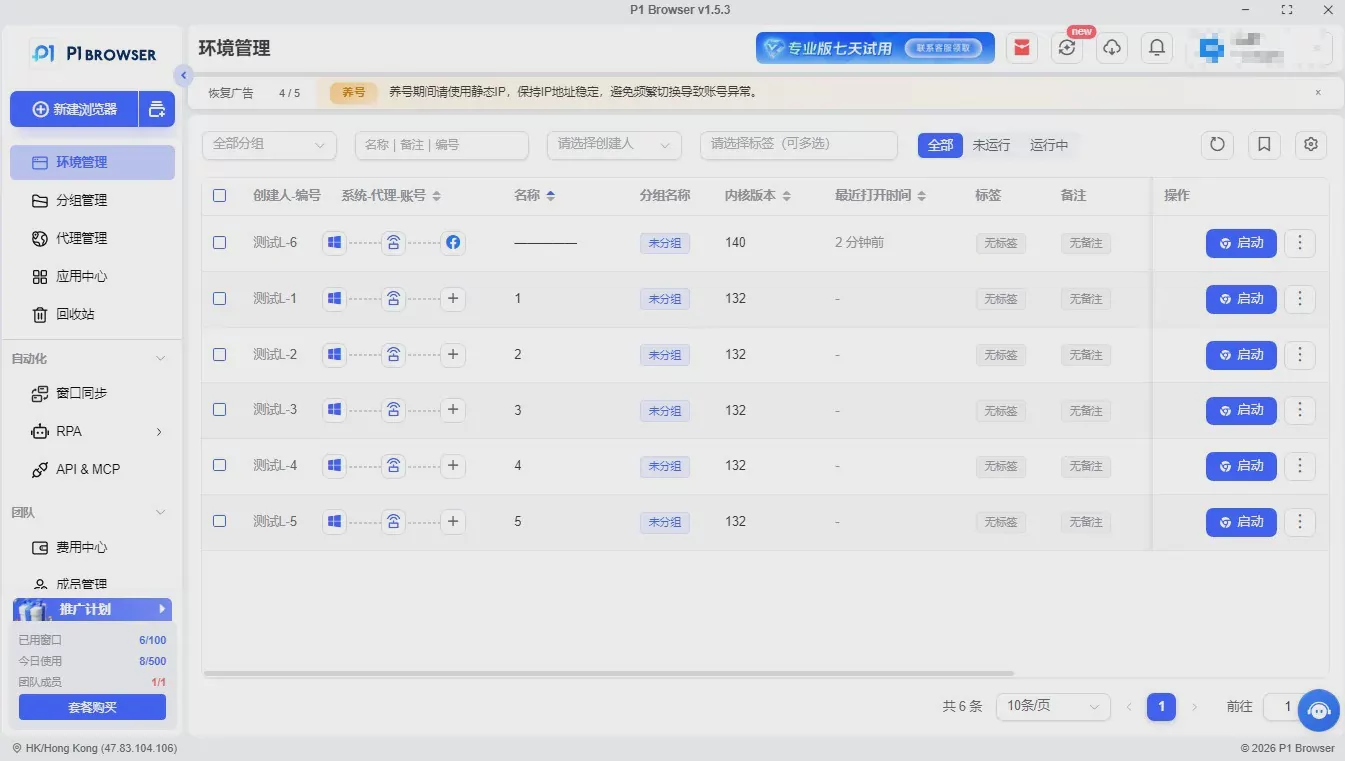
P1Browser usesvirtual sandbox technology, generating N completely isolated virtual browser environments (Profiles) on a single physical device. Each environment has its own independent “device identity,” and is recognized by platforms asreal devices from different regions, of different models, and with different user habitscompletely cutting off account association links.
1.2 Core Advantages in 2026 (Distinguishing It from Ordinary Fingerprint Browsers)
- ✅ Self-developed core engine with anti-penetration protection:Chromium-customized kernel, blocking new risk-control techniques such as WebRTC real IP leaks and Canvas fingerprint penetration.
- ✅ AI fingerprint logic consistency:Rejects “random parameter concatenation” and generates fingerprints that match real device patterns (such as matching a Windows system with the corresponding GPU model), avoiding “parameter contradictions” that trigger risk controls.
- ✅ One-click environment cloning + synchronization:Supports compliant copying of mature account environments and synchronizing fingerprints, IP, and cache configurations, significantly reducing the cost of setting up multiple accounts.
- ✅ Team-level permission control:An RBAC role-based permission system enables permission isolation between “Operations - Customer Service - Finance,” allowing environment permissions to be reclaimed with one click when an employee leaves.
II. Pitfall Avoidance Guide: The 5 Major Anti-Association Mistakes Most Likely to Occur in 2026 (Frequent Account-Ban Triggers)
2.1 Mistake 1: Changing Only the IP While Ignoring Fingerprint Parameter Consistency
Error:Multiple accounts share the same browser environment and only switch IPs; the platform can identify them as linked throughCanvas, WebGL, font listsand 20 + other fingerprint parameters.
Correct:P1Browser “one account, one environment”: Each environment’s fingerprint parameters are generated independently, with the IP bound to the fingerprint and no cross-use throughout the process.
2.2 Misconception 2: Pursuing “absolute randomness” leads to contradictory fingerprint logic
Error:Using low-quality tools to generate contradictory fingerprints such as “Mac system + Android GPU” and “Chinese time zone + English system,” resulting in the AI risk control system flagging the device as an “abnormal device.”
Correct:P1Browser’s AI fingerprint system automatically matches the corresponding time zone, language, and device model to the IP, ensuring that all parametersform a logically consistent and verifiable whole.
2.3 Misconception 3: Mixing IPs and ignoring IP type and ASN detection
Error: Using data center IPs, shared IPs, or multiple IPs under the same ASN (Autonomous System Number), platforms can directly associate them.
Correct: P1Browser supportsstatic residential IPs (preferred) / clean datacenter IPs, supports IP history tracing, avoids using flagged IPs; bind each environment to an independent IP and avoid frequent switching.
2.4 Misconception 4: “Patterned” operating behavior triggers AI behavioral risk control
Error: Multiple accounts logging in at fixed times, following the same operation sequence, and using similar reply templates lead AI to identify them as “controlled by the same team”.
Correct: P1Browser includesHuman behavior simulationfeature that lets you configure randomized login times, mouse trajectories, and page dwell times, eliminating signs of mechanical operation.
2.5 Misconception 5: Shared team environments and cross-account data leakage
Incorrect: When multiple people share a browser environment, Cookies and cached data may remain, leading to account association or information leakage.
Correct: The P1Browser Team Edition supportsenvironment isolation + operation log auditing, allowing each employee to access only authorized environments; all operations are logged throughout, making them traceable and accountability possible.
III. Hands-on Tutorial: P1Browser's Complete Process from Installation to Secure Operations (2026 Latest Version)
3.1 First Step: Official Website Installation + Account Registration (The Starting Point for Security)
- Visit the P1Browser official website and download the version for your operating system (Windows/macOS). Reject installation packages from unofficial channels (to prevent malicious code from being embedded).
- When registering an account, usea dedicated email address + a strong passwordand enable two-factor authentication to protect the security of the primary account.
- After logging in, choose a plan based on your team size: Personal (≤5 environments) / Professional (≤50 environments) / Enterprise (unlimited environments + team collaboration).
3.2 The second step: Create a secure environment (a core step that determines the account’s survival)
3.2.1 Basic configuration (required, zero errors)
- Environment name:Name it according to “Platform - Site - Account type” (e.g., “Amazon - North America - Store A”) for easier management.
- Kernel selection:For mainstream platforms (Amazon, TikTok), select the Chromium kernel; less common platforms can be adapted to the Firefox kernel.
- Fingerprint generation: Select “AI Smart Generation”; the system will automatically match real device parameters, eliminating the need for manual adjustments (to prevent misoperations).
3.2.2 IP Configuration (top priority, the core of association prevention)
- Click “Proxy Settings” and select the IP type:Static residential IP (recommended, high security) > Clean data center IP (moderate security) .
- Enter the IP address, port, username, and password, then click “Test Connectivity” to ensure that the IP is valid and has not been flagged.
- Enable “Bind IP to Environment.” This environment will use this IP exclusively thereafter; arbitrary switching is prohibited.
3.2.3 Advanced Fingerprint Configuration (added in 2026, enhanced security)
- Time Zone / Language: Enable “Automatically Match IP Geolocation” to ensure that the time zone and language are consistent with the IP location.
- Canvas/WebGL: Enable “Add Noise” to generate a unique rendering fingerprint without affecting functionality.
- WebRTC: Select “Full Isolation” to block the risk of real IP address leaks.
- Resolution / Fonts: Randomly generate common device parameters to avoid association caused by fixed parameters.
3.3 Step Three: Environment Launch + Account Login (Compliant Operation)
- After saving the configuration, click “Launch Environment” to open an independent, isolated browser window.
- When logging in to the account for the first time,Avoid frequent operations: First browse the page for 3-5 minutes, then log in to the account to simulate human behavior.
- After logging in,Do not immediately modify critical information (such as the password or email); gradually complete the profile after stable operation for 3-7 days.
3.4 Step Four: Multi-Environment Management + Team Collaboration (Efficient Operations)
- Environment Grouping:Manage environments by platform (Amazon, TikTok, Facebook), switch quickly, and avoid confusion.
- Permission Allocation:In the team version, assign different permissions to the primary account, operations staff, and customer service staff. Customer service staff can only view the corresponding accounts and cannot modify environment configurations.
- Operation Logs:Enable log recording, audit operations regularly, and promptly identify abnormal activities.
IV. 2026 Advanced Anti-Association Strategies: P1Browser + Operational Standards to Build an Ironclad Account Protection Network
4.1 Absolute Independence of Account Information (One Set of Information per Account)
- Registration email: Usedifferent domain email addressesfor different accounts (such as Gmail, Outlook, and Yahoo used interchangeably).
- Payment account: each account is linked toan independent receiving account, and cross-use is strictly prohibited.
- Registration information: name, address, phone number, and other informationmust not overlap at all, to avoid soft associations.
4.2 Differentiating operational behavior (breaking AI association models)
- Login times: Stagger login times across different accounts (e.g., A account at 9:00, B account at 10:30, and C account at 14:00) to avoid logging in simultaneously.
- Operating rhythm: Limit each account's daily operating time to 2-4 hours to avoid prolonged, high-frequency operations; randomly vary the order of operations across different accounts.
- Content differences: Product main images, copy, and pricing for multiple storesDifferentiation, to avoid homogeneous content triggering associations.
4.3 Regular Environment Maintenance (Long-Term Security Assurance)
- Cache Clearing:Clear the environment's cookies and cache 1 time each week to prevent residual data from accumulating.
- Fingerprint Updates: Update environment fingerprint parameters 1 time per month (while maintaining logical consistency) to reduce the risk of long-term association.
- IP Detection: Check IP status 1 time per quarter and replace flagged or unstable IPs.
V. Frequently Asked Questions (2026 Frequently Asked Questions)
Q1: Which platforms is P1Browser suitable for?
A1: SupportsAmazon, TikTok, Facebook, Instagram, Shopee, Lazadaand other mainstream cross-border e-commerce and social media platforms, covering more than 95% of global cross-border operations scenarios.
Q2: Do I need to purchase proxy IPs separately?
A2: The basic plan requires you to usestatic residential IPs; the enterprise plan can connect to the P1Browser partner IP pool to obtain clean IPs with one click, without requiring separate procurement.
Q3: Can the environment still be reused after an account is banned?
A3:Direct reuse is not recommended. The environment of a banned account may retain risk-control markers. You need to reset the fingerprint, change the IP, and clear the cache before using it for a new account to reduce the risk of association.
Conclusion: 2026 Core Conclusions for Preventing Account Association
Platform risk controls will only become stricter; a “get lucky” mentality is the biggest trigger for account bans.P1Browser fingerprint browser + standardized operating guidelines, is the only safe solution for cross-border multi-account operations in 2026.
Reiterate the core selling pointP1Browser’s self-developed sandbox kernel + AI fingerprint biomimicry,blocks association risks at the foundational levelgiving every account an independent “device identity” for secure, efficient, and compliant multi-account operations.

