



Stop being fooled! Incognito mode does not make you invisible at all—the real solution for preventing account association is the P1Browser fingerprint browser
Many people have a major misunderstanding about “incognito mode,” thinking that as soon as they turn it on, they become “invisible” online—that their boss cannot see their browsing history, advertisers cannot track their behavioral trails, and all traces will seemingly disappear completely the moment they close the incognito window. But that is not the case.
In this article, we will break down the underlying logic ofincognito modeand explain exactly where its privacy protection boundaries lie. At the same time, we will reveal why professionals with extremely high requirements for privacy security and multi-account anti-association all chooseP1Browser fingerprint browser.
I. What Is Incognito Mode?
Incognito mode (also known as private browsing) is a basic privacy feature built into mainstream browsers. Simply put, incognito browsing is a way to browse the internet without retaining local browsing records. Baidu Baike defines incognito browsing, also known as private browsing mode or an incognito window, as a feature whose core purpose is not to retain internet data on the local device.
Most mainstream browsers currently fully support this feature, including Baidu Browser, Firefox, Sogou Browser, 360 Secure Browser, Chrome, Edge, Safari, and others.
During private browsing, the browser will not automatically save local data such as browsing history, search history, download history, form cache, Cookie, or temporary webpage files.
Incognito mode creates a set of isolated temporary processes on the local computer. After the window is closed, browsing records, autofill information, and logged-in account status are all automatically cleared, achieving zero local trace retention.

II. How Incognito Mode Works
Incognito mode primarily relies ontemporary sandbox+memory storagetwo core technical mechanisms to operate; taking Chrome's incognito window as an example:
-
Create an independent temporary sandboxAfter incognito mode is enabled, the browser does not read the local configuration used in everyday browsing; instead, the system creates a separate, isolated runtime environment. All browsing clicks, webpage interactions, and account login activities are confined to the sandbox and do not affect the main browser environment.
-
Data is stored in memory, not written to the hard driveIn normal browsing mode, webpage caches, cookies, and browsing history are written to the computer's hard drive for permanent storage; in incognito mode, all temporary data is stored only in the runtime memory, and no local files are generated.
-
Close the window, and it disappears without a traceThe moment the incognito window is closed, the system automatically releases the corresponding memory space, the isolated sandbox is destroyed at the same time, and all temporary browsing data is cleared in one click.⚠️ Note: Downloaded files and content manually saved, such as bookmarks, will not be cleared by incognito mode. Only temporary data such as caches and logs is automatically deleted.
III. Practical Everyday Use Cases for Incognito Mode
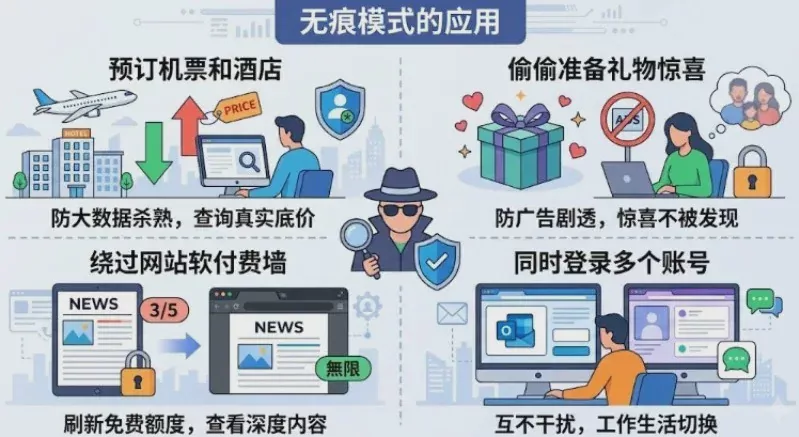
Relying on a temporary isolation mechanism, incognito mode offers a degree of practicality for light everyday use and is suitable for the following scenarios:
-
Booking Flights and Hotels to Avoid Personalized Price HikesTravel platforms and ticketing websites use cookies to record search frequency. Repeatedly searching for the same route or hotel may cause you to be identified as a high-demand user, indirectly driving up prices. Incognito mode makes you appear to the platform as a brand-new visitor, effectively helping you avoid personalized price hikes and check the true lowest prices.
-
Private Shopping to Prevent Advertising SpoilersWhen using a shared computer or public device, incognito mode does not retain search history when you quietly purchase gifts or private products. After the window is closed, it prevents targeted ads from being shown, avoiding the exposure of private content through precisely targeted recommendations.
-
Bypass Website Reading RestrictionsMost overseas news and information platforms and paid-content websites rely on cookies to limit the number of free articles you can read. Copy the link and open it in an incognito window, and the website cannot access your previous visit history, allowing you to reset your free reading quota.
-
Quick Temporary Login to Multiple AccountsWithout logging out of your primary account, quickly log in to a second social media or email account in an incognito window, enabling temporary simultaneous access to two accounts and meeting short-term multi-account usage needs.
How to Quickly Enable and Disable Incognito Mode
4.1 How to Enable Incognito Mode
All major browsers support two ways to open an incognito window: a quick-access option and a keyboard shortcut, making the process simple and efficient:
| Browser (Mode Name) | Windows / Linux | Mac | Mobile (iOS/Android) |
|---|---|---|---|
| Google Chrome | Ctrl + Shift + N | ⌘ + Shift + N | Click the menu in the upper-right corner and open a new incognito tab |
| Microsoft Edge | Ctrl + Shift + N | ⌘ + Shift + N | Click the menu on the right and open a new incognito window |
| Firefox Firefox | Ctrl + Shift + P | ⌘ + Shift + P | Click the menu bar and open a new private tab |
| Safari Apple | Not applicable | ⌘ + Shift + N | Tab entry point; swipe to select Incognito browsing |
4.2 How to exit Incognito mode

- Desktop (Windows/Mac): Simply click the window close button to destroy the sandbox and all temporary data in one click.
- Mobile (phone / tablet): Open the tab management interface, find the Incognito tab group, and close all Incognito pages in bulk.
V. In-depth analysis: Three major misconceptions about Incognito mode
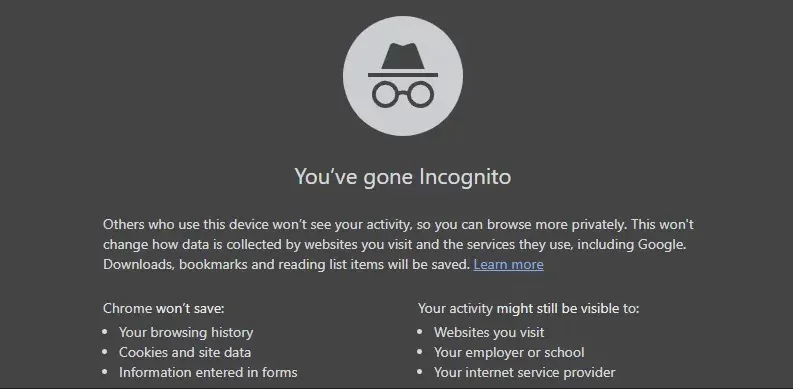
The vast majority of users overestimate the protection provided by Incognito mode. Browser providers have long made it clear: Incognito mode cannot provide complete anonymity online.
Misconception 1: Incognito mode can prevent websites from tracking you
Incognito modecannot hide your real IP address, is not a proxy or VPN tool, and all network requests will carry this device's real IP.
E-commerce platforms, social media, and cross-border platforms can accurately determine your region and network environment through your IP address, easily identify your identity, and completely fail to provide anonymous protection.
Even when used with a VPN, it can only change your IP address and cannot evade underlying device hardware tracking; risk-control checks can still identify you accurately.
Misconception 2: Incognito mode can prevent account association and account bans
This is the pitfall most easily encountered by cross-border operators and multi-account practitioners.
Major platforms' risk-control systems collect device hardware parameters: screen resolution, system fonts, graphics card WebGL, sound card information, device identifiers, and more, generatingunique browser fingerprint.
Regardless of how many incognito windows are opened on the same computer, the underlying device fingerprint remains exactly the same. Multi-account logins will be directly identified as related, triggering batch rate limiting and account bans.
Misconception 3: Corporate networks and ISPs cannot see browsing history
Incognito mode only clearslocal computer traces, and cannot encrypt network transmission data.
When connected to company WiFi, campus networks, or ISP broadband, DNS access records and website access logs are fully retained by routers and ISP backend systems. Administrators can clearly view all browsing history, providing no privacy protection whatsoever.
VI. Comprehensive Comparison: Incognito Mode VS P1Browser Fingerprint Browser
Ordinary incognito mode has many limitations and is only suitable for basic local privacy protection; for professional scenarios such as cross-border e-commerce, social media marketing, multi-account matrix operations, and affiliate promotion,P1Browser fingerprint browseris the essential solution.
| Comparison criteria | Ordinary incognito mode | P1Browser Fingerprint Browser |
|---|---|---|
| Core Logic | Passive subtraction: only clears local cache and browsing history | Active protection: kernel-level isolation + deep hardware fingerprint spoofing |
| IP address protection | ❌ Exposes the real IP with no hiding capability | ✅ Supports binding an independent proxy IP, one IP per environment, with network isolation |
| Browser fingerprint | ❌ Retains the device’s native fingerprint, making it extremely easy to link | ✅ Customizable randomized fingerprint parameters, unique profiles for every user to evade detection |
| Multi-account operations | ❌ Shares device characteristics globally, creating an extremely high risk of mass account bans | ✅ Independently isolated environments for the secure, unlinked operation of countless accounts |
| Team collaboration | ❌ No environment retention, making collaboration and sharing impossible | ✅ Cloud-based environment synchronization with support for tiered team permission management |
| Applicable users | General users and temporary local privacy use | Cross-border sellers, social media operators, studios, and enterprise multi-account teams |
The comparison clearly shows that incognito mode is merely a simple tool for clearing local records, leaving it powerless against platform risk control, fingerprint detection, and account association; P1Browser, however, starts from the underlying architecture to create independently isolated environments, making it an essential tool for professional multi-account operations and online privacy protection.
VII. P1Browser Fingerprint Browser: Truly Achieving Comprehensive Stealth and Anti-Association
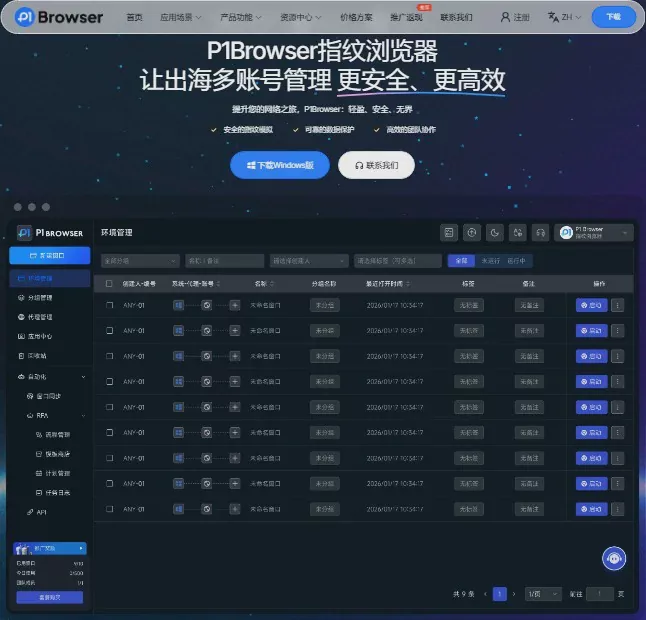
Faced with a complex and stringent risk-control environment across the entire internet, P1Browser has become a mainstream choice for cross-border and multi-account operation teams through its self-developed kernel isolation technology and mature risk-control bypass solutions, comprehensively addressing all the shortcomings of incognito mode.
7.1 Deep Kernel-Level Isolation to Prevent Account Association
P1Browser delves into the browser's underlying kernel architecture and independently assigns an exclusive virtual operating environment to each account.
Each environment is completely isolated, sharing no device parameters, cached data, or network identifiers, so that platforms recognize every account as anindependent device and an independent userin operation, eliminating the risk of linked-account bans at its source.
7.2 Full-Dimension Fingerprint Spoofing to Bypass Top-Tier Risk-Control Detection
Supports customized modification of hundreds of device fingerprint parameters, including Canvas, WebGL graphics card parameters, audio fingerprints, system version, resolution, time zone, language, and other hardware and software characteristics.
Generate an independent fingerprint randomly with one click, fully bypassing mainstream fingerprint detection tools such as Pixelscan and FingerprintJS. Device characteristics are highly realistic, ensuring long-term account stability.
7.3 Multi-IP Adaptation Solutions for All-in-One Network Isolation
Compatible with various proxy protocols, including residential proxies, static IPs, and dynamic dial-up, with one-click binding of an independent IP to achieve precise one-account-one-IP matching.
Suitable for network requirements across multiple scenarios, including cross-border e-commerce, overseas social media, and advertising campaigns. It delivers low latency and a high connection rate while preventing risk-control anomalies caused by IP conflicts.
7.4 Efficient Multi-Account Operations with Batch Management for Greater Efficiency
Say goodbye to the multi-account limitations of incognito mode. P1Browser supports the concurrent operation of dozens or hundreds of windows, with lightweight resource usage that enables stable multi-window operation even on low-spec devices.
Built-in batch account management, environment template duplication, and quick grouping features significantly reduce the daily operating costs of managing multiple accounts and improve the efficiency of batch operations.
7.5 Enterprise-grade team collaboration, secure and controllable
Designed specifically for studios and enterprise teams, it supports sub-account assignment, tiered operation permissions, one-click environment sharing, and operation log retention.
Team members can collaboratively manage account assets, while environment data is stored with cloud encryption to prevent data loss and account leaks, balancing collaboration efficiency with data security.
VIII. Full Summary
- Incognito modeOnly protects local privacy,clearing local browsing history on the computer, making it suitable for use on public devices, temporary private searches, and other ordinary scenarios. It is fully sufficient for light daily use.
- Incognito mode **≠ total online invisibility **, and cannot hide IP addresses, modify device fingerprints, or counter platform risk controls. It absolutely must not be used for multi-account operations.
- For professional needs such as cross-border e-commerce, social media account matrices, advertising campaigns, and bulk account operations, if you want to completely prevent tracking, association, and account bans,P1Browser fingerprint browseris the optimal solution.
Relying on robust capabilities such as isolated environments, fingerprint spoofing, dedicated IPs, and team collaboration, P1Browser breaks through the limitations of incognito mode and builds a secure, stable, and efficient dedicated protection system for multi-account online operations.

