
Have you ever considered that every website you visit may be quietly collecting your private information, such as your behavior and preferences, and converting it into what are known as “cookies”? This seems to have become quite common.
In fact, the collection of cookies has become part of our online lives. By 2024, we are asked to consent to the use of cookies on nearly every website we visit—but what exactly is this for?
It is not just websites; the browsers we use every day are also accumulating large amounts of our data. They record our sensitive passwords, browsing history, and detailed information about our device hardware, all of which together form a unique “browser fingerprint” for each of us.
For digital marketers and online merchants who manage multiple accounts, maintaining anonymity is an even greater challenge. If you use only a regular browser, your online activities may be tracked, and your accounts may even be disabled or blocked.
However, the good news is that specialized tools are now available to help us address these privacy concerns: antidetect browsers. These browsers can effectively protect our online anonymity, and this article will explore them in depth. Before examining their advantages, let us first take a detailed look at the concept of browser fingerprinting.
What is a browser fingerprint?
A browser fingerprint is a technique websites use to collect various types of data from your device, including your browser type and version, operating system, language settings, screen resolution, currently installed plugins, and many other system-related details. Taken together, this data forms a unique identifier for your browser—your digital fingerprint.
Unlike cookies, which can be deleted, and IP addresses, which can be hidden through a VPN, browser fingerprints are much more difficult to alter or conceal. They consist of various hardware and software parameters collected through JavaScript and other technologies, such as HTML5 canvas fingerprinting. This creates a unique profile invisible to the user, making it an extremely covert tracking method.
How are browser fingerprints collected and used?
Data collection: JavaScript code is embedded in web applications and websites to collect various types of browser data, which are then recorded in a separate database.
Unique identification: Websites generate a unique user ID by analyzing combinations of various parameters, such as system fonts, the operating system, and HTTP header attributes.
Session ID: A new browser ID can be generated from the cookie hash value for each session, allowing websites to determine whether the same user is browsing across different sessions.
Hardware-based identification: A device hash is generated based on hardware information, such as HTML canvas and support for touch functionality, thereby constructing the browser's fingerprint.
Applications of browser fingerprints
The primary purpose of browser fingerprints is to help websites collect detailed visitor data. This data is widely used in cybersecurity, anti-fraud measures, and digital marketing. Advertisers use this data to track users' online behavior and deliver targeted advertisements, while data brokers can sell the collected information to third parties, which then use it to provide costly personalized services based on that data.
How do fingerprint browsers work?
Next, we will explore how these privacy-protecting browsers work and why they have become essential tools for privacy-conscious users.
Diversified fingerprint settings
Users can choose fingerprints from a fingerprint library, ensuring that each browser profile and every session uses a different fingerprint, thereby disrupting the continuity of the data collected by websites.
P1Browser's Diverse Fingerprint Settings
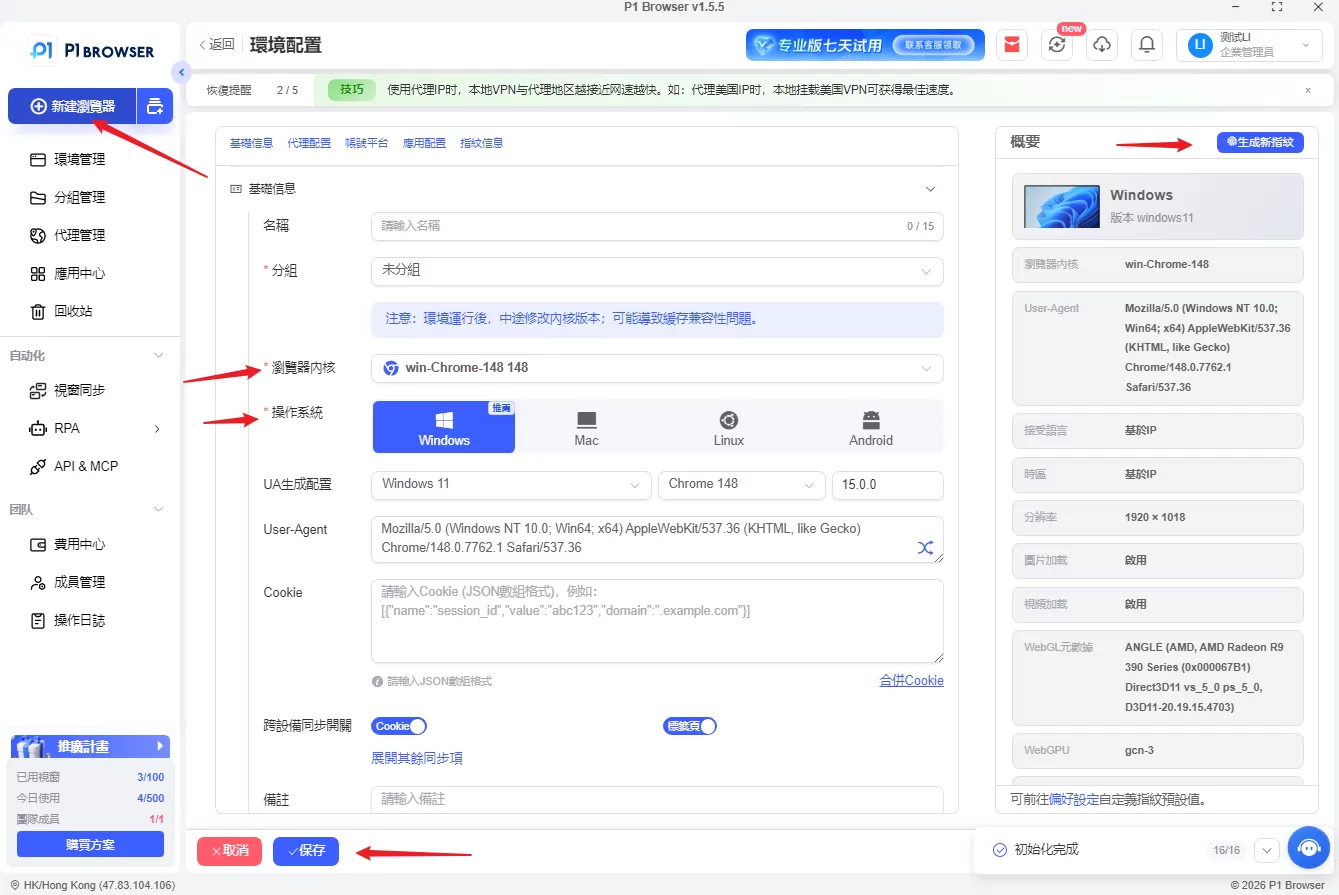
Default Fingerprint Masking
A fingerprint browser replaces your device's real fingerprint with commonly used fingerprint information, making it more difficult to trace back to your actual device.
A fingerprint browser can replace your device's real fingerprint.
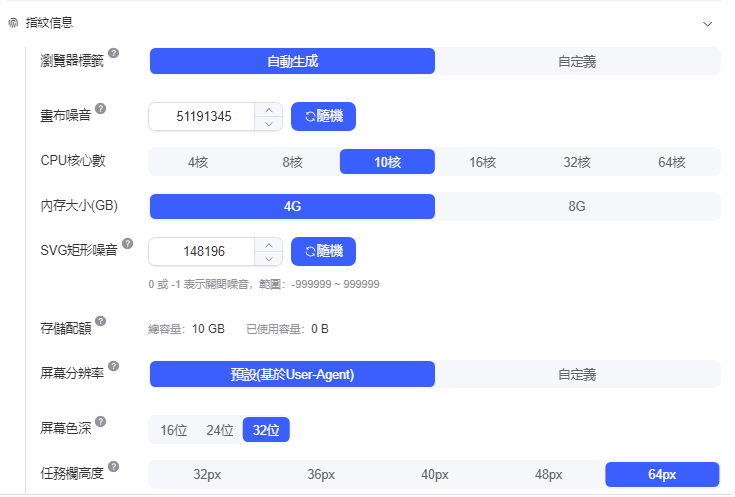
Fingerprint Optimization
These browsers can customize and optimize fingerprints for different websites, helping prevent account bans or access restrictions. This is especially useful for digital marketing professionals.
Virtual Browser Settings
These settings act as an intermediary layer, isolating users from direct data collection and greatly reducing the possibility of data correlation.
Hardware and Software Anonymization
By combining proxy servers, encrypted channels, and other advanced technologies, fingerprint browsers can prevent organizations from collecting users' online activity data.
User-Defined Parameters
Users can adjust various settings themselves, including operating system emulation, browser type, screen resolution, and disabling plugins for security reasons.
Advanced Anti-Tracking and Fingerprinting Technologies
Fingerprint browsers use a range of advanced technologies to prevent tracking:
IP Address Simulation: Fingerprint browsers simulate different IP addresses, making users' online visits appear to originate from multiple locations.
Canvas Fingerprinting Masking: This tracking technique uses the HTML5 canvas element to generate a unique identifier, but fingerprint browsers can mask this technology, making it difficult for companies to track user activity.
User-Agent String Randomization: The browser's identity is concealed by randomizing the user-agent string, creating additional obstacles for trackers.
Enhanced Cookie Protection: Cookies are disabled or randomized, preventing trackers from linking users' online activities together.
Dedicated Proxy Network: Traffic is transmitted through a dedicated network, further concealing users' online activities.
Why Do You Need a Fingerprint Browser?
Online Security
The internet is full of potential threats. Fingerprint browsers provide a secure way to browse the digital world, protecting your data from malicious attacks so you don't have to worry about the risks associated with leaving a digital footprint.
Anonymous
The most acclaimed feature of anti-detect browsers is their ability to conceal users’ identities. Users seek online anonymity not only for cybersecurity, but also for other reasons related to maintaining privacy. These browsers use advanced fingerprinting technology to make users virtually invisible online, ensuring that their privacy is protected across the internet.
Digital / Affiliate Marketing
For digital marketers, anti-detect browsers are highly transformative tools. They can bypass potential bans and restrictions, enabling marketers to expand their reach seamlessly.
Cross-Border E-Commerce
E-commerce dropshippers can expand their businesses and increase profits by creating multiple accounts on major e-commerce platforms. However, some platform policies often result in account bans. Anti-detect browsers offer a solution that allows merchants to bypass these restrictions and achieve significant business growth.
Social Media Management
For companies managing numerous social media accounts, anti-detect browsers are extremely valuable. They streamline account management and verification processes, reduce the risk of account bans, and thereby improve work efficiency.
Digital Advertising
For individual advertisers or advertising agencies, expanding the scope of their business means running multiple advertising campaigns. Anti-detect browsers support this process by enabling traffic arbitrage, allowing advertisers to maximize the effectiveness of their ad placements without triggering risk alerts.
Website Testing and Data Scraping
Users who need to collect large amounts of website data can use anti-detect browsers to speed up the data scraping process. These browsers can run multiple browser instances simultaneously without raising suspicion, making data collection faster and smoother. In addition, they are well suited for website testing and can simulate different browsing environments, including screen sizes and browser engines.
For users looking to enhance their online privacy, we have a detailed guide to the top10 fingerprint browsers, which you can use to find the right fingerprint browser for your needs.
Key features of fingerprint browsers:
1. Fingerprint switching
One of the core functions of a fingerprint browser is the ability to switch fingerprints—a unique combination of device and browser attributes that trackers use to monitor your online activities. By changing this digital fingerprint, the browser can prevent others from tracking your online activity, ensuring that ads tracking you cannot find you.
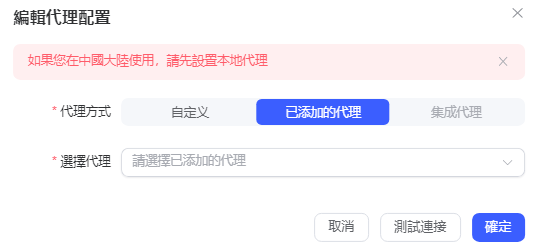
2. User-agent spoofing
User-agent switching is a strong line of defense against tracking. A fingerprint browser can cleverly disguise itself as various browsers with different configurations. This chameleon-like disguise makes tracking futile by using different browser identities to conceal your true online identity.
User Agent Switching
3. Proxy Versatility
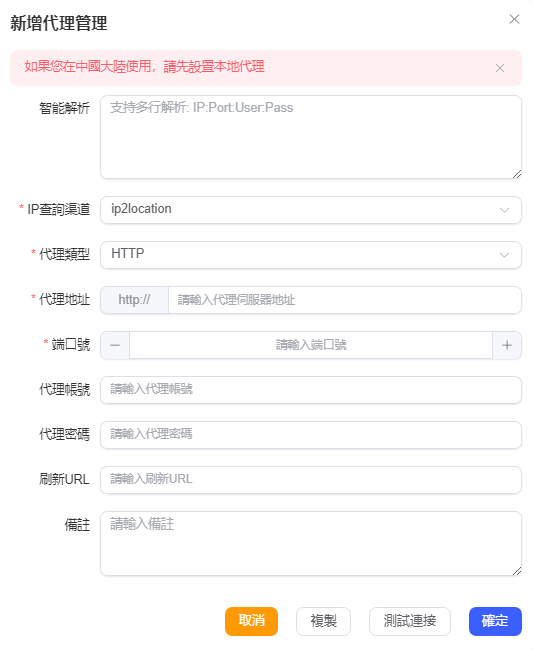
Proxy management is another layer of defense, giving users the option to surf the internet through different proxy servers. This not only enhances privacy protection but also improves security, making it difficult for trackers to pinpoint your exact location or browsing habits.
P1Browser provides the ability to automatically match dynamic proxy IPs
4. Team Collaboration Options
Some fingerprint browsers offer features specifically designed for team collaboration. Fingerprint browsers support securely sharing information and managing workflows, ensuring that team members can work together regardless of their location, without being limited by geographical boundaries.
5. Integrated Social Media Management
For users managing multiple social media accounts simultaneously, fingerprint browsers provide an integrated interface. This feature consolidates activity across all social media accounts into a clean account dashboard, simplifying management for both teams and individuals.
6. Seamless Session Continuity
One notable convenience of fingerprint browsers is their ability to maintain browser session continuity. Users can skip repetitive login processes, including entering passwords and verification codes, allowing them to seamlessly continue where they left off in their previous session.
Conclusion
Although fingerprint browsers play an important role in multi-account management and digital marketing, using them still involves certain risks. You can use BrowserScan to detect the authenticity of your browser fingerprint. This is a powerful browser fingerprint detection tool that can help you identify your browser fingerprint, thereby helping protect your personal privacy and online security.