



With the rapid development of artificial intelligence technology, Claude has become an important AI tool for many users in content creation, code development, and data analysis.
However, in actual use, many users also encounter some problems:
- Claude quota limits
- Unstable response speed
- Different tasks require different AI models
- Teams need to use multiple AI tools simultaneously
Therefore, more and more users have begun to look for Claude alternatives, hoping to find an AI tool that better suits their workflow.
There are already several mature AI assistants on the market, such as ChatGPT and Gemini, each with different advantages in writing, coding, analysis, and office productivity.
This article will provide a detailed introduction to the mainstream Claude alternatives in 2026 and help you choose the right AI tool based on your actual needs.
I. Why Are Users Starting to Look for Claude Alternatives?
Claude has attracted a large number of individual users and enterprise teams with its excellent text comprehension, long-text processing capabilities, and natural language expression.
It performs particularly well in the following scenarios:
- Long-form article writing
- Document analysis
- Code assistance
- Complex content summarization
However, no single AI tool can cover all needs.
Users typically choose Claude alternatives for the following reasons:
1. Usage Quota Limits
Some users encounter message frequency limits when using Claude frequently.
For content teams, developers, or enterprise users, relying solely on one AI tool may not meet daily work requirements.
2. Need for Combined AI Capabilities
Different AI models perform differently on different tasks.
For example:
- Some models are better at writing
- Some models are more suitable for coding
- Some models are better at search and real-time information analysis
Therefore, many professional users use multiple AI tools simultaneously to improve work efficiency.
3. Enterprise Teams Need to Manage Multiple AI Accounts
As AI enters enterprise workflows, more and more teams have started using multiple AI services simultaneously.
For example:
- The content department uses Claude for article creation
- The R&D team uses AI for development assistance
- The marketing team uses AI to generate materials
As the number of AI accounts increases, account management has also become a new issue.
II. What Are Claude's Advantages?
Before looking for Claude alternatives, we first need to understand why Claude is so popular among users.
Claude's core advantages are mainly concentrated in the following areas:
1. Powerful Long-Text Processing Capabilities
One of Claude's biggest features is its excellent long-text comprehension ability.
Users can upload longer documents and have Claude help with:
- Content summarization
- Information extraction
- Article optimization
- Data analysis
This capability is very practical for users who need to process large amounts of text, such as researchers, operations staff, and content creators.
2. More Natural Content Generation Capability
Claude excels in written expression.
Compared to models that tend toward structured output, Claude-generated content is generally closer to natural communication.
Therefore, it is often used for:
- Blog article writing
- Marketing copy
- Email drafting
- Content polishing
3. Code Assistance Capabilities
In addition to text tasks, Claude is also used extensively by developers for code analysis and development assistance.
For example:
- Code explanation
- Error analysis
- Project structure understanding
- Code optimization suggestions
However, different AI models have different characteristics in code tasks, so many developers test multiple AI tools simultaneously.
III. Recommended Popular Claude Alternative AI Tools in 2026
There are many AI assistants on the market that can serve as Claude alternatives.
Below are several AI tools with large user bases and wide application scenarios.
1. ChatGPT: The Most Well-Rounded AI Assistant

ChatGPT is currently one of the most widely used AI tools.
It covers:
- Text generation
- Image understanding
- Code assistance
- Data analysis
- Office automation
Compared to Claude, ChatGPT's advantage lies in its more complete ecosystem.
A large number of plugins, third-party tools, and enterprise applications make ChatGPT suitable for more work scenarios.
Suitable for:
- Enterprise office users
- Content creators
- Software developers
- AI tool explorers
2. Google Gemini: Best for Search and Information Integration
Gemini is an AI model launched by Google.
Its biggest advantage lies in its integration with the Google ecosystem.
For example:
- Information search
- Document processing
- Google service collaboration
- Real-time information analysis
For users who frequently need to look up information and organize data, Gemini is a good choice.
3. Microsoft Copilot: Best for Office Scenarios

If an enterprise extensively uses the Microsoft ecosystem, then Copilot is also a good choice.
It can integrate with:
- Word
- Excel
- PowerPoint
- Teams
Helping users improve office productivity.
4. Perplexity: Best for AI Search Scenarios

Perplexity is more focused on AI search tools.
It is suitable for:
- Information lookup
- Industry research
- Market analysis
- Rapid information retrieval
For users who need to quickly find answers, Perplexity can serve as a complement to Claude.
IV. Suggestions for Choosing a Claude Alternative
There is no absolute good or bad among different AI tools; it depends on your usage needs.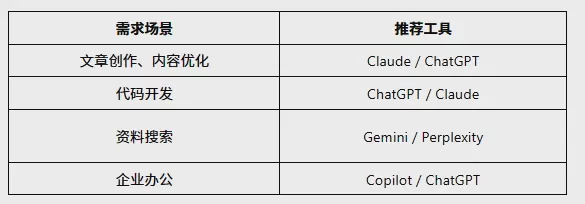
Many professional users do not choose just one AI tool but use multiple models in combination based on different tasks.
V. What Are the Differences Between Claude, ChatGPT, and Gemini?
For ordinary users, the most common concern when choosing a Claude alternative is:
Which AI tool is more suitable for my work?
Below is a simple comparison across several common dimensions.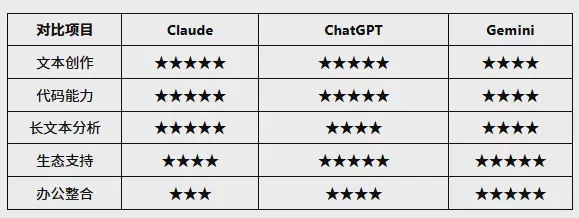
As you can see, different AI tools each have their own advantages.
For individual users, you can choose tools based on your tasks.
For enterprise teams, managing multiple AI accounts simultaneously has become an increasingly common need.
VI. Why Are More and More People Needing to Manage Multiple AI Accounts?
In the past, most users only needed one AI account to meet their needs.
But as AI applications have entered workflows, many teams have started using multiple AI services simultaneously.
For example:
- Claude for long article analysis
- ChatGPT for content generation
- Gemini for information search
- Copilot for enterprise office work
Different accounts handling different tasks can improve overall work efficiency.
However, as the number of accounts increases, it also brings new management challenges.
1. Multiple Account Logins Are Easy to Confuse
Regular browsers can usually only switch accounts by using tabs or logging out and back in.
As the number of accounts increases, it is easy to encounter:
- Logging into the wrong account
- Confusion of account information
- Frequent password entry
- Workflow interruptions
2. Reduced Team Collaboration Efficiency
If multiple members within an enterprise share AI tools without clear account management, many problems arise.
For example:
- Not knowing which account belongs to which project
- Difficulty in account handover
- Chaotic member permission management
3. Different Businesses Require Different Browser Environments
AI platforms retain user browsing information, login status, and usage habits during operation.
If multiple accounts are mixed and used long-term, management becomes even more complex.
VII. What Problems Exist with Managing Multiple AI Accounts in Regular Browsers?
Regular browsers like Chrome and Edge are suitable for daily web browsing.
However, they have certain limitations in multi-account operation scenarios.
1. Cookies and Cache Cannot Be Managed Independently
Regular browsers usually share the same browsing environment.
When multiple AI accounts are used simultaneously:
- Account login statuses are prone to conflicts
- Frequent account switching is needed
- Management costs increase
2. Cannot Create Independent Environments for Different Accounts
For example:
- Claude account A for the content team
- ChatGPT account B for the marketing team
- Gemini account C for data analysis
If all are managed in the same browser, long-term use becomes quite chaotic.
3. Enterprise Teams Lack Unified Management Methods
As the number of employees increases, enterprises need not only AI tools but also a more standardized account management process.
VIII. How to More Efficiently Manage Multiple AI Accounts?
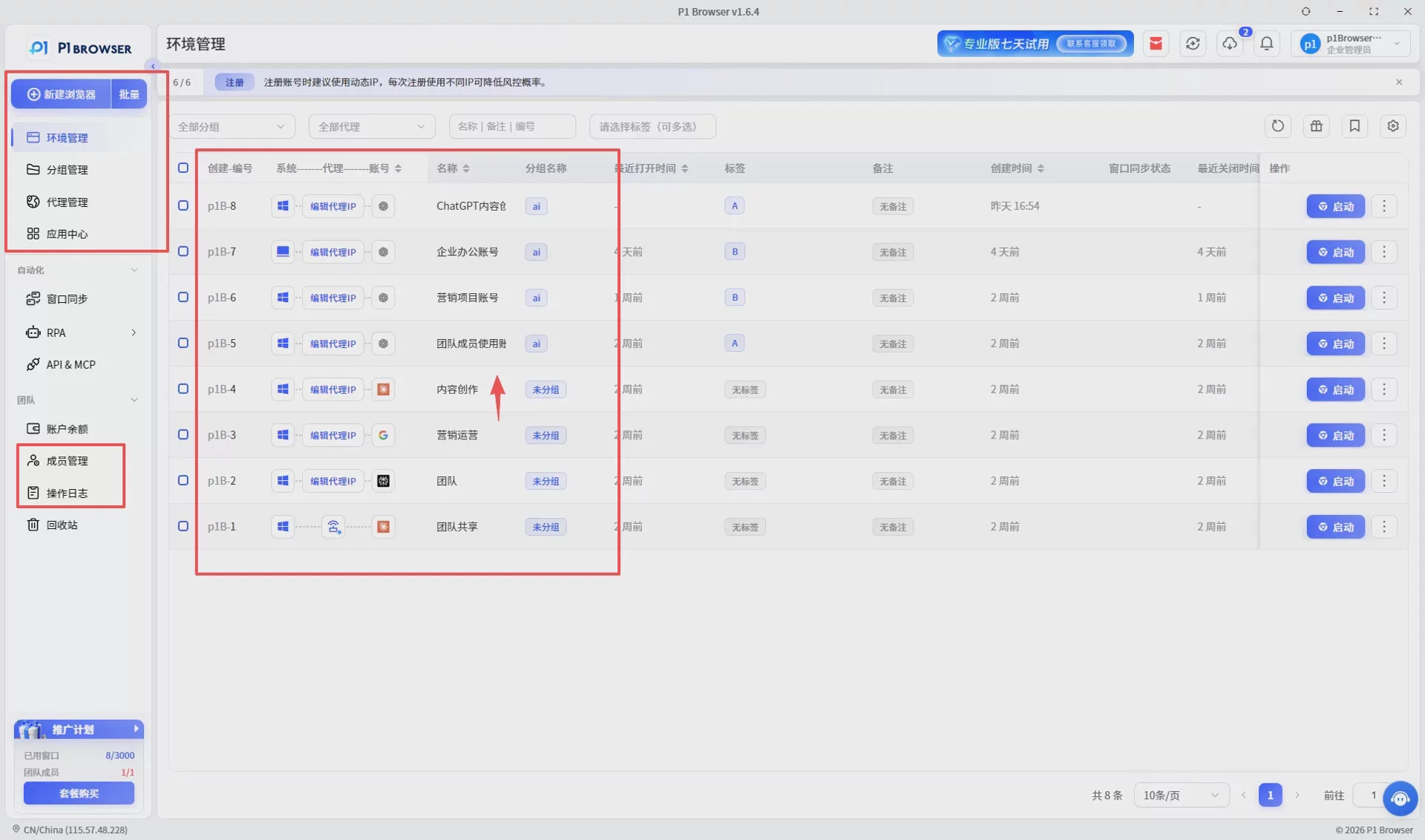
For individual or enterprise users with multiple AI accounts, the following approaches are recommended:
1. Segment Accounts by Purpose
Do not let all accounts handle the same work.
For example:
- Content creation account
- R&D testing account
- Marketing operations account
- Team shared account
2. Use Independent Browsing Environments to Manage Accounts
Compared to traditional browsers, an independent environment can more conveniently save corresponding account information.
This reduces repeated logins and improves work efficiency.
3. Establish Team Account Management Standards
Enterprises can plan in advance:
- Account responsibilities
- Usage permissions
- Associated projects
- Management processes
IX. How Does P1 Fingerprint Browser Help Manage Multiple AI Accounts?
As AI tools such as Claude, ChatGPT, and Gemini gradually become important productivity tools for enterprises and individuals, how to efficiently manage multiple AI accounts has become a concern for many users.
P1 Fingerprint Browser is designed for multi-account management scenarios, helping users more conveniently manage different AI accounts by creating independent browsing environments.
1. Independent Browsing Environments to Separate Different AI Accounts
P1 can create independent browsing environments for different accounts, with each environment having its own separate browsing data.
Users can create different environments based on different needs, such as:
- Claude content creation environment
- ChatGPT office environment
- Gemini data analysis environment
- Enterprise team project environment
This avoids mixing multiple accounts and improves account management efficiency.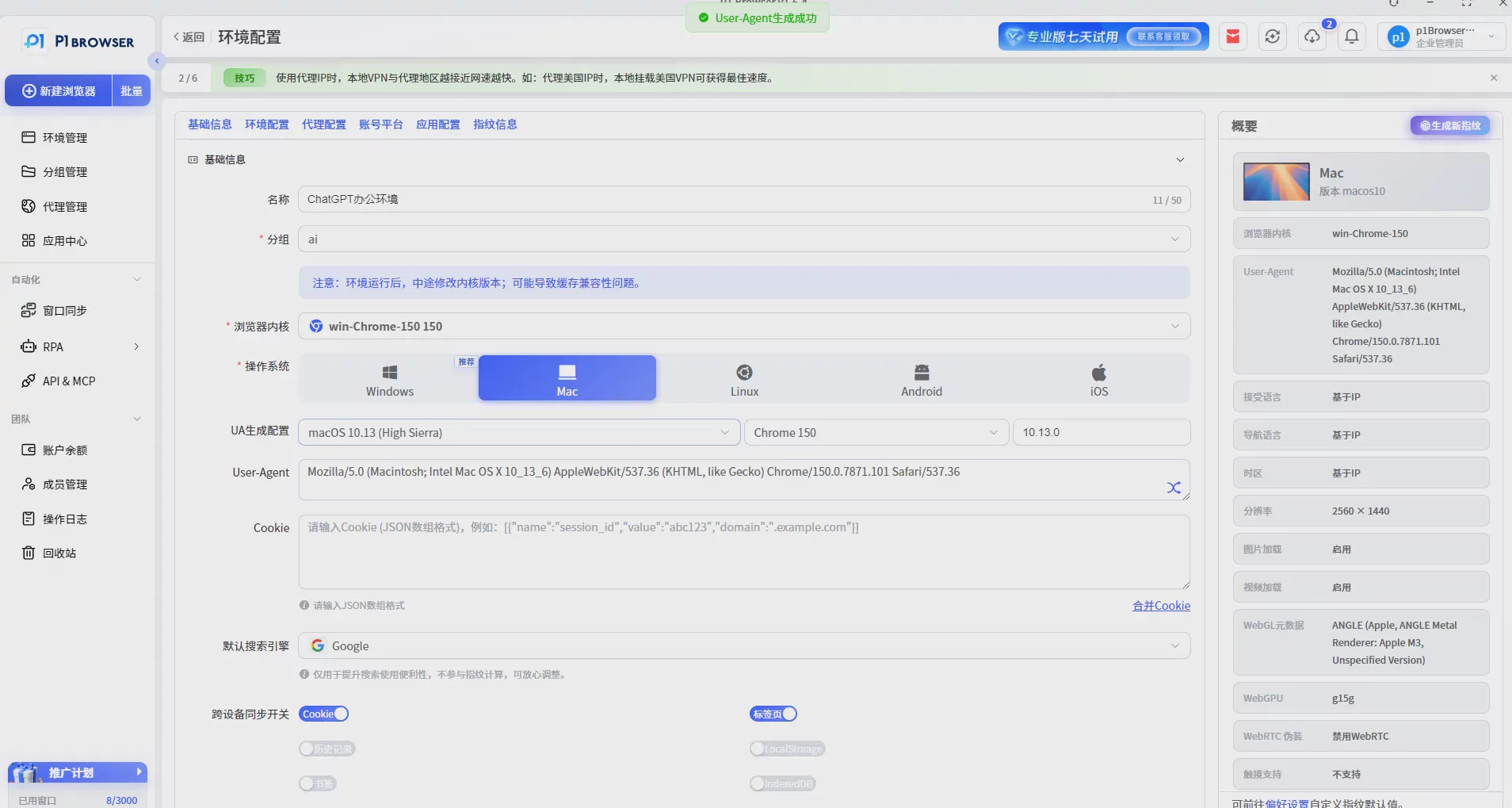
2. Multi-Account Classification Management to Improve Work Efficiency
For users with multiple AI accounts, account classification is very important.
P1 supports users managing browsing environments according to different business needs, allowing users to quickly find the corresponding accounts.
For example:
- Classified by project
- Classified by team members
- Classified by AI tool
Reducing repeated login operations and improving daily work efficiency.
3. Suitable for Both Individuals and Enterprise Teams
Whether for individual AI users or enterprise teams, everyone can use P1 to establish a clearer account management process.
Applicable scenarios include:
- AI content creation teams
- Overseas marketing teams
- Cross-border e-commerce teams
- Software development teams
- Internal enterprise AI application departments
X. Best Practices for AI Account Management
Choosing the right AI tool is only the first step; establishing good account management habits is equally important.
1. Clarify the Purpose of Each AI Account
It is recommended not to have all accounts handle the same tasks.
You can plan in advance:
- Content generation account
- Code assistance account
- Market analysis account
- Team shared account
Clarifying purposes can reduce management difficulty.
2. Keep Good Records of Account Information
As the number of accounts increases, it is recommended to record:
- Account purpose
- Account owner
- Creation date
- Associated project
This facilitates subsequent team collaboration and account handover.
3. Regularly Check Account Status
Regularly checking account login status, subscription status, and usage can help identify abnormalities early.
Proactive management is more efficient than dealing with issues after they arise.
XI. Frequently Asked Questions About Claude Alternatives
Q1: Is there a perfect equivalent alternative to Claude?
Currently, there is no exact equivalent. Different AI tools have their own advantages in text, coding, search, and office productivity.
Q2: Can ChatGPT replace Claude?
Yes. ChatGPT has advantages in comprehensive capabilities, ecosystem support, and application scenarios, making it suitable for most users' daily use.
Q3: Is Gemini suitable as a Claude alternative?
If you frequently need to search for information and handle Google ecosystem-related tasks, Gemini is a good choice.
Q4: Why do many users use multiple AI tools simultaneously?
Different AI models excel in different areas. Using multiple tools simultaneously allows you to choose the most appropriate AI for each task, improving work efficiency.
Q5: What AI accounts can P1 Fingerprint Browser manage?
P1 can help users manage various online account environments, including Claude, ChatGPT, Gemini, Copilot, and more.
XII. Summary: Choose the Right AI Tools to Improve Work Efficiency
Claude has become an important AI assistant for many users with its excellent text comprehension and long-text processing capabilities.
However, as AI application scenarios continue to expand, users' demands for AI tools have also increased.
Tools such as ChatGPT, Gemini, and Copilot can each serve as Claude alternatives in different scenarios.
For individual users, you can choose suitable tools based on your needs.
For enterprise teams, in addition to choosing AI tools, more attention needs to be paid to the management efficiency of multiple AI accounts.
P1 Fingerprint Browser helps users more efficiently organize their AI workflows and makes managing multiple AI accounts simpler, through independent browsing environments and multi-account management capabilities.

