


The 2026 Amazon store setup process is divided into 7 main steps:
Prepare documents → Create seller account → Fill in business information → Fill in personal information → Configure bank and credit card → Fill in store information → Complete identity verification
The entire process, from submitting documents to passing verification, typically takes 1-3 business days (the exact duration varies depending on the seller's situation and verification method).
Many people who are new to cross-border e-commerce find that the tutorials they see when they first search "how to open an Amazon store" tend to be scattered and fragmented. In reality, opening an Amazon store is not as complicated as it seems.
This article follows the current 2026 registration process and clearly explains, all in one place, what you need to prepare to open an Amazon store, how to register, how to complete identity verification, and what to do after registration is complete.
What Do You Need to Prepare for Opening an Amazon Store in 2026?
Before officially registering, it is recommended to have all the required documents ready in advance.
The seller registration information currently listed on the official Amazon website mainly includes: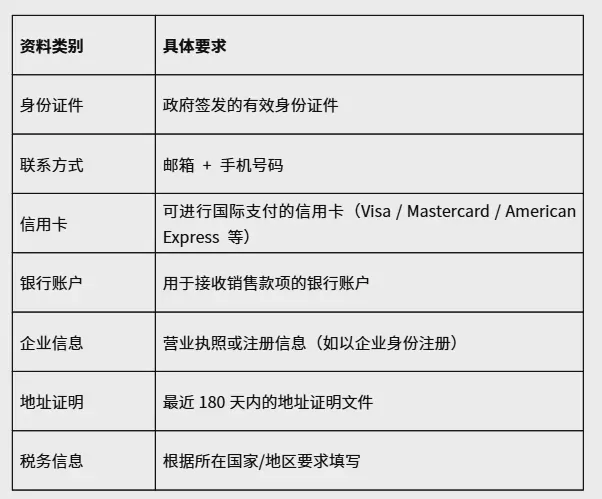
The specific documents you need to submit may vary depending on your business type, country or region, and the actual prompts during the registration process.
The materials actually required by Amazon during the registration process shall prevail.
II. Can Individuals Open a Store on Amazon?
Yes. This is a common misunderstanding among many beginners.
Many people believe: "Do you have to register a company before doing business on Amazon?" In reality, that is not the case.
Amazon's current official registration guide explicitly states that sellers are not necessarily required to be an LLC or a registered business entity. If you operate as an individual, you can choose the individual type during registration.
However, for those in China who want to run a long-term cross-border e-commerce business, whether to register as an individual or a business entity should be determined based on your own business plans, tax considerations, payment collection, and future business scale.
If you plan to manage multiple products over the long term, build a brand, or run team-based operations, a business entity is generally more convenient for ongoing management.
Three. Step One of Opening an Amazon Store: Creating a Seller Account
Once you have all your documents ready, you can proceed to the official Amazon seller registration page.
After accessing the Amazon seller registration page, the first thing you need to do is create an account. You will typically need to fill in:
- Full Name
- Email Address
- Password
- Mobile Phone Number
Amazon officially recommends that sellers choose an email address based on their actual situation. If you already have related accounts such as Amazon Brand Registry, Amazon Ads, or Vendor Central, the official guidance also notes that you can use the corresponding email and password to sync access permissions.
Here is a simple piece of advice:Do not just grab any random email address for the convenience of signing up, especially one you will never manage later.Since it will later be used for account verification, notifications, security alerts, and more, this email address should ideally be managed long-term by the store owner.
Four. Step Two: Fill In Your Business Information
Once you create an account, you enter the official seller registration process. The first section is mainly about filling in your business information.
1. Country/Region of Your Business
Enter the location where your business is actually registered. If you are an individual operator, select your actual place of operation.
2. Business Type
Select the option that best fits your situation: business, individual, or other applicable type.
3. Business Name
If you are registering as a business, fill this in according to your official registration details. Do not arbitrarily modify the company's English name here,Make sure the information you submit is consistent with your official business records.
4. Business Registration Number
If the registering entity is a business, you need to provide the corresponding business registration information.
5. Business Registered Address
Enter the registered business address.
6. Phone Number
Enter a phone number that can receive messages normally.
V. Step Three: Fill in the Seller's Personal Information
Next, fill in the information for the seller or the primary contact person of the business. This step is mainly to confirm:Who you actually are.
Typically, you need to fill in:
- Legal Name
- Nationality
- Country/Region of Birth
- Date of Birth
- Residential Address
- Phone number
- Relationship to the company
For example, if you are a company shareholder or the corporate legal representative, fill in the details based on your actual circumstances.
Per Amazon's official guidance, the primary contact may need to confirm whether they hold identities such as beneficial owner, legal representative, or similar roles within the company.
The most important principle here really comes down to one sentence:
Complete all information with your actual details. Do not alter the information just to make approval easier.
Six, Step Four: Fill in Payment and Billing Information
Next is the payment section that many people care about. This part mainly involves:Bank account + credit card.Amazon needs this information to process sales proceeds and related fees.
Bank account
The bank account holder must maintain reasonable consistency with the registration information. Amazon's official guidance currently states that the receiving bank account can be in the seller's personal name or in the company's name.
Besides:You don't necessarily need a U.S. bank account.According to Amazon's official documentation, sellers can use eligible overseas bank accounts to receive sales proceeds.
Credit Card
During registration, you will also need to provide a credit card that supports international payments. Amazon currently accepts card types including Visa, Mastercard, American Express, Discover, JCB, Diners Club, and others. The specific cards supported are subject to what is currently shown on the registration page.
Seven, Step Five: Fill In Store and Product Information
After completing the billing information, you will move on to the store information section. Many new sellers find this step confusing and wonder: "I haven't even sold my products yet, so why am I being asked to fill in product information now?"
In reality, this step does not require you to immediately list all of your products. It is mainly to help Amazon understand your store and product details. It may involve:
- Store Name
- Product Codes
- Brand Information
- Manufacturer Information
- Business verification information
The store name does not necessarily need to be exactly the same as the company name. According to Amazon's official guidelines, the store name must be unique, but it is not required to match the business name.
Eight. Step Six: Complete Identity Verification
This is a relatively important part of the process of opening an Amazon store. After all of the preceding documents have been submitted, Amazon will require identity verification.
You will typically need to prepare:
- A government-issued photo ID
- Proof of address within the last 180 days(This can be a qualifying bank or credit card statement or other acceptable document)
How is identity verification generally conducted?
Under Amazon's current registration process, you may need to complete one of the following verification methods:
Method One: Upload your ID and complete facial recognition verification
Submit your ID as prompted on the page and complete the photo verification.
Method Two: Video Verification
Have a video call with an Amazon representative. If you proceed to the video verification process, you will need to prepare documents such as a valid ID and proof of address as required.
IX. Why Does Amazon Identity Verification Get Stuck?
Many beginners don't fail at registration itself; rather:Their documents fail verification after submission.
The more common issues are not about so-called "tips" but about inconsistencies in the documents themselves. For example:
- Inconsistent company name
- Inconsistent address information
- Inconsistent ID information
- Blurry images
- Missing pages in the document
- Submitted documents do not meet the requirements
- Using screenshots instead of official documents
Amazon currently reminds sellers specifically that uploaded files should be clear color scans or photos. The text must be legible, and all four corners of the document must be visible. Do not use screenshots or blurry images.
So when preparing your materials, avoid the "let me just throw something up quickly and see" mindset.Getting it right the first time is usually more time-efficient than repeatedly resubmitting.
X. What Should You Do After Completing Your Amazon Store Registration?
Once identity verification is complete, you can access Seller Central, which is Amazon's seller backend. Think of it as:your Amazon store management hub.
From the dashboard, you can manage product listings, pricing, inventory, order processing, shipping settings, advertising, store operations, and account settings.
Eleven. Don't Rush to Launch Ads Right After Registration
This is a very common trap for beginners. Many people's first move after registering an account is: find products → list them → run ads. But in reality, there are many things to handle before you can truly start operations. We recommend proceeding in the following order: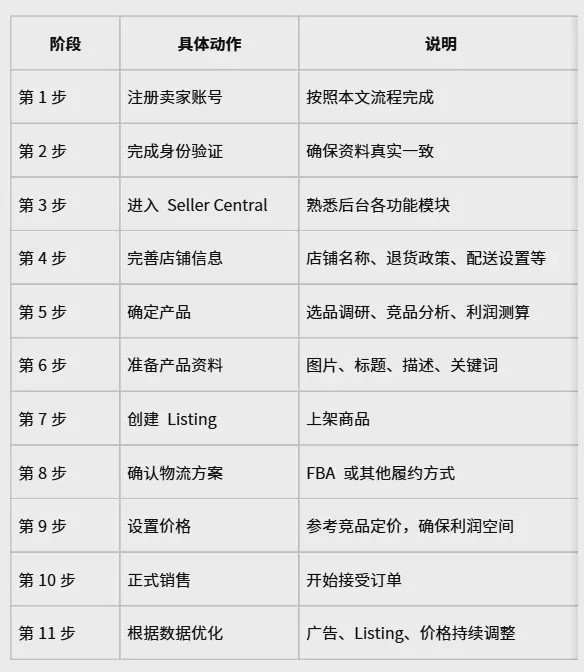
This is a safer approach than immediately burning through your ad budget the moment your registration is approved.
Twelve. Key Concepts Every Amazon Beginner Should Grasp First
If you are just starting out on Amazon, here are a few core terms you should familiarize yourself with first: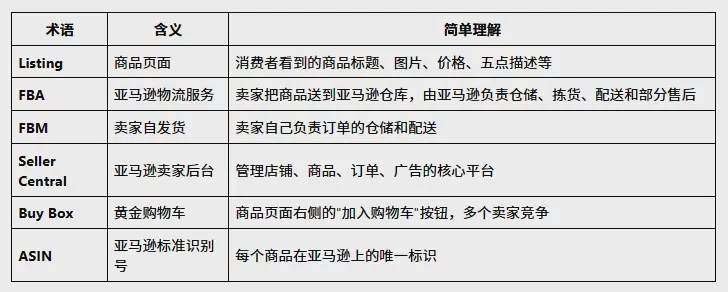
Thirteen. How Much Does It Cost to Open an Amazon Store?
"How much does it cost to open an Amazon store?" is another critically important topic. Once you actually start running your business, the costs go well beyond just the registration fee. Below are reference ranges for the main cost items: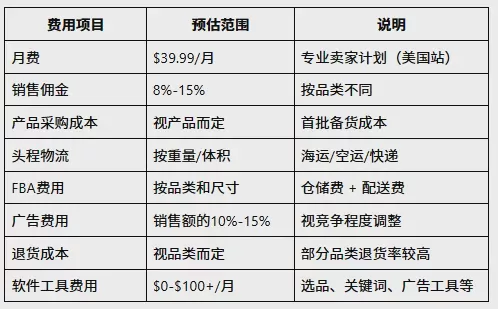
Based on currently available public information for the US marketplace, the fee for an Amazon Professional Seller account is USD 39.99/month, plus sales-related fees. Specific fees will vary depending on factors such as the marketplace, selling plan, and product category.
So if you see someone saying "opening an Amazon store only costs a few dollars," they are basically only talking about the registration or account level. To actually run a business, costs must be calculated using a complete operating model.
Fourteen. How Should a Solo Seller Actually Get Started on Amazon?
If you are a complete beginner, I would actually advise against overcomplicating things from the start. You can follow this path:
First Step: Identify Your Market
First, decide which marketplace to enter. For example: the United States, Japan, Europe, Canada, or Australia. Each marketplace has different market conditions, consumer demands, tax regulations, and logistics rules.
Step Two: Choose Your Product
Do not register your store first and then search for products aimlessly. At minimum, calculate your product costs, selling price, competitive landscape, logistics costs, and profit margin beforehand.
Step Three: Prepare Registration Documents
Gather your business documents, personal information, bank account, credit card, and identity verification materials.
Step four: Register on Seller Central
Follow Amazon's official process step by step.
Step Five: Complete Verification
Ensure that all submitted materials are authentic, clear, and consistent.
Step Six: Prepare Your Listing
Once your product is finalized, begin preparing the product images, title, product description, bullet points, keywords, and product price.
Step Seven: Choose Your Logistics
Based on your product and sales model, choose FBA or another fulfillment option.
Fifteen. What Should Multi-Store Sellers Pay Special Attention To?
If you are only planning to opena single Amazon store, the process outlined above is essentially sufficient. However, if you plan to operate multiple stores later, you cannot focus solely on "how to register."
You will need to pay further attention to:account entities, permission management, login environments, team collaboration, and platform policies.
In particular, do not assume that because others operate multiple stores simultaneously, you can simply "register a few accounts and see what happens." Multi-store operations involve Amazon's specific policies and qualification requirements, and cannot be reduced to merely "signing up with a few email addresses to open a few stores."
If you genuinely have a multi-store operational need, you should first confirm whether you comply with Amazon's current rules before proceeding with any further steps. For specific methods on managing multi-store environments, you can refer to "How to Prevent Amazon Account Association?".
If your team needs to manage multiple Amazon stores simultaneously, it is recommended to use a professional environment management tool (such as P1 Browser). It can help your team establish an independent browser environment for each store, assign permissions by member, and avoid the confusion and risks that come with multiple people operating in the same environment. For guidance on how to choose the right tool, you can refer to "How to Choose a Fingerprint Browser?".
Sixteen. Summary of the Complete Process for Opening an Amazon Store in 2026
Amazon's current official registration guide also categorizes the registration process into 5 main stages:business information, seller information, billing information, store and product information, identity verification.
Seventeen: A Few Final Tips for Beginners
If you're planning to start on Amazon in 2026, you don't actually need to research a bunch of complex tools at the beginning. Start by getting the following right:
First, keep your information accurate.Don't casually modify your business, personal, or address details just to make registration easier.
Second, keep your information consistent.Strive for clear consistency across your company details, personal information, bank details, and verification documents.
Third, understand your products before opening a store.Successfully registering a store doesn't mean you'll definitely make money.
Fourth, don't aim for complex operations right out of the gate.When you're just starting out on your own, getting the basics down—product selection, listings, logistics, and orders—is more important than managing a dozen or more accounts simultaneously.
Fifth, consider management tools only after your accounts multiply.A small number of accounts can be handled perfectly well with a standard browser and the user profile features built into your system. Once the number of stores, operators, and login environments grows, then consider a professional environment management solution—it will align better with your actual needs.
Summary
The core process of opening an Amazon store in 2026 is not as complicated as you might think. Simply put, it goes like this:
Prepare documents → Register account → Fill in details → Submit for verification → Enter Seller Central → Prepare products → Start selling.
If you are preparing to register an Amazon store, start by getting familiar with the setup process and the required documents.
P1 Browser offers a free environment management tool with support for standalone window trials. No credit card is required to experience the full environment isolation feature, making it suitable for individual beginners to try multi-environment isolation when managing multiple accounts.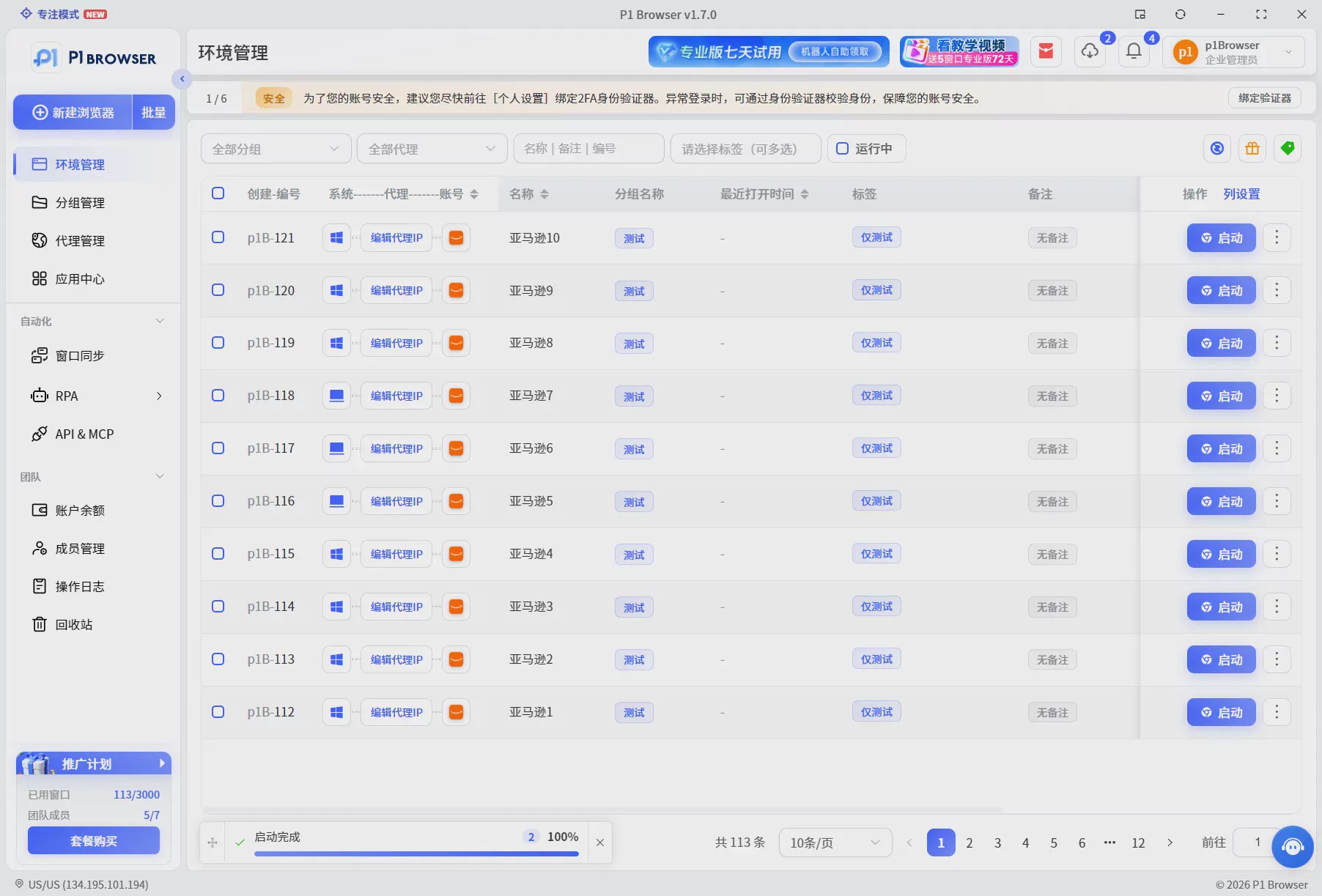
Frequently Asked Questions (FAQ)
What documents are needed to open an Amazon store?
You will need a government-issued ID, an email address, a mobile phone number, a credit card that supports international payments, a bank account, a business license (if registering as a business entity), proof of address, and tax-related information. The specific requirements are subject to Amazon's actual requests during the registration process.
Can individuals open an Amazon store?
Yes. Amazon does not require sellers to be registered businesses. If you operate as an individual, you can select the individual type during registration. However, for domestic sellers looking to operate long-term, a business entity is generally more convenient for ongoing management, tax handling, and receiving payments.
How much does it cost to open an Amazon store?
At the account level alone, the Professional Seller Plan fee for the US site is $39.99/month, plus selling commissions and other fees. However, actual operating costs also include product sourcing, first-mile logistics, FBA fees, advertising expenses, and more. Overall costs must be calculated comprehensively based on the product category and business model.
What to do if Amazon identity verification fails?
The most common causes are inconsistent documentation or unclear files. Ensure that the company name, address, and document information remain consistent across all materials. Upload clear color scans or photos (do not use screenshots). Files must show all four corners and the text must be legible. Getting everything right the first time usually saves more time than resubmitting repeatedly.
How long does the Amazon store opening process take?
From submitting registration documents to completing identity verification, it typically takes 1-3 business days (the exact duration varies depending on the seller's situation and verification method). If the process enters the video verification stage, it may take longer. It is recommended to have all documents ready before registration to avoid repeated submissions due to material issues.

